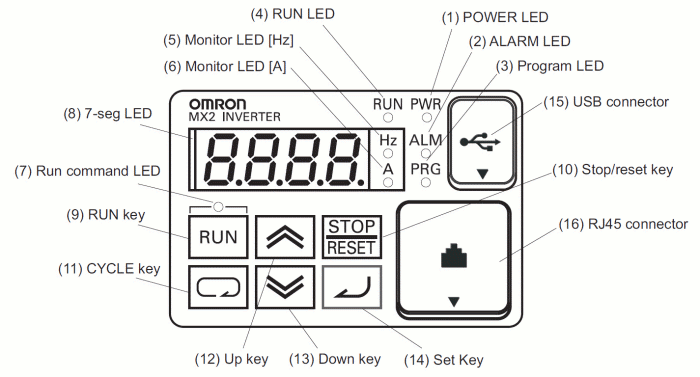
The frequency inverters used in the sat-nms ACU-ODU have an integrated display that shows you all of the parameters set to the frequency inverter. It also is able to show you the actual values of e.g. output frequency, voltage and output voltage. The following picture shows how the frontpanel looks like:
The following table shows the function of the frequency inverter's buttons:
| item | content |
|---|---|
| (1) POWER LED | Turns ON (green) while the inverter is powered up |
| (2) ALARM LED | Turns ON (red) when the inverter trips |
| (3) Program LED | Turns ON (green) when the display shows changeable parameter. Blinks when there is a mismatch in setting |
| (4) RUN LED | Turns ON (green) when the inverter is drivin the motor |
| (5) Monitor LED [Hz] | Turns ON (green) when the displayed data is frequency related |
| (6) Monitor LED [A] | Turns ON (green) when the displayed data is current related |
| (7) Run command LED | Turns ON (green) when a Run command is set to the operator |
| (8) 7-seg LED | Shows each parameter , monitors etc. |
| (9) Run key | Makes inverter run |
| (19) Stop/reset key | Makes inverter decelerates to a stop. Reset the inverter when it is in trip situation |
| (11) CYCLE key | Go to the top of next function group, when a function mode is shown. Cancel the setting and return to the function code, when a data is shown. Moves the cursor to a digit left, when it is in digit-to-digit setting mode. Pressing for 1 second leads display data of d001 , regardless of current display. |
| (12) Up key (13) Down key | Increase or decrease data. Pressing both keys at the same time gives you the digit-to-digit edit. |
| (14) SET key | Go to the data display mode when a function code is shown. Stores the data and go back to show the function code, when data is shown. Moves the cursor to a digit right, when it is in digit-to-digit display mode. |
| (15) USB connector | Connect USB connector (mini-B) fur using PC communication |
| (16) RJ45 connector | Connect RJ45 jack for remote operator (this is not an Ethernet interface!) |
origin: OMRON user Documentation I570-E2-01-X+MX2+UsersManual.pdf