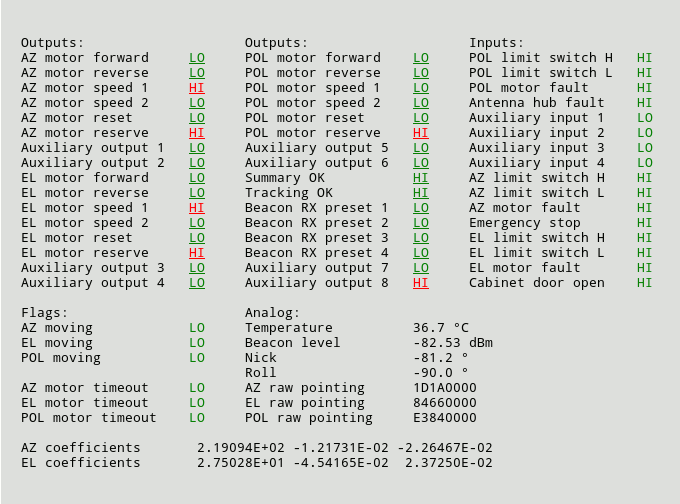
The page 'Test' displays the electrical / logical level of all inputs and outputs of the ACU. This helps you to install the ACU or to identify a malfunction of peripheral components. Below some information how to interpret the values in this page are given.
Electrical I/O Levels
The electrical state of an input or output is indicated by the HI / LO label displayed with the signal. HI means that current is flowing through the optocoupler for this input or output. LO means that no current flows. As some signals are defined to be 'true' when a switch is opened, the electrical level of the signal not necessarily describes the logical level of this signal, too.
Logical I/O Levels
The logical level of an input or output is described by it's color: Green means this signal is inactive, OK or 'false'. Read means the signal is active or 'true'.
Toggling output levels manually
The 'Test' page also lets you toggle the actual state of each output signal simply by clicking to the underlined HI/LO mark of the signal. If you do this, you should consider the following:
Adaptive tracking coefficients:
In adaptive tracking mode the ACU displays the coefficients of the actual model in two lines at the bottom of the text page. The number of coefficients displayed depends on the size of the model:
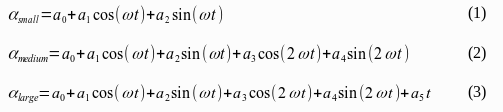
SMALL: a0,a1,a2 (1) MEDIUM: a0,a1,a2,a3,a4 (2) LARGE: a0,a1,a2,a3,a4,a5 (3)
If the beacon signal drops below it's theshold, the antenna movement is calculated from these coefficients using the formulas shown below:
Hardware Test Page Example: