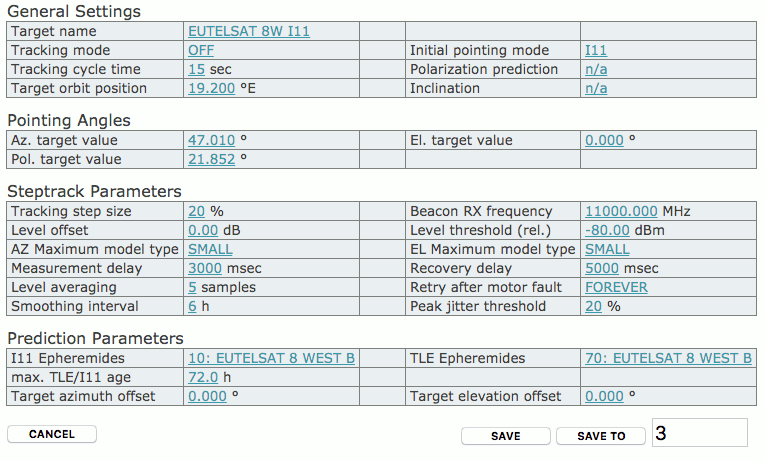
The target editor lets you edit the contents of a target memory
without actually applying the target setting. Using the editor permits
to edit target setting while the antenna is tracking and in operative
use.
You enter the target editor for a certain target memory by clicking
to the ‘edit’ icon in the target’s line in the target selection page.
The editor page looks much like the tracking parameters page, it
contains the same information with some additional parameters. You edit
each single parameter the same way as at the trackon parameter page:
click to the parameter, edit the value, and finally submit the change.
All this happens with a temporary copy of the tareget memory. The target
memory itself is not changed by this unless you click the ‘Save’ button
at the very bottom of the page.
General Settings
Target name — A descriptive name for this target
memory. If the ACU-ODM is used stand alone, you are free to enter any
text here. Target memories are saved and recalled by number, hence it
does not matter if there are duplicate target names. If however the
ACU-ODM is controlled by a sat-nms monitoring
and control system, targets are recalled by name with this software. In
this case you should avoid duplicate names and you should be aware, that
the sat-nms software will remove all
punctuation characters from the target name. Target names in the
sat-nms software may only consist of
characters A-Z (upper or lower case), digits and the characters space,
‘-’ and ‘.’.
Tracking mode — The tracking mode parameter selects
the tracking method, the ACU actually uses. Possible selection are:
OFF — No tracking is performed.
STEP — Step track mode. In regular intervals, the
antenna performs small search steps to optimize the pointing. Chapter ‘8.3.0 Step Track’ gives more information about this
mode.
STEP-TLE — The antenna tries to optimize its
pointing like in STEP mode. If the level of the received signal
is too low for this optimization, the antenna moves along the path
calculated from a TLE parameter set instead.
STEP-I11 — The antenna tries to optimize its
pointing like in STEP mode. If the level of the received signal
is too low for this optimization, the antenna moves along the path
calculated from an Intelsat 11 parameter set instead.
MEMORY — The antenna tries to optimize its pointing
like in STEP mode. If the level of the received signal is too
low for this optimization, the antenna moves to the position it had
exactly one siderian day before.
ADAPTIVE — The adaptive tracking mode works the
same way as step track, but it additionally is capable to predict the
satellite’s position when the beacon reception fails. It computes
mathematical models of the satellites motion from the step track results
recorded over a certain time. Details about this tracking mode are given
in chapter ‘8.4.0 Adaptive Tracking’ .
PROGRAM — The program tracking mode is different
from the modes above. The ACU moves the antenna along a path which is
described in a data file. No beacon reception is required for this. You
have to create such a data file and copy it with FTP to the ACU before
you can use this mode. SatService GmbH provides a PC software which lets
you easily create data files for program track from commonly used
ephemeris data sets for geostationary satellites. Chapter ‘8.5.0 Program Tracking’ describes this tracking mode
more detailed.
TLE — The antenna moves along a path calculated
from a TLE ephemeris data set. There are no optimization steps and no
receive signal is required for such an optimization.
I11 — The antenna moves along a path calculated
from an Intelsat 11 parameter data set. There are no optimization steps
and no receive signal is required for such an optimization.
Initial pointing mode — The initial pointing mode
specifies how the antenna finds its initial position before it starts
the tracking mode selected with the setting above. This parameter only
has an effect, when a target memory gets recalled. Changing the initial
pointing mode does not re-position the antenna. Possible selection are:
STORED-POSTION — The antenna moves to the Az/El/Pol
angles stored for the particular satellite. After this position has been
reached, the tracking selected by the ‘tracking mode’ is started.
ORBIT — The antenna’s Az/El/Pol angles are
calculated from the satellite’s orbit position stored in the recalled
target memory. The ‘target azimuth offset’ and ‘target elevation offset’
values described later on this page are added to the calculated angled
before they are applied. After the commanded position has been reached,
the tracking selected by the ‘tracking mode’ is started.
TLE — The antenna’s Az/El angles are calculated
from the TLE data set selected in the recalled target memory. The
‘target azimuth offset’ and ‘target elevation offset’ values described
later on this page are added to the calculated angled before they are
applied. The Pol angle is set to its stored position in this mode. After
the commanded position has been reached, the tracking selected by the
‘tracking mode’ is started.
I11 — The antenna’s Az/El angles are calculated
from the I11 data set selected in the recalled target memory. The
‘target azimuth offset’ and ‘target elevation offset’ values described
later on this page are added to the calculated angled before they are
applied. The Pol angle is set to its stored position in this mode. After
the commanded position has been reached, the tracking selected by the
‘tracking mode’ is started.
Tracking cycle time — The cycle time specifies how
often the ACU shall perform a step track cycle. The value is to be
entered in seconds. In fact, the parameter does not specify a cycle time
but the sleep time between two tracking cycles. This means, the true
cycle time is the time the ACU needs to perform one step track cycle
plus the time entered here. 300 seconds (5 minutes) is a good starting
value for this parameter. Inclined orbit satellites probably will
require a shorter cycle time, very stable satellites can be perfectly
tracked with one step track cycle every 15 minutes (900 seconds). The
maximum cycle time accepted by the ACU is 1638 seconds. This parameter
is also used so specify how often the antenna position shall be moved in
the PROGRAM, I11 and TLE tracking modes.
Polarization prediction — Actually not
implemented.
Target orbit position — The nominal orbit position
of the satellite (°E). This value is used for the initial pointing of
the antenna if the ‘initial pointing mode’ is set to ‘ORBIT’.
Inclination — Actually not implemented.
Pointing Angles
Az target value /El target value / Pol target value / Pol2
target value — The pointing angles stored with the target are
used to position the antenna if the initial pointing mode is set to
‘STORED-POSITION’.
Steptrack Parameters
Tracking step size — The tracking step size is a
very important parameter for the performance of the tracking. It defines
the size of every depointing step, the ACU makes in order to find out
where the optimal antenna pointing is. Setting too high values will
cause significant signal degradations during the step track cycle
because the antenna moves a too large amount away from the satellite.
Setting the value too small will let the beacon level jitter mask the
level differences caused by the test steps, the antenna will not track
the satellite properly.The step size is specified as a percentage of the
antenna’s half 3dB beamwidth. The ACU calculates the beamwidth from the
antenna diameter and the beacon frequency. Expressing the step size in
this relative way keeps the value in the same range, regardless of the
type of antenna. The recommended value for this parameter is 15-20%. You
may want to start with 20% and try to reduce down to 15% if the signal
degradation during tracking becomes too high.The tracking step size is a
common parameter for both axes. If both axes behave differently, you can
tweak the antenna diameter settings in the setup. Specifying a larger
diameter makes the ACU using a smaller step size for this axis.If the
tracking step seems to be completely out of range, you should check if
the beacon frequency is set properly. The frequency must be the true
receive frequency at the antenna, entered in MHz, not an L-band
frequency or other IF.
Beacon frequency — This parameter tells the ACU the
frequency of the beacon signal to be used for tracking. The ACU
calculates the antenna beam width from this frequency and the antenna
diameter configured at the setup page. The value has to be entered as
true receive frequency, no L-band or other IF frequency. When used with
a SatService beacon receiver, the ACU automatically reads the beacon
frequency at the start of each tracking cycle from the receiver. Any
value entered here will be overwritten in this case. The beacon
frequency entered here never sets the frequency at the receiver, neither
with a SatService receiver nor with a third party device!
Level offset — Principally there are two ways to
display a beacon receive level: Either as an absolute level in dBm as
reported by the receiver or as a relative level with ‘0dB’ signalling
the nominal level at clear sky conditions. The latter gives an easy
measure for any degradation of the receive level.The parameter ‘Level
offset’ lets you calibrate the absolute reading of the beacon receiver
to the relative level. You may either enter a value to shift the reading
by this offset or you may click to the ‘calc.’ link beside this
parameter to set the offset to the actual absolute level reading, making
the actual level being 0dB relative.
Level threshold — If the beacon level falls below
this threshold value, the ACU does not perform a step track cycle. If
the level falls below the threshold during the steptrack cycle, the
cycle gets aborted.If the ADAPTIVE tracking is enabled and there is
enough data in the tracking memory, the ACU computes a mathematical
model from the stored data and predicts the antenna pointing position
from the extrapolation of the model. Analogously the antenna is moved to
the actual TLE it I11 position in such a case if the ‘STEP-TLE’ or
‘STEP-I11’ mode is selected. If the tracking mode is set to ‘STEP’, the
ACU leaves the antenna where it is if the beacon level drops below the
limit.Adjusting the threshold level that adaptive tracking is switched
as expected must be done carefully and may require some iterations,
specially if the beacon is received with a low C/N. A good starting
value for the threshold is 10 dB below the nominal receive level or 2 dB
above the noise floor the beacon receiver sees with a depointed antenna,
whatever value is higher.To turn off the monitoring of the beacon level
(this in fact inhibits the adaptive tracking), simply set the threshold
the a very low value (e.g. -99 dBm)
AZ Maximum model type / EL Maximum model type —
These settings let you limit the adaptive model to a simpler one, the
ACU would choose by itself. The maximum model type can be set
individually for each axis. Normally you will set both axes to ‘LARGE’,
which leaves the model selection fully to the ACU’s internal selection
algorithms.In cases where the ACU seems to be too ‘optimistic’ about the
quality of the step track results, the maximum model on one or both axes
may be limited to a more simple and more noise-resistant model.
Specially inclined orbit satellites which are located close to the
longitude of the antenna’s geodetic location may require this limitation
for the azimuth axis. With such a satellite, the elevation may move
several degrees while the azimuth shows almost no motion.
Measurement delay — During a steptrack cycle, the
ACU positions the antenna to a certain offset and then measures the
level. Between the moment when the antenna reached commanded position
and the beacon level measurement the ACU waits some time to let the
beacon level settle. The optimal delay value depends on the beacon
receiver’s averaging / post detector filter setting and is a quite
critical for the steptrack performance.If the delay is too short, the
beacon voltage does not reach its final value, the steptrack does not
properly recognize if the signal goes better or worse after a test step.
If the delay is too long, the impact of fluctuation to the measured
level grows and may cover the small level difference caused by the test
step. With the sat-nms LBRX beacon receiver,
best results are achieved if the receiver is set to 0.5 Hz post detector
filter bandwidth and a measurement delay of 1500 msec.
Recovery delay — After the ACU has done the
tracking steps for the elevation axis, it waits some time before it
starts tracking the azimuth axis. This is to let the beacon level settle
after the final position has been found. A typical value for this
parameter is 4000 msec.
Level averaging — When measuring the beacon level,
the ACU takes a number of samples and averages them. The standard value
of 5 samples normally should not be changed. Larger values will slow
down the ACU execution cycle.
Retry after motor fault — When the ACU encounters a
motor fault during steptrack, the tracking cycle gets aborted and the
ACU shows a fault. This parameter tells the ACU how to proceed after
this, with the next tracking cycle:
NEVER — The ACU will not try to move the antenna
again. This will stop tracking until an operator will have checked the
antenna motor and re-started the tracking.
FOREVER — The ACU try to move the antenna again
with the next tracking cycle. If the antenna is really blocked, the ACU
will try to move the antenna every tracking cycle. This increases the
probability to keep the antenna following the satellite - even if the
antenna motors show sporadic faults. But this also increases the risk to
crash motors and/or spindles of the antenna.
ONCE — This mode offers a compromise between
preserving the motors and trying to keep the antenna following the
satellite. The mode ONCE allows the ACU to do exactly one retry after a
motor fault, if this fils as well the ACU stops tracking
Smoothing interval — This parameter controls the
smoothing function. Setting it to zero disables smoothing. Smoothing
lets the ACU point the antenna to positions evaluated from a simple
model calculated from the step track peaks of the recent few hours. A
detailed description of this function you find at chapter ‘8.3.3 Smoothing’
Peak jitter threshold — If the jitter value of at
least one axis exceeds this threshold, the ACU raises an ‘model fault’.
If this happens three consecutive times, the ACU resets the models of
both axes. Adaptive tracking will be possible not until 6 hours after
this happens.During adaptive tracking, the ACU evaluates for each axis a
figure called jitter. The jitter value describes standard deviation of
the measured peak positions with respect to the positions calculated
from the (currently selected) model. The figure is also expressed as a
percentage of the antenna’s beamwidth, low values indicate, that the
model ideally describes the antenna’s path. High values indicate that’s
something wrong. The step track results may be to noisy at low
amplitudes or the model does not fit at all. This may be the case if a
satellite gets repositioned in the orbit.A typical threshold value is
20%, this will detect very early that a model does not fit to describe
the satellite’s motion. If this value causes false alarms too often, you
may want to raise the threshold to 50%. Setting it to 0 switches the
threshold monitoring completely off.
Prediction Parameters
I11 Ephemerides — The ACU provides 99 named memory
places (numbered 1..99) to store Intelsat 11 parameter sets. With this
parameter you address the number of the I11 parameter set to be used
with the ‘I11’ or ‘STEP-I11’ tracking modes and for the ‘I11’ initial
pointing mode as well. The setting is a reference to the memory location
where the I11 parameter are stored, hence, if the parameters at this
location are changed the ACU automatically uses the changed
parameters.
TLE Ephemerides — The ACU provides 99 named memory
places (numbered 1..99) to store TLE ephemerides sets. With this
parameter you address the number of the TLE parameter set to be used
with the ‘TLE’ or ‘STEP-TLE’ tracking modes and for the ‘TLE’ initial
pointing mode as well. The setting is a reference to the memory location
where the TLE parameter are stored, hence, if the parameters at this
location are changed the ACU automatically uses the changed
parameters.
max. TLE/I11 age — If the epoch of a TLE or I11
parameter set which is actually in use (‘TLE’ or ‘I11’ tracking modes)
is older than the time specified here, a TLE-OUTDATED or I11-OUTDATED
fault is raised. This has no impact on the TLE/I11 tracking but signals,
that the ephemeris data should be updated for an optimal antenna
pointing
Target azimuth offset / Target elevation offset —
The offsets specified here are added to any antenna pointing which is
calculated from ephemeris data or from an orbit position and also to the
pointing angles read from a file in PROGRAM tracking mode. The offsets
can be used to compensate for differences between measured and
calculated angles, e.g. if the azimuth axis of the antenna is not
exactly vertical. The buttons at the bottom of the target editor page
let you either save the edited value, save the edited values to another
memory location or you may leave the editor without saving the
changes.
CANCEL — This abadons the editing process, leaves
the stored values unchanged. You are returned to the target selection
page
SAVE — This saves the edited values and returns to
the target selection page. The updated target memory is not recalled,
not applied to the ‘live’ settings. If you want this, you have to click
‘go’ for this target memory at the target selection page.
SAVETO — This saves the edited values to the memory
location set at the entry field right beside the button. The value in
this field is preset with the target number for which the editor has
been opened. It has to be changed if the editor shall save the edited
target to another location. After saving the ACU returns to the target
selection page. Like with ‘SAVE’, the saved target memory is not
recalled, not applied to the ‘live’ settings.
All three buttons work immediately when clicked, there is no ‘do you
really want’ query before the clicked action is executed.
Please note, that the ACU-ODM uses one single temporary memory for
the target editor. The implies that the target editor may not be used
from more than one browser window at a time or the edited values will be
messed up. This also applies to a remote controlled edit session, either
a target memory may be edited in the WebGUI or via an external software,
not from both sources at the same time.