
The rack mountable version of the sat-nms ACU provides a LCD and a small keyboard at the front panel for operating the device locally as an option. The capabilities of the front panel operation are designed to operate the ACU locally. It is possible to select a new target, move the antenna incremental, set new pointing angles or select another step track mode. Advanced configuration parameters are available over the web interface. Please start reading at chapter 5.1 for more information.
Display
The 2-line display normally shows the actual target name, the angle of the three axes, the step track mode and the beacon level. During menu operation it is used to view and edit some parameter of the ACU.
LEDs
Three LEDs at the front panel signal the summary state of the ACU.
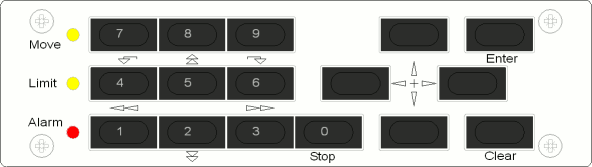
Keys
The front panel keyboard provides beside the numeric keys four arrow keys and two keys named ENTER and CLEAR. Some keys have a second meaning. The first meaning of the keys remains constant through most levels of the menu:
 — The ENTER key
descends in the menu tree, accepts and stores changed values
— The ENTER key
descends in the menu tree, accepts and stores changed values — The CLEAR key
leaves to higher menu levels, abandons changes when editing parameters.
It also resets the alarm buzzer when in display mode.
— The CLEAR key
leaves to higher menu levels, abandons changes when editing parameters.
It also resets the alarm buzzer when in display mode.
 — The arrow keys
navigate in the menu.
— The arrow keys
navigate in the menu.If STEP MOVE is selected in the menu the following keys have a new function.
— Move the
elevation up/down (small step) — Move the
elevation east/west (small step)For all directions: view from behind antenna. ‘Large steps’ normally are 10 times the step size configured for this axis. Pressing the 3 key enlarges them to ‘XL steps’, 100 times the standard step size. Pressing 1 changes back to 10x steps. The step size is configured on the ‘Setup’-page on the sat-nms ACU-ODMs Website.
The XL step size requires a sat-nms ACU-ODM with software version 2.2.035 2013-12-02 or newer. If you have an older version, it is not possible to drive XL steps although you can select them on the handheld. If you nevertheless want to drive XL steps, please contact SatService GmbH and request a software update.
If one or all motors are moving, they can stop with the following key: