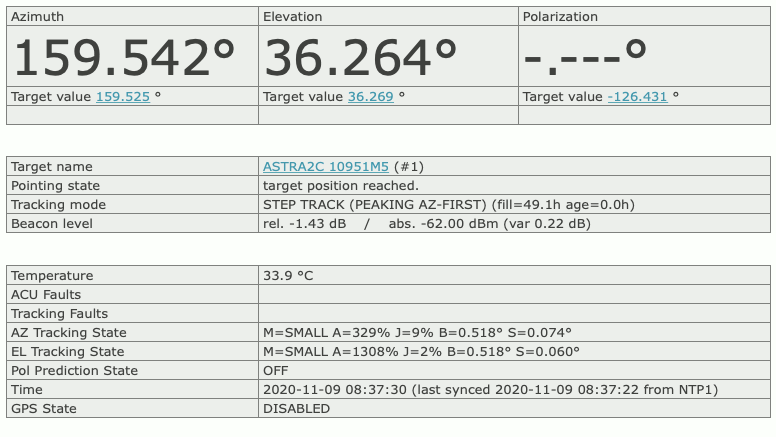
The ‘Pointing’ page is the main page of the ACU user interface which
shows the actual antenna pointing and some status information. The
‘Pointing’ page automatically refreshes once a second. The refresh-rate
may be adjusted on the setup-page.
point.gif
The table below describes the information shown by this page:
Azimuth Elevation Polarization — The bold printed
figures show the actual antenna pointing angles as read from the
position sensors. If the polarization axis is not controlled by the ACU,
‘-.—°’ is displayed in the polarization field. ACU versions equipped
with a fourth axis show four columns here, the fourth column labeled
“Polarization 2â€?.
Xx. target value — Below the measured angles the
ACU displays the target values of the antenna pointing. The target
values are the angles which have been commanded to the ACU. You may
click to a target angle in order to change the pointing manually. The
ACU display a dialog page where you can enter the new pointing angle. If
you click to the ‘SUBMIT’ button in this dialog page, the antenna
immediately moves to the new position. To go back to the main page
without changing the pointing, click to the ‘Back’ button of your Web
browser.
Axis state flags — Below the target values, for
each axis there is a field reserved which contains some state
information for this axis. While the motor is running, ‘MOVING’ is
displayed at this place. If the motor has been stopped due to a fault or
an emergency stop request, a red label ‘STOPPED’ is displayed. Finally,
if the ACU recognizes the activation of a limit switch, the orange
colored label ‘LIMIT’ is displayed in this field. If the ACU is in
standby mode, ‘STANDBY’ ist displayed for all axes.
Target name — The name of the satellite the antenna
is pointing to. Click to the name to get a dialog page where you can
change the name. The name is stored together with a satellite’s pointing
at the target memory page. If you change the target
pointing values, the target name is set to ‘unknown’ by the ACU. Hence
you first should adjust the antenna pointing, then enter the satellite’s
name.
Tracking mode — sat-nms
ACUs with the tracking option installed display the actual tracking mode
/ state in this field. ACUs without tracking show ‘OFF’ all the time. In
STEP and ADAPTIVE tracking modes this field shows what the tracking
actually is doing and some information about the tracking data in
memory:
fill — tells how many hours of step track data for
calculating a model the ACU actually has in memory. This data may be
used in ADAPTIVE mode to predict the satellite movement in case of a
beacon failure. The smoothing which may be applied to the step track
also relies on this data.
age — means the age of the most recent successful
tracking step. In other words this describes how many hours ago the
beacon was lost in case of a beacon failure.
Beacon level — This field shows the beacon level as
read from the beacon receiver. Depending on the source defined at the Setup page, this either is the beacon level reported by
a sat-nms LBRX beacon receiver via TCP/IP of
the level derived from the ACU’s analog input.
Temperature — The actual temperature inside the ACU
enclosure. This value is for information only.
ACU Faults — If there are any faults with the ACU,
they are displayed in this field. If there is more than one fault at a
time, the ACU concatenated the fault descriptions. More detailed
information about faults are available in chapter Faults
and Tracking . If one axis stops operation due to a fault, the step
tracking also stops operation. Possible faults are:
EMERGENCY-STOP — Someone opened the emergency stop
circuit. The ACU stopped all motors and stays in this state until the
‘RESET’ button at the navigation bar is clicked.
HUB-FAULT — The ACU detected a ‘hub fault’
condition.
CABINET-OPEN — The ACU detected a ‘cabinet open’
condition.
BCRX-TIMEOUT — If the ACU reads the beacon level
via TCP/IP from a sat-nms LBRX and the latter
does not respond, a BCRX-TIMEOUT fault is reported
Tracking Faults — If the ACU has the tracking
option installed, any faults of the tracking module are shown in this
field. With tracking option, this field is always empty.
AZ/EL Tracking State — If the ACU has the tracking
option installed and ADAPTIVE tracking is selected, these give some
information about the model of antenna/satellite movement the ACU has
calculated from the step track data:
M(model) — The complexity of the model the ACU uses
(small/medium/large). With a small amount of tracking data available,
the ACU uses a smaller, less complex model than with a completely filled
tracking memory.
A(amplitude) — The amplitude of the antenna
movement in this axis, expressed as a percentage of the full 3dB
beamwidth.
J(jitter) — The jitter of the antenna movement in
this axis, expressed as a percentage of the full 3dB beamwidth.
B(beamwidth) — The 3dB beamwidth as calculated by
the ACU from the antenna diameter in this axis and the beacon receive
frequency. This is the full beamwidth, the angle between both 3dB points
in the antenna pattern.
S(step size) — The absolute step size used by the
step track in this axis.
Time — The actual time of the ACU’s internal
clock.
GPS State — The actual state of an external GPS
receiver connected to the ACU (if applicable).