The table below shows the complete list of M&C parameters the ACU knows in alphabetical order. For each parameter the valid range and a short description is given.
| name | range | unit | description | |
|---|---|---|---|---|
| aabw | r/o | ° | AZ antenna 3dB beamwidth | |
| aalt | 0 .. 8000 | m | Antenna abs. altitude | |
| aamp | r/o | % | AZ Amplitude | |
| acal | -3600.000 .. 3600.000 | ° | AZ Calibration offset | |
| aclc | ° | Calculate offset from Az. value | ||
| acoe | r/o | see below | - | AZ model coefficients |
| acou | -180.000 .. 180.000 | ° | Antenna course | |
| add5 | A B C D E F G NONE | - | RS485 address | |
| addr | A B C D E F G NONE TERM | - | RS232 address | |
| ahys | 0.000 .. 2.000 | ° | AZ Pointing hysteresis | |
| ainv | NORMAL INVERTED | - | AZ Sense invert | |
| ajog | R r x f F | - | AZ jog command | |
| ajtr | r/o | % | AZ Peaking jitter | |
| alat | -90.000 .. 90.000 | °N | Antenna latitude | |
| alon | -180.000 .. 180.000 | °E | Antenna longitude | |
| amax | -3600.000 .. 3600.000 | ° | AZ Upper limit | |
| amdt | r/o | character string | AZ Model type | |
| amin | -3600.000 .. 3600.000 | ° | AZ Lower limit | |
| ammx | SMALL MEDIUM LARGE | - | AZ Maximum model type | |
| amnt | AZ-OVER-EL POLAR | - | Antenna mount type | |
| amot | DUAL-START DIR-START NONE | - | AZ Motor driver type | |
| aofs | ######## | AZ Pre scale offset | ||
| apos | r/o | -180.000 .. 180.000 | ° | AZ Pointing |
| araw | r/o | 00000000 .. FFFFFFFF | AZ raw pointing | |
| asca | 0.000000 .. 100000.000000 | AZ Calibration scale | ||
| asen | SSI-13B SSI-13G SSI-17B SSI-17G SSI-18B SSI-18G SSI-19B SSI-19G SSI-20B SSI-20G SSI-24B SSI-24G RESOLVER VOLTAGE NONE | - | AZ Position sensor type | |
| asth | 0.0 .. 10.0 | ° | AZ Low speed threshold | |
| astp | 0.000 .. 90.000 | ° | AZ Step delta | |
| atar | -180.000 .. 180.000 | ° | Az. target value | |
| atot | 0 .. 32000 | msec | AZ Motor timeout | |
| atsz | r/o | ° | AZ tracking step size | |
| attn | 0 10 20 30 | dB | BCRX Attenuation | |
| autr | DISABLED ENABLED | SNMP traps | ||
| auxo | see below. | - | AUX output switch command | |
| axmd | PARALLEL SEQUENTIAL | - | Axes control mode | |
| babs | r/o | #.## | dBm | Beacon level (absolute) |
| bavg | 1 .. 25 | samples | Level averaging | |
| bcfr | 1000.000 .. 40000.000 | MHz | Beacon RX frequency | |
| bcip | aaa.bbb.ccc.ddd | Beacon RX IP address | ||
| bclc | Calculate level offset | |||
| bcof | -200.00 .. 0.00 | dBm | Beacon RX 0V level | |
| bcsc | -5.0000 .. 5.0000 | V/dB | Beacon RX voltage scale | |
| bcty | sat-nms VOLTAGE | - | Beacon RX type | |
| bdrt | 1200 2400 4800 9600 19200 38400 57600 115200 | - | RS232 baudrate | |
| bdr5 | 1200 2400 4800 9600 19200 38400 57600 115200 | - | RS485 baudrate | |
| blev | r/o | #.## | dBm | Beacon level |
| bofs | #.## | dB | Level offset | |
| brip | r/o | #.## | dB | Beacon level ripple |
| btrh | -999.00 .. 100.00 | dBm | Level threshold | |
| caps | r/o | 00 .. FF | Software capabilities 1) | |
| cmod | DISABLED ENABLED | Linear/Circular switch | ||
| cnmf | #.### | MHz | BCRX Noise measurement frequency | |
| cnmi | # | sec | BCRX Noise measurement interval | |
| coha | OFF ON | Use cab-open as handheld active | ||
| coty | NONE | - | Compass type 2) | |
| cpos | r/o | LINEAR CIRCULAR SWITCHING INVALID | Lin/Crc switch position | |
| ctar | LINEAR CIRCULAR UNKNOWN | Linear / circular switch | ||
| daco | #.## | dB | BCRX Analog output offset | |
| dacs | #.#### | V/dB | BCRX Analog output scale | |
| decl | -90.000 .. 90.000 | ° | Antenna declination | |
| dele | 0 .. 199 | Delete target | ||
| diaa | 0.0 .. 100.0 | m | AZ Antenna diameter | |
| diae | 0.0 .. 100.0 | m | EL Antenna diameter | |
| eabw | r/o | ° | EL antenna 3dB beamwidth | |
| eamp | r/o | % | EL Amplitude | |
| ecal | -3600.000 .. 3600.000 | ° | EL Calibration offset | |
| eclc | ° | Calculate offset from El. value | ||
| ecoe | r/o | see below | EL model coefficients | |
| ehys | 0.000 .. 2.000 | ° | EL Pointing hysteresis | |
| einv | NORMAL INVERTED | - | EL Sense invert | |
| ejog | R r x f F | - | EL jog command | |
| ejtr | r/o | 0 .. | % | EL Peaking jitter |
| emax | -3600.000 .. 3600.000 | ° | EL Upper limit | |
| emdt | r/o | character string | EL Model type | |
| emin | -3600.000 .. 3600.000 | ° | EL Lower limit | |
| emmx | SMALL MEDIUM LARGE | - | EL Maximum model type | |
| emot | DUAL-START DIR-START NONE | - | EL Motor driver type | |
| eofs | ######## | EL Pre scale offset | ||
| epoc | r/o | Model epoch | ||
| epos | r/o | 0.000 .. 90.000 | ° | EL Pointing |
| eraw | r/o | 00000000 .. FFFFFFFF | EL raw pointing | |
| esca | 0.000000 .. 100000.000000 | EL Calibration scale | ||
| esen | SSI-13B SSI-13G SSI-17B SSI-17G SSI-18B SSI-18G SSI-19B SSI-19G SSI-20B SSI-20G SSI-24B SSI-24G RESOLVER VOLTAGE NONE | - | EL Position sensor type | |
| esth | 0.0 .. 10.0 | ° | EL Low speed threshold | |
| estp | 0.000 .. 90.000 | ° | EL Step delta | |
| etar | 0.000 .. 90.000 | ° | El. target value | |
| etot | 0 .. 32000 | msec | EL Motor timeout | |
| etsz | r/o | ° | EL tracking step size | |
| fltr | 0.1 0.2 0.5 1 2 5 | Hz | BCRX Post detector filter | |
| freq | #.### | MHz | BCRX RF receive frequency | |
| ftri | # | sec | BCRX Frequency tracking interval | |
| ftrk | OFF ON | BCRX Frequency tracking | ||
| ftrw | # | kHz | BCRX Frequency tracking width | |
| goto | 0 .. 199 | Goto target | ||
| gper | r/o | # | GPS error status | |
| gpsa | r/o | # | GPS satellites | |
| gpty | NONE NMEA | - | GPS receiver type | |
| hfsl | OFF ON | - | Use hub-fault as summary limit | |
| i11c | 1 .. 99 | I11 parameter clear | ||
| i11d | - | I11 parameter data 3) | ||
| i11d | - | I11 parameter name 3) | ||
| i11n | I11 parameter name | |||
| i11p | - | I11 parameter predict 3) | ||
| i11s | 0 .. 99 | - | I11 parameter select 3) | |
| ibit | 00000000 .. FFFFFFFF | Input bits (described below) | ||
| ibi2 | 0000 .. FFFF | Extended input bits (described below) | ||
| icty | NONE | - | Inclinometer type 4) | |
| incl | Satellite inclination | |||
| inpo | STORED-POSITION ORBIT TLE I11 MODEL FROM-TARGET | Initial pointing mode overwrite | ||
| inpt | STORED-POSITION ORBIT TLE I11 | - | Initial pointing mode | |
| ipt1 | SNMP trap IP 1 | |||
| ipt2 | SNMP trap IP 2 | |||
| ipt3 | SNMP trap IP 3 | |||
| ipt4 | SNMP trap IP 4 | |||
| ivpr | Invalid parameter value | |||
| jogm | OFF ON | - | Jog mode | |
| jtrh | 0 .. 100 | % | Peak jitter threshold | |
| lsyn | r/o | Last time synchronization | ||
| mbtr | OFF ON | Apply model before track | ||
| mdly | 0 .. 9999 | msec | Measurement delay | |
| mhys | 0 .. 100 | % | Model hysteresis | |
| mmod | OFF C/N C/N0 | BCRX C/N measurement mode | ||
| msbw | 6 12 30 100 | kHz | BCRX Measurement bandwidth | |
| msct | r/o | 0 .. 999 | msec | Measured software cycle |
| mstp | w/o | 0 .. 1 | 1 stops all motors (STOP at the Web UI), 0 releases the stop (RESET at the Web UI). Command only, reading returns the recently commanded value, not the actual state. | |
| nick | r/o | -90.0 .. 90.0 | ° | Nick angle |
| niko | -90.0 .. 90.0 | ° | Nick offset | |
| note | character string | Note | ||
| ntp1 | NTP server 1 address | |||
| ntp2 | NTP server 2 address | |||
| obit | 00000000 .. FFFFFFFF | Output bits (described below) | ||
| obi2 | 0000 .. FFFF | Extended qutput bits (described below) | ||
| orbt | -180.000 .. 180.000 | °E | Orbit position | |
| pcal | -3600.000 .. 3600.000 | ° | PO Calibration offset | |
| pclc | ° | Calculate offset from Pol. value | ||
| pcnt | ° | Peak count | ||
| phys | 0.000 .. 10.000 | ° | PO Pointing hysteresis | |
| pinv | NORMAL INVERTED | - | PO Sense invert | |
| pjog | R r x f F | - | PO jog command | |
| plal | Beacon RX Pol. aliases (H,V) | |||
| pmax | -3600.000 .. 3600.000 | ° | PO Upper limit | |
| pmin | -3600.000 .. 3600.000 | ° | PO Lower limit | |
| pmot | DUAL-START DIR-START NONE | - | PO Motor driver type | |
| pofs | ######## | PO Pre scale offset | ||
| ppos | r/o | -90.000 .. 90.000 | ° | PO Pointing |
| pprd | OFF ON ADAPTIVE | - | Polarization prediction 10) | |
| ppst | r/o | Pol prediction status 10) | ||
| praw | r/o | 00000000 .. FFFFFFFF | PO raw pointing | |
| prds | Single prediction calculation | |||
| pred | Prediction file creation | |||
| psca | 0.000000 .. 100000.000000 | PO Calibration scale | ||
| psen | SSI-13B SSI-13G SSI-17B SSI-17G SSI-18B SSI-18G SSI-19B SSI-19G SSI-20B SSI-20G SSI-24B SSI-24G RESOLVER VOLTAGE NONE | - | PO Position sensor type | |
| psth | 0.0 .. 10.0 | ° | PO Low speed threshold | |
| pstp | 0.000 .. 90.000 | ° | PO Step delta | |
| ptar | -90.000 .. 90.000 | ° | PO target value | |
| ptot | 0 .. 32000 | msec | PO Motor timeout | |
| qcal | -3600.000 .. 3600.000 | ° | PO2 Calibration offset 11) | |
| qclc | ° | Calculate offset from Pol.2 value 11) | ||
| qhys | 0.000 .. 10.000 | ° | PO2 Pointing hysteresis 11) | |
| qinv | NORMAL INVERTED | - | PO2 Sense invert 11) | |
| qjog | R r x f F | - | PO2 jog command 11) | |
| qmax | -3600.000 .. 3600.000 | ° | PO2 Upper limit 11) | |
| qmin | -3600.000 .. 3600.000 | ° | PO2 Lower limit 11) | |
| qmot | DUAL-START DIR-START NONE | - | PO2 Motor driver type 11) | |
| qofs | ######## | PO2 Pre scale offset 11) | ||
| qpos | r/o | -90.000 .. 90.000 | ° | PO2 Pointing 11) |
| qraw | r/o | 00000000 .. FFFFFFFF | PO2 raw pointing 11) | |
| qsca | 0.000000 .. 100000.000000 | PO2 Calibration scale 11) | ||
| qsen | SSI-13B SSI-13G SSI-17B SSI-17G SSI-18B SSI-18G SSI-19B SSI-19G SSI-20B SSI-20G SSI-24B SSI-24G RESOLVER VOLTAGE NONE | - | PO2 Position sensor type 11) | |
| qsth | 0.0 .. 10.0 | ° | PO2 Low speed threshold 11) | |
| qstp | 0.000 .. 90.000 | ° | PO2 Step delta 11) | |
| qtar | -90.000 .. 90.000 | ° | PO2 target value 11) | |
| qtot | 0 .. 32000 | msec | PO2 Motor timeout 11) | |
| rcom | SNMP read community | |||
| rfsh | 0 .. 60 | sec | Display refresh, 0=manual refresh only | |
| roll | r/o | -90.0 .. 90.0 | ° | Roll angle |
| rolo | -90.0 .. 90.0 | ° | Roll offset | |
| rxpl | H V | BCRX Polarization | ||
| save | 0 .. 199 | Save target | ||
| scmp | character string | BCRX Spectrum compensation | ||
| scnt | r/o | 0 .. 65535 | Save count | |
| scon | SNMP system contact | |||
| sdly | # | sec | BCRX Signal search delay | |
| slee | r/o | 0 .. 65535 | sec | Sleep time up to the next tracking action |
| sloc | SNMP system location | |||
| smod | ALL NO-POINTING� | Save mode | ||
| smth | 0 .. 6 | h | Smoothing interval | |
| snam | SNMP system name | |||
| splo | -45.000 .. 45.000 | ° | Satellite polarization offset | |
| srno | r/o | character string | Device serial no | |
| ssen | OFF ON | BCRX Signal search enable | ||
| ssmd | OFF 1 .. 20 | Spindle save mode | ||
| ssth | 0 .. 100 | % | Spindle save threshold | |
| stby | 0 .. 1 | Standby mode | ||
| step | command | Step move 5) | ||
| stim | w/o | character string | Sets date / time, command only 6) | |
| sver | r/o | character string | Software version | |
| tage | r/o | #.# | h | Tracking model age |
| taof | -180.000 .. 180.000 | ° | Target azimuth offset | |
| tcom | SNMP trap community | |||
| tcyc | 1 .. 1638 | sec | Tracking cycle time | |
| tdir | r/o | Target directory (HTTP only) | ||
| tdly | 100 .. 9999 | msec | Recovery delay | |
| tdsc | 0..99 / character string | - | Target description 7) | |
| tedt | 0 .. 199 | Load target memory to editor | ||
| temp | r/o | #.# | °C | Temperature |
| teof | -180.000 .. 180.000 | ° | Target elevation offset | |
| tflt | r/o | 00 .. FF | Tracking fault bits (described below) | |
| tgac | ACK NEW | Acknowledge position change | ||
| tgnr | r/o | -1 .. 199 | Loaded target number, -1 = unknown | |
| tgtd | r/o | 0 .. 1 | Target tainted | |
| thrh | #.## | dBm | BCRX Alarm threshold | |
| thrs | r/o | #.# | h | Tracking memory |
| ti11 | 0 .. 99 | I11 parameter set selected in target | ||
| time | r/o | character string | Date / time 6) | |
| tle1 | character string | TLE parameter line 1 | ||
| tle2 | character string | TLE parameter line 2 | ||
| tlec | 1 .. 99 | TLE parameter clear | ||
| tlen | character string | TLE parameter name | ||
| tles | 0 .. 99 | TLE parameter select 8) | ||
| tltm | r/o | character string | Last tracking memory entry | |
| tmod | OFF STEP ADAPTIVE STEP-TLE STEP-I11 MEMORY TLE I11 PROGRAM | - | Tracking mode 9) | |
| tmxa | 0 .. 999 | h | max. TLE/I11 age | |
| tnam | character string | Target name | ||
| torb | -360.000 .. 360.000 | °E | Target orbit position | |
| trcd | 0 .. 1 | Target position reached | ||
| trst | 1 .. 1 | Reset tracking memory | ||
| trty | NEVER ONCE FOREVER | Tracking retry on fault | ||
| trty | NEVER ONCE FOREVER | Tracking retry on fault | ||
| tsav | 0 .. 199 | Save edited target to position n | ||
| tsta | r/o | character string | Tracking state | |
| tstp | 1 .. 100 | % | Tracking step size | |
| tsya | r/o | 0 .. 2 | NTP time sync alarm, 0=OK, 1=FAULT, 2=using NTP2 because NTP1 does not answer | |
| ttle | 0 .. 99 | TLE parameter set selected in target | ||
| wcom | SNMP write community | |||
| wdog | OFF ON | ON Sends a heatbeat to the AUX 8 output | ||
| xipt | 1 .. 1 | Execute initial pointing | ||
| eammx | same as ‘ammx’ | Copy of ‘ammx’ in the target editor | ||
| eatar | same as ‘atar’ | Copy of ‘atar’ in the target editor | ||
| eattn | same as ‘attn’ | Copy of ‘attn’ in the target editor | ||
| ebavg | same as ‘bavg’ | Copy of ‘bavg’ in the target editor | ||
| ebcfr | same as ‘bcfr’ | Copy of ‘bcfr’ in the target editor | ||
| ebofs | same as ‘bofs’ | Copy of ‘bofs’ in the target editor | ||
| ebtrh | same as ‘btrh’ | Copy of ‘btrh’ in the target editor | ||
| ecnmf | same as ‘cnmf’ | Copy of ‘cnmf’ in the target editor | ||
| ecnmi | same as ‘cnmi’ | Copy of ‘cnmi’ in the target editor | ||
| ectar | same as ‘ctar’ | Copy of ‘ctar’ in the target editor | ||
| edaco | same as ‘daco’ | Copy of ‘daco’ in the target editor | ||
| edacs | same as ‘dacs’ | Copy of ‘dacs’ in the target editor | ||
| eemmx | same as ‘emmx’ | Copy of ‘emmx’ in the target editor | ||
| eetar | same as ‘etar’ | Copy of ‘etar’ in the target editor | ||
| efltr | same as ‘fltr’ | Copy of ‘fltr’ in the target editor | ||
| efreq | same as ‘freq’ | Copy of ‘freq’ in the target editor | ||
| eftri | same as ‘ftri’ | Copy of ‘ftri’ in the target editor | ||
| eftrk | same as ‘ftrk’ | Copy of ‘ftrk’ in the target editor | ||
| eftrw | same as ‘ftrw’ | Copy of ‘ftrw’ in the target editor | ||
| eincl | same as ‘incl’ | Copy of ‘incl’ in the target editor | ||
| einpt | same as ‘inpt’ | Copy of ‘inpt’ in the target editor | ||
| ejtrh | same as ‘jtrh’ | Copy of ‘jtrh’ in the target editor | ||
| embtr | same as ‘mbtr’ | Copy of ‘mbtr’ in the target editor | ||
| emdly | same as ‘mdly’ | Copy of ‘mdly’ in the target editor | ||
| emhys | same as ‘mhys’ | Copy of ‘mhys’ in the target editor | ||
| emmod | same as ‘mmod’ | Copy of ‘mmod’ in the target editor | ||
| emsbw | same as ‘msbw’ | Copy of ‘msbw’ in the target editor | ||
| epprd | same as ‘pprd’ | Copy of ‘pprd’ in the target editor | ||
| eptar | same as ‘ptar’ | Copy of ‘ptar’ in the target editor | ||
| eqtar | same as ‘qtar’ | Copy of ‘qtar’ in the target editor | ||
| erxpl | same as ‘rxpl’ | Copy of ‘rxpl’ in the target editor | ||
| escmp | same as ‘scmp’ | Copy of ‘scmp’ in the target editor | ||
| esdly | same as ‘sdly’ | Copy of ‘sdly’ in the target editor | ||
| esmth | same as ‘smth’ | Copy of ‘smth’ in the target editor | ||
| esplo | same as ‘splo’ | Copy of ‘splo’ in the target editor | ||
| essen | same as ‘ssen’ | Copy of ‘ssen’ in the target editor | ||
| essmd | same as ‘ssmd’ | Copy of ‘ssmd’ in the target editor | ||
| essth | same as ‘ssth’ | Copy of ‘ssth’ in the target editor | ||
| etaof | same as ‘taof’ | Copy of ‘taof’ in the target editor | ||
| etcyc | same as ‘tcyc’ | Copy of ‘tcyc’ in the target editor | ||
| etdly | same as ‘tdly’ | Copy of ‘tdly’ in the target editor | ||
| eteof | same as ‘teof’ | Copy of ‘teof’ in the target editor | ||
| ethrh | same as ‘thrh’ | Copy of ‘thrh’ in the target editor | ||
| eti11 | same as ‘ti11’ | Copy of ‘ti11’ in the target editor | ||
| etmod | same as ‘tmod’ | Copy of ‘tmod’ in the target editor | ||
| etmxa | same as ‘tmxa’ | Copy of ‘tmxa’ in the target editor | ||
| etnam | same as ‘tnam’ | Copy of ‘tnam’ in the target editor | ||
| etorb | same as ‘torb’ | Copy of ‘torb’ in the target editor | ||
| etrty | same as ‘trty’ | Copy of ‘trty’ in the target editor | ||
| etstp | same as ‘tstp’ | Copy of ‘tstp’ in the target editor | ||
| ettle | same as ‘ttle’ | Copy of ‘ttle’ in the target editor |
Remarks:
1) Software capabilities are summed from the following values:
| value | description |
|---|---|
| 1 | step track & adaptive tracking included |
| 2 | polar mount antennas supported |
| 4 | memory tracking included |
| 8 | linear / cirular polarization switch supported |
| 16 | supports relative beacon level |
| 32 | implements the a standby mode for the positioner |
| 64 | has 200 target memories |
| 128 | supports I11 and TLE tracking modes |
| 256 | support 4-axis positioning control |
2) ACU variants with compass support provide other choices beside NONE for this parameter.
3) To set a I11 parameter set from extern, first select the parameter set to edit (0..99) by writing the parameter set number to ‘i11s’, then set the I11 parameters (‘i11d’), the I11 prediction values (‘i11p’) and optionally the parameter set name (‘i11n’). For details, see I11 parameter data below.
4) ACU variants with inclinometer support provide other choices beside NONE for this parameter.
5) for single step move, use following commands:
| command | description |
|---|---|
| ll | Azimuth large step left |
| l | Azimuth small step left |
| r | Azimuth small step right |
| rr | Azimuth large step right |
| dd | Elevation large step down |
| d | small step down |
| u | small step up |
| uu | large step up |
| c | Polarisation clockwise step |
| cc | Polarisation counter clockwise step |
6) Use the ‘time’ parameter to read the actual time used by the ACU. Use the ‘stim’ parameter to set the time.
7) This parameter reports the description (name and pointing angles) for a given target number. ‘tdsc=12’ e.g. is interpreted by the ACU as a request to report the target description for target no. 12. The reply to this command is something like ‘tdsc=ASTRA 19.2 (167.335/43.412/-15.455)’
8) To set a TLE parameter set from extern, first select the parameter set to edit (0..99) by writing the parameter set number to ‘tles’, then set the two TLE lines (‘tle1’, ‘tle2’) and optionally the parameter set name (‘tlen’). For details, see TLE parameter data below.
9) ACU variants without tracking support only accept NONE for this parameter.
10) The polarization prediction mode controls if the ACU shall calculate and command the polarization angle during tracking. The following modes are defined:
| mode | description |
|---|---|
| OFF | No polarization prediction is done |
| ON | The ACU calculates and commands the pol angle with each tracking cycle. With TLE or I11 it calculates the angle from there, with steptrack modes it calculates the pol angle from the satellite’s orbital position and inclination as set with the sorb and incl parameters. |
| ADAPTIVE | Like ‘ON’, but the ACU refines the satellite’s orbital position and inclination based on the recorded tracking data every three hours |
The polarization prediction status shows from which data the polarization prediction is actually calculated in a free format string.
11) This parameter is only avaliable with ACU models equipped with a four axis position control. With 3-axis models, this parameter returns a dummy value when read, setting this parameter has no effect in this case.
Bit definitions in ‘ibit’ (input bits and flags):
The ‘ibit’ value is returned as a 32 bit hexadecimal number. The bit number 0 means the least significant bit, bit number 31 the most significant bit in this number.
| no. | name | description |
|---|---|---|
| 0 | IN_PLHLM | polarization hi limit |
| 1 | IN_PLLLM | polarization lo limit |
| 2 | IN_PLFLT | polarization motor fault |
| 3 | IN_HBFLT | antenna hub fault |
| 4 | IN_AUX1 | reserved |
| 5 | IN_AUX2 | reserved |
| 6 | IN_AUX3 | reserved |
| 7 | IN_AUX4 | reserved |
| 8 | IN_AZHLM | azimuth hi limit |
| 9 | IN_AZLLM | azimuth lo limit |
| 10 | IN_AZFLT | azimuth motor fault |
| 11 | IN_EMERG | emergency stop |
| 12 | IN_ELHLM | elevation hi limit |
| 13 | IN_ELLLM | elevation lo limit |
| 14 | IN_ELFLT | elevation motor fault |
| 15 | IN_COPEN | cabinet open |
| 16 | AZMOV | azimuth moving |
| 17 | ELMOV | elevation moving |
| 18 | PLMOV | polarization moving |
| 19 | MOVING | moving summary bit |
| 20 | AZTOT | azimuth timeout |
| 21 | ELTOT | elevation timeout |
| 22 | PLTOT | polarization timeout |
| 23 | TIMEOUT | timeout summary bit |
| 24 | TRKPEAK | peaking in progress |
| 25 | LOWBEAC | low beacon signal |
| 26 | BCRXFLT | beacon receiver fault |
| 27 | LIMIT | limit switch summary |
| 28 | AZSTOP | azimuth stopped |
| 29 | ELSTOP | elevation stopped |
| 30 | PLSTOP | polarization stopped |
| 31 | GPSFLT | GPS receiver fault |
Bit definitions in ‘ibi2’ (input bits and flags for the 4th axis):
The ‘ibi2’ value is returned as a 16 bit hexadecimal number. The bit number 0 means the least significant bit, bit number 31 the most significant bit in this number.
| no. | name | description |
|---|---|---|
| 0 | IN_PL2FLT | polarization 2 motor fault |
| 1 | reserved | |
| 2 | IN_PL2HLM | polarization 2 high limit |
| 3 | IN_PL2LLM | polarization 2 low limit |
| 4 | IN_AUX5 | reserved |
| 5 | IN_AUX6 | reserved |
| 6 | IN_AUX7 | reserved |
| 7 | IN_AUX8 | reserved |
| 8 | PL2MOV | polarization 2 moving |
| 9 | PL2TOT | polarization 2 timeout |
| 10 | PL2TOT | polarization 2 stopped |
| 11 | reserved | |
| 12 | reserved | |
| 13 | reserved | |
| 14 | reserved | |
| 15 | reserved |
Bit definitions in ‘obit’ (output bits):
The ‘obit’ value is returned as a 32 bit hexadecimal number. The bit number 0 means the least significant bit, bit number 31 the most significant bit in this number.
| no. | name | description |
|---|---|---|
| 0 | OUT_AZ_FWD | azimuth motor forward |
| 1 | OUT_AZ_REV | azimuth motor reverse |
| 2 | OUT_AZ_SPD1 | azimuth motor low speed |
| 3 | OUT_AZ_SPD2 | azimuth motor hi speed |
| 4 | OUT_AZ_RESET | azimuth motor driver reset |
| 5 | OUT_AZ_RESERVE | reserved for extended motor control |
| 6 | OUT_AUX1 | not used |
| 7 | OUT_AUX2 | not used |
| 8 | OUT_EL_FWD | elevation motor forward |
| 9 | OUT_EL_REV | elevation motor reverse |
| 10 | OUT_EL_SPD1 | elevation motor low speed |
| 11 | OUT_EL_SPD2 | elevation motor hi speed |
| 12 | OUT_EL_RESET | elevation motor driver reset |
| 13 | OUT_EL_RESERVE | reserved for extended motor control |
| 14 | OUT_AUX3 | not used |
| 15 | OUT_AUX4 | not used |
| 16 | OUT_POL_FWD | polarization motor forward |
| 17 | OUT_POL_REV | polarization motor reverse |
| 18 | OUT_POL_SPD1 | polarization motor low speed |
| 19 | OUT_POL_SPD2 | polarization motor hi speed |
| 20 | OUT_POL_RESET | polarization motor driver reset |
| 21 | OUT_POL_RESERVE | reserved for extended motor control |
| 22 | OUT_AUX5 | not used |
| 23 | OUT_AUX6 | not used |
| 24 | OUT_SUMMARY | summary fault relay (1 == OK) |
| 25 | OUT_TRACKING | tracking fault relay (1 == OK) |
| 26 | OUT_BCPR1 | reserved for beacon receiver frequency select |
| 27 | OUT_BCPR2 | reserved for beacon receiver frequency select |
| 28 | OUT_BCPR3 | reserved for beacon receiver frequency select |
| 29 | OUT_BCPR4 | reserved for beacon receiver frequency select |
| 30 | OUT_AUX7 | not used |
| 31 | OUT_AUX8 | not used |
The meaning of the ‘FWD’ / ‘REV’ motor control outputs depend on the motor control mode set for this axis.
Bit definitions in ‘obi2’ (output bits 4th axis):
The ‘obit’ value is returned as an 8 bit hexadecimal number. The bit number 0 means the least significant bit, bit number 7 the most significant bit in this number.
| no. | name | description |
|---|---|---|
| 0 | OUT_PL2_FWD | polarization 2 motor forward |
| 1 | OUT_PL2_REV | polarization 2 motor reverse |
| 2 | OUT_PL2_SPD1 | polarization 2 motor low speed |
| 3 | OUT_PL2_SPD2 | polarization 2 motor hi speed |
| 4 | OUT_PL2_RESET | polarization 2 motor driver reset |
| 5 | OUT_PL2_RESERVE | reserved for extended motor control |
| 6 | OUT_AUX9 | not used |
| 7 | OUT_AUX10 | not used |
The meaning of the ‘FWD’ / ‘REV’ motor control outputs depend on the motor control mode set for this axis.
AUX output control
By means of the ‘auxo’ command, the ACU’s auxiliary outputs may be controlled. The command expects two numbers, separated by a comma character. The first one is the AUX output number (1..10), the second one is 0 or 1 to switch this output off or on. Example:
auxo=2,1switches the AUX2 output on.
Bit definitions in ‘tflt’ (tracking faults):
The ‘tflt’ value is returned as a 9 bit hexadecimal number. The bit number 0 means the least significant bit, bit number 9 the most significant bit in this number.
| no. | name | description |
|---|---|---|
| 0 | APEAKFLT | azimuth peaking fault |
| 1 | EPEAKFLT | elevation peaking fault |
| 2 | MODELFLT | model match fault |
| 3 | JITTRFLT | jitter fault |
| 4 | TLEAGEFLT | the used TLE data is outdated |
| 5 | TLEFMTFLT | the used TLE data cannot be parsed |
| 6 | I11AGEFLT | the used I11 data is outdated |
| 7 | I11FMTFLT | the used I11 data cannot be parsed |
| 8 | TLIMITFLT | TLE/I11 data resulted in pointing angles outside the soft limits |
Tracking coefficients on ‘acoe’ / ‘ecoe’:
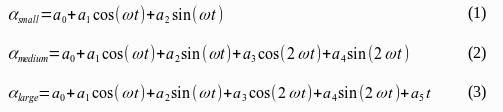
In adaptive tracking mode the ‘acoe’ / ‘ecoe’ commands may be used to read the coefficients of the actual model. The coefficients are returned as a comma separated list of numbers in scientific notation. The number of coefficients returned depends on the size of the model:
If the beacon signal drops below it’s theshold, the antenna movement is calculated from these coefficients using the formulas shown below:
I11 parameter data
The ACU permits to monitor and control the I11 parameter sets used from remote. The commands used for this have been designed to be compatible with third party SNMP based software which may limit the amount of data transferred with a single command. The typical sequence to update an I11 parameter set is as follows:
You should ensure, that the ‘i11s’ parameter is not changed until all parts of the I11 parameter set have been set. This implies, that only one remote control instance may update I11 parameters at a time. After this command sequence the I11 parameter set is stored at the ACU. When changing the parameter set which is actually in use for a STEP-I11 or a I11 tracking mode, the updated parameters will be used when the next tracking step ist started.
I11 parameters (‘i11d’) are expected as a semicolon separated character string containing the coefficients in the following order:
EPOCH;LM0;LM1;LM2;LONC;LONC1;LONS;LONS1;LATC;LATC1;LATS;LATS1
The epoch has to be (exactly) defined in the format ‘YYYY MM DD HH MM SS’. Numbers hare to be given with (exactly) 4 digits precision, except for the LM2 parameter which expects 6 digits following the decimal point.
The I11 prediction values are expected as two numbers LON;LAT, each with 4 digita precision.
TLE parameter data
The ACU permits to monitor and control the TLE parameter sets used from remote. The commands used for this have been designed to be compatible with third party SNMP based software which may limit the amount of data transferred with a single command. The typical sequence to update a TLE parameter set is as follows:
You should ensure, that the ‘tles’ parameter is not changed until all parts of the TLE parameter set have been set. This implies, that only one remote control instance may update I11 parameters at a time. After this command sequence the TLE parameter set is stored at the ACU. When changing the parameter set which is actually in use for a STEP-TLE or a TLE tracking mode, the updated parameters will be used when the next tracking step ist started.
The ‘tle1’, ‘tle2’ parameter expect the line 1 / line 2 of the TLE parameter set exactly as defined in the TLE specification.
Controlling the target editor from remote
The target editor available at the ACU’s WebGUI can be controlled remotely. This is done by simulating the same steps which would be done by an operator at the ACU’s WebGUI.
The first step to do ist to load as target into the editor. The ‘tedt’ command does this. Seting ‘tedt’ to 25, for eample, loads the target memory 25 into the editor. Now the settings stored in this preset can be read for the external UI by inspecting the parameter commands of the editor. A target preset consists of about 25 parameters which are set when the preset is recalled. Editing the target contents meand to load these values into copies of the real destiniation paramets.
These parameters have 5-character command names, they all start with ‘e’ for ‘edit’. The remaining four characters are identical to the parameter to edit. Example ‘eatar’ is the edit copy of the ‘atar’ parameter, the azimuth target angle. Commanding ‘atar’ immediately moves the antenna to the commanded angle, but commanding ‘eatar’ simply overwrites the value in the editor.
‘tsav’ is command to write the edited values back to a target memory in the ACU. ‘tsav’ also expects a target number, if the number is not the same as used with ‘tedt’, ‘tsav’ act as a ‘save as’ command. Again, saving the edited target does not recall the target, does not change any acitve parameter. The edited target memory is only executed if it is explicitly recalled.