This unit is not longer available. This chapter is for existing handheld terminals only.
Startup
Set parameter ‘RS485 address’ on the ACUs Setup-page to ‘TERM’. This enables communication between the ACU and the sat-nms handheld.
Connect the Handheld with the provided cable (Handheld: 9pol DSUB + Power supply, ACU-Cabinet: 15pol DSUB). After connecting the Handheld, push the Redraw button once. The start-up screen, that shows the installed software version is displayed for a few seconds. After that the menu for controlling the antenna is displayed automatically.
Operation
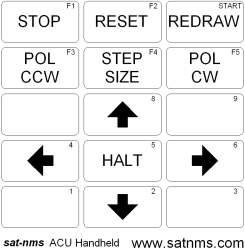
 — Emergency STOP,
stops all Motors immediately, it has to be released by pushing the
-button
— Emergency STOP,
stops all Motors immediately, it has to be released by pushing the
-button — Releases the
motor-lock that was set by pushing the STOP-button.
— Releases the
motor-lock that was set by pushing the STOP-button. — Back to
start screen
— Back to
start screen — Turns the
Polarisation counterclockwise
— Turns the
Polarisation counterclockwise — Selects the
step-size: small steps: x°/keypress (x is the value that was set on the
setup-screen), large steps: 10*x°/keypress, continuous mode: the antenna
moves as long until the -button is pushed or a limit switch or limit
value is reached.
— Selects the
step-size: small steps: x°/keypress (x is the value that was set on the
setup-screen), large steps: 10*x°/keypress, continuous mode: the antenna
moves as long until the -button is pushed or a limit switch or limit
value is reached. — Turns the
Polarisation clockwise
— Turns the
Polarisation clockwise — Moves the antenna
up (EL)
— Moves the antenna
up (EL) — Moves the
antenna to the left (AZ)
— Moves the
antenna to the left (AZ) — Stops the
antenna movement (only in continuous mode)
— Stops the
antenna movement (only in continuous mode) — Moves the
antenna to the right (AZ)
— Moves the
antenna to the right (AZ) — Moves the
antenna down (EL)
— Moves the
antenna down (EL)Remark: This unit is not longer available, but still software supported from the sat-nms ACU-ODM.