J1 Three-phase current Mains Connector
Connector Type: Harting HAN B 6+PE female Power supply for the motors to be connected to the ACU-RMU
| pin | signal | description | type |
|---|---|---|---|
| 1 | Phase 1 | IN | |
| 2 | Phase 2 | IN | |
| 3 | Phase 3 | IN | |
| 4 | neutral conductor | IN | |
| 5 | n.c. | ||
| 6 | n.c. | ||
| PE | grounding conductor |
J2 Single-phase current UPS Mains Connector
Connector Type: Harting HAN A 3+PE female Power supply for the ACU-RMU core module.
| pin | signal | description | type |
|---|---|---|---|
| 1 | Phase | IN | |
| 2 | neutral conductor | IN | |
| 3 | n.c. | IN | |
| PE | grounding conductor |
J3-1 AZ Motor Connector
Connector Type: Harting HAN B 6+PE male
Connect the azimuth motor here. Use shielded cable only. Take care, that the shield is connected to J3-1 and is NOT connected to the crankcase.
The ACU knows two different configuration modes to control a motor driver. They are called ‘DIR-START’ and ‘DUAL-START’. In ‘DIR-START’ mode, the ‘FWD’ signal switches the motor on/off, the ‘REV’ signal controls the motor direction. This is the configuration many frequency inverters use. In ‘DUAL-START’ mode, the ‘FWD’ signal switches the motor on in forward direction, ‘REV’ activates the motor in reverse direction. This configuration mode is convenient to control a motor with relays. At sat-nms ACU-RMU it has to be configured as DIR-START for AZ and EL and as DUAL-START for POL.
| pin | signal | description | type |
|---|---|---|---|
| 1 | Phase 1 | OUT | |
| 2 | Phase 2 | OUT | |
| 3 | Phase 3 | OUT | |
| 4 | n.c. | ||
| 5 | n.c. | ||
| 6 | n.c. | ||
| PE | grounding conductor |
J3-2 AZ Limit Switch Connector
Connector Type: D-Sub9 female
Connect the azimuth limit switches here.
The limit switch inputs internally are connected to the external 24V / GND rails. The switches are connected directly to the input pairs without any external ground or supply cabling. The ACU treats a closed contact as OK, contacts have to be opened to indicate the ‘limit reached’ condition.
Please note, that the left/right azimuth and polarization limit switches have to be swapped when the antenna is operated at the southern hemisphere.
| pin | signal | description | type |
|---|---|---|---|
| 1 | n.c. | ||
| 2 | n.c. | ||
| 3 | n.c. | ||
| 4 | n.c. | ||
| 5 | AZ Lo | CCW Limit | IN |
| 6 | GND_Ext | ||
| 7 | AZ Hi | CW Limit | IN |
| 8 | GND_EXT | ||
| 9 | n.c. |
J4-1 EL Motor Connector
Connector Type: Harting HAN B 6+PE male
Connect the elevation motor here. Use shielded cable only. Take care, that the shield is connected to J4-1 and is NOT connected to the crankcase.
The ACU knows two different configuration modes to control a motor driver. They are called ‘DIR-START’ and ‘DUAL-START’. In ‘DIR-START’ mode, the ‘FWD’ signal switches the motor on/off, the ‘REV’ signal controls the motor direction. This is the configuration many frequency inverters use. In ‘DUAL-START’ mode, the ‘FWD’ signal switches the motor on in forward direction, ‘REV’ activates the motor in reverse direction. This configuration mode is convenient to control a motor with relays. At sat-nms ACU-RMU it has to be configured as DIR-START for AZ and EL and as DUAL-START for POL.
| pin | signal | description | type |
|---|---|---|---|
| 1 | n.c. | ||
| 2 | n.c. | ||
| 3 | n.c. | ||
| 4 | Phase 1 | OUT | |
| 5 | Phase 2 | OUT | |
| 6 | Phase 3 | OUT | |
| PE | grounding conductor |
J4-2 EL Limit Switch Connector
Connector Type: D-Sub9 female
Connect the elevation limit switches here.
The limit switch inputs internally are connected to the external 24V / GND rails. The switches are connected directly to the input pairs without any external ground or supply cabling. The ACU treats a closed contact as OK, contacts have to be opened to indicate the ‘limit reached’ condition.
| pin | signal | description | type |
|---|---|---|---|
| 1 | n.c. | ||
| 2 | n.c. | ||
| 3 | n.c. | ||
| 4 | n.c. | ||
| 5 | EL Lo | EL Lower Limit | IN |
| 6 | GND_Ext | ||
| 7 | EL Hi | EL Upper Limit | IN |
| 8 | GND_EXT | ||
| 9 | n.c. |
J5 Beacon Receiver Analog Input
Connector Type: SMA male
The sat-nms ACU-RMU preferably is used together with the sat-nms LBRX beacon receiver. With the sat-nms LBRX the sat-nms ACU-RMU talks though TCP/IP, no additional cabling is required in this case. At J5 the ACU provides an analog interface to third party beacon receivers.
| pin | signal | description | type |
|---|---|---|---|
| Pin | Beacon Level | beacon level signal 0..10V | IN |
| case | GND |
J5-1 POL Motor Connector
Connector Type: Harting HAN A 3+PE male
Connect the polarization motor here. Take care for the desired voltage. The standard version of the sat-nms ACU-RMU is only able to drive 230V single phase motors without brake. As an option a brake driver and/or 110V transformer is available.
The ACU knows two different configuration modes to control a motor driver. They are called ‘DIR-START’ and ‘DUAL-START’. In ‘DIR-START’ mode, the ‘FWD’ signal switches the motor on/off, the ‘REV’ signal controls the motor direction. This is the configuration many frequency inverters use. In ‘DUAL-START’ mode, the ‘FWD’ signal switches the motor on in forward direction, ‘REV’ activates the motor in reverse direction. This configuration mode is convenient to control a motor with relays. At sat-nms ACU-RMU it has to be configured as DIR-START for AZ and EL and as DUAL-START for POL.
| pin | signal | description | type |
|---|---|---|---|
| 1 | POL CCW | OUT | |
| 2 | POL CW | OUT | |
| 3 | neutral conductor | OUT | |
| PE | grounding conductor |
J5-2 POL Limit Switch Connector
Connector Type: D-Sub9 female
Connect the polarization limit switches here.
The limit switch inputs internally are connected to the external 24V / GND rails. The switches are connected directly to the input pairs without any external ground or supply cabling. The ACU treats a closed contact as OK, contacts have to be opened to indicate the ‘limit reached’ condition.
Please note, that the left/right azimuth and polarization limit switches have to be swapped when the antenna is operated at the southern hemisphere.
| pin | signal | description | type |
|---|---|---|---|
| 1 | n.c. | ||
| 2 | n.c. | ||
| 3 | n.c. | ||
| 4 | n.c. | ||
| 5 | POL Lo | CCW Limit | IN |
| 6 | GND_Ext | ||
| 7 | POL Hi | CW Limit | IN |
| 8 | GND_EXT | ||
| 9 | n.c. |
J6 Disable Connector
Connector Type: D-Sub9 male
If you have an emergency stop button, connect it here. If you do not have one, make a bridge between Pin 1 and 8 and between Pin 2 and 9. Without these bridges the motors mains are interrupted.
| pin | signal | description | type |
|---|---|---|---|
| 1 | K1- | disable contactor input - | IN |
| 2 | K1+ | disable contactor input + | IN |
| 3 | n.c. | ||
| 4 | n.c. | ||
| 5 | n.c. | ||
| 6 | n.c. | ||
| 7 | n.c. | ||
| 8 | GND_EXT | OUT | |
| 9 | 24V_EXT | OUT |
J7, J8, J9 Angle Encoder Connector
Connector Type: D-Sub9 male
The sat-nms ACU-RMU is available in different configurations of angle encoders. It is possible to equip it with interfaces for standard resolvers, for optical SSI encoders or for analog sensors (potentiometers). It is possible to mix it (e.g. SSI encoder at AZ and EL and an analog sensor for POL). You have to select type of interface when you order the sat-nms ACU-RMU. A label nearby the angle connectors show which type of interface is installed.
Find below the pin description of all possibilities:
J7, J8, J9 Resolver Interface
| pin | signal | description | type |
|---|---|---|---|
| 1 | GND | resolver SIN | IN |
| 2 | SIN | resolver SIN | IN |
| 3 | GND | resolver COS | IN |
| 4 | COS | resolver COS | IN |
| 5 | GND | drive signal to resolver | OUT |
| 6 | REF | drive signal to resolver | OUT |
| 7 | n.c. | ||
| 8 | n.c. | ||
| 9 | n.c. |
The ACU resolver interface is designed for resolvers with an impedance of 100 Ohms or more and transfer factor 0.5. The interface applies 4Veff / 2000Hz to the resolver drive coil. It expects 2Veff at the sine / cosine inputs at the maximum positions.
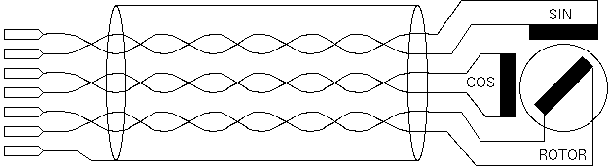
When connecting a resolver to the ACU, please consider the following:
J7, J8, J9 SSI Position Encoder Interface
The SSI positional encoder may be powered from the ACU internal power supply. +5V and +24V clamps are provided at the connector. To avoid ground loops, the cable shield should be connected either to pin 1 or to the ground at the encoder housing, never at both ends. The power supply outputs are internally fused. Be aware not to cause a short circuit. If this happens, the core module of the unit has to be opened and the fuse has to be replaced.
| pin | signal | description | type |
|---|---|---|---|
| 1 | GND | ||
| 2 | SSI-Data+ | SSI data | IN |
| 3 | SSI-Data- | SSI data | IN |
| 4 | SSI CLK+ | SSI clock | OUT |
| 5 | SSI CLK- | SSI clock | OUT |
| 6 | n.c. | ||
| 7 | +5V | encoder power supply | |
| 8 | +24V | encoder power supply | |
| 9 | n.c. |
J7, J8, J9 Analog Angle Sensor Interface
Below the pinout of an analog type positional sensor interface board is shown.
| pin | signal | description | type |
|---|---|---|---|
| 1 | AGND | analog ground | OUT |
| 2 | INPUT | A/D converter input | IN |
| 3 | REF | reference voltage | OUT |
| 4 | AGND | analog ground | OUT |
| 5 | +15V (opt) | optional DC out | OUT |
| 6 | -15V (opt) | optional DC out | OUT |
| 7 | +9V (opt) | optional DC out | OUT |
| 8 | GND | digital ground | OUT |
| 9 | n.c. |
J11 LAN Connector
Connector Type: RJ45 male
J11 is the Ethernet 10Base-T / RJ45 connector. Use a standard network cable to connect the sat-nms ACU-RMU to an Ethernet hub. If you want to connect your computer and the ACU directly without using a hub, you need a crossover cable for this with swapped RX/TX lines.
| pin | signal | description | type |
|---|---|---|---|
| 1 | TX+ | default Ethernet cabling (10Base-T) | OUT |
| 2 | TX- | OUT | |
| 3 | RX+ | IN | |
| 4 | |||
| 5 | |||
| 6 | RX- | IN | |
| 7 | |||
| 8 |