2.4.4 Detect 24V DC signals with DIN41...48
On these digital inputs you can select, if you like to detect potential- free on/off-contacts or if you want to detect a 24V DC Voltage. Factory setting is detecting potential-free contacts, like all the other digital-inputs. If you want to detect 24V DC signals, you have to observe following procedure:
Attention: this configuration should be carried out by well trained personnel only!
Never do this during operation. sat-nms IO-FEP2 has to be switched off and all connectors have to be disconnected for this modification!
- Open sat-nms IO-FEP2's housing: Remove top cover (3 screws) and the upper side-rail (4 screws).
- Now take out the PCBs of the unit vertical up.
- flip PCB over. between CON32 and CON33 you find 2 solder jumpers. The one nearer to pin 1 of CON32 and CON33 is SJ-1 the one nearer to the middle of CON32 and CON33 is SJ2.
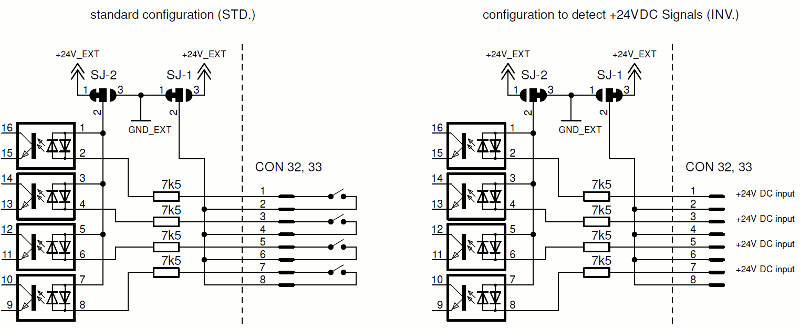
- As factory default, middle and outer pads (near by CON32) are connected to enable standard configuration. This position is marked with 'STD.' on the PCB. To configure these inputs for detecting 24V DC, change the position of both solder jumpers. Now middle and inner pads (near by CON33) have to be connected. This position is marked with 'INV.' on the PCB.
- Put PCB back into its housing and screw everything together in reverse order.
Following picture shows how to connect the digital inputs #41...48 in both ways of configuration, and how it works internally.