2.6 Replacing an existing sat-nms IO-FEP(-E) by IO-FEP2
To ensure easy replacement of an existing sat-nms IO-FEP or IO-FEP-E, the new sat-nms IO-FEP2 is designed 100% pin- and connector compatible. By this it is possible to use existing cabling including connectors, so you have a plug-and play scenario.
There are only some things that need to be considered when installing a new sat-nms IO-FEP2 instead of an old sat-nms IO-FEP or IO-FEP-E:
- Make sure that you have enabled enough interfaces. sat-nms IO-FEP2 is available in only one hardware version, definition of enabled interfaces is done with license codes. To learn more about that, please refer to chapter {h2410 2.4.1 Feature code activation}.
- Although extreme compact design, the new sat-nms IO-FEP2 is a bit longer than formerly IO-FEP. Compared to sat-nms IO-FEP-E, the new sat-nms IO-FEP2 is a lot more compact and saves approximately 40% space. You have to consider that if you plan to replace an existing sat-nms IO-FEP.
Following table compares mechanical dimensions of all 3 models:
| IO-FEP |
264mm |
165mm |
60mm |
| IO-FEP-E |
434mm |
165mm |
60mm |
| IO-FEP2 |
307mm |
139mm |
60mm |
- Assignment of waveguide-switch interface number 5...8 and corresponding connector number have changed. Pin assignment is the same, so you only have to connect existing cables in new order. Following table shows new assignment:
| switch 5 |
CON 23 |
CON22 |
| switch 6 |
CON 22 |
CON23 |
| switch 7 |
CON 25 |
CON24 |
| switch 8 |
CON 24 |
CON25 |
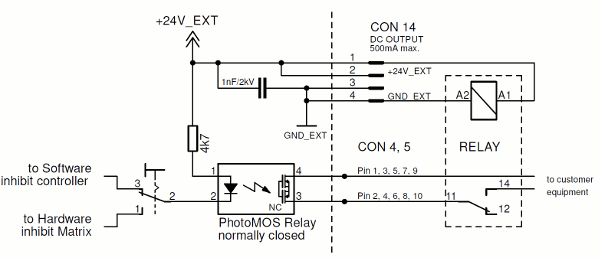
- In contrast to sat-nms IO-FEP(-E), the new sat-nms IO-FEP2 contains new photomos relay types. These ones are normally closed, so contact is closed when power is off. This ensures that connected HPAs are not muted in case sat-nms IO-FEP2 fails. If you use one or more of these outputs for controlling an external device, e.g. a heater, this function might be a problem. If possible, we recommend to use digital outputs 11-16. These are implemented as normally open relay contacts, so they will remain open upon power interrupt. If you nevertheless need to ensure photomos digital output interfaces with normally open function, we recommend to use an external relay connected to 24V EXT. Its contact needs to be connected in line to the photomos digital output. As soon as 24V EXT voltage disappears, contact will open. Following schematic shows how to connect this external relay: