 to enter this mode. The display shows the receive level (live updated) and the actual receive frequency. The
  keys change the frequency in steps of 1 kHz, the
  keys perform 10 kHz steps.
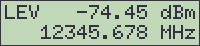
The step tuning page lets you adjust the receive frequency with the arrow keys while watching the receive level.
From the main menu, select 'STEP TUNE' and press to enter this mode. The display shows the receive level (live updated) and the actual receive frequency. The keys change the frequency in steps of 1 kHz, the keys perform 10 kHz steps.
If you leave the step tune page by pressing  , the receiver reverts it's receive frequency to the value prior to the adjustment. To keep the adjusted value as the new receive frequency, press .