2.3 Connecting the L-Band Switch Matrix
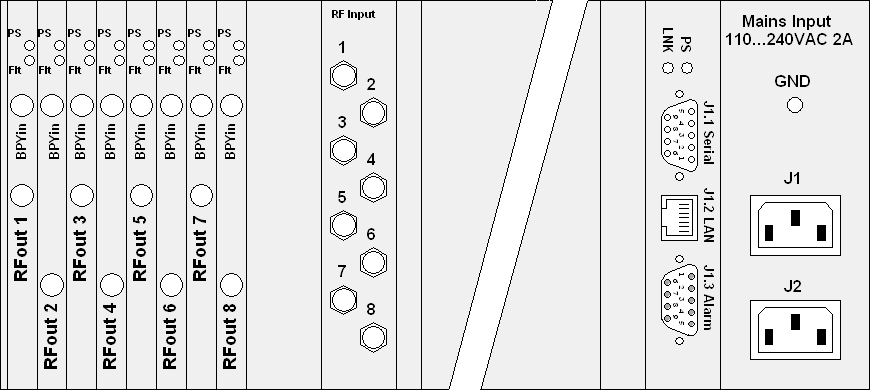
The connectors of the L-Band Switch Matrix are placed on the rear side of the enclosure. Right hand you can find the A/C Power and Data connectors, left hand the RF connectors. The following picture shows you the location of the connectors at a 8x8 L-Band Switch Matrix.
When you connect the L-Band Switch Matrix, please consider the following:
- J1.2 LAN is the Ethernet 10Base-T / RJ45 connector. Use a standard network cable to connect the L-Band Switch Matrix to an Ethernet hub or switch. If you want to connect your computer and the unit directly without using a hub, you need a crossover cable for this with swapped RX/TX lines.
- J1.1 serial is a standard 9-pin RS232 (DCE) SUB-D pin-connector. You may use a direct 9-pin cable to connect a PC to the L-Band Switch Matrix. The RTS/CTS and the DTR/DSR lines are bridged in the unit to simulate hardware handshaking. They need however not to be connected, if you want to use a 3 wire cable.
- J1.3 Alarm is a standard 9-pin SUB-D socket-connector. This connector contains the alarm contacts of the internal failure relais.
- J1 and J2 are the power-inputs. Use only IEC plugs to connect the power supplies. Don´t forget to connect the GND -labelled screw to the ground potencial.
- The input and output RF-connectors are all SMA/50Ohm female.