3.5 Frontpanel Operation
The front panel of the L-Band Switch Matrix provides a LCD and a small keyboard for operating the device locally.
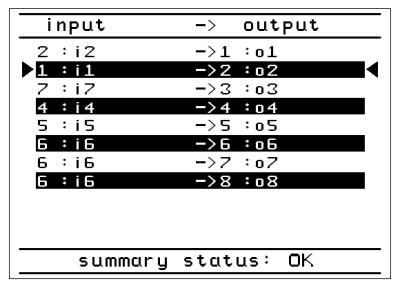
Display The graphic display normally shows the actual sources for the L-Band Outputs.
LEDs
Three LEDs at the front panel signal the summary state of the L-Band Switch Matrix.
- The 'Remote' LED is on while the unit is controlled from a remote computer via network or serial interface. There is no exclusive remote or local lockout mode with the sat-nms L-Band Switch Matrix. Local operation of the L-Band Switch Matrix is still possible while the device is accessed remotely. The 'Remote' LED is just an information, that someone from remote talks to the device and a local change of parameters may interfere with this.
- The 'Test' LED should not be on during normal operation of the unit. If the 'Test' LED is on, there has occurred a latched fault. A latched fault means, the fault has been there but it doesn´t exsist no longer. So the 'Test' LED is on to inform you that there has occurred a fault. You can see in the 'Alarm log'which fault occurred.
- The 'Alarm' LED is on while the unit is in alarm state. This is the same condition which controls the fault relay output.
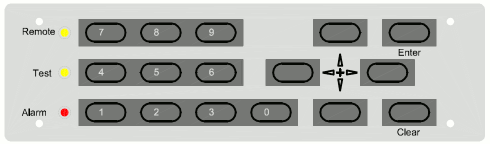
Keys
The front panel keyboard provides beside the numeric keys four arrow keys and two keys named ENTER and CLEAR. The general meaning of the keys remains constant through all levels of the menu:
 --- The ENTER key descends in the menu tree, accepts and stores changed values.
 --- The CLEAR key leaves to higher menu levels, abandons changes when editing parameters. It also resets the alarm buzzer when in display mode.
 --- The arrow keys navigate in the menu, in some cases they also increment / decrement values.
- 0 .. 9 --- The number keys are to enter numeric parameters.