The APS-Backup-Antenna-Switch logical device is a project specific extension to the sat-nms software. The device controls the signal path to from the HPAs / power combiners to the antenna. For this the device commands a number of wave guide switches. The device names of the switches are configurable as the individual switch positions are as well. The APS-Backup-Antenna-Switch device is used in conjunction with the APS-Backup-Antenna-Control device which manages the sequence of operations required to switch an antenna's transmit signal to the backup antenna.
The APS-Backup-Antenna-Switch provides three signal destination choices:
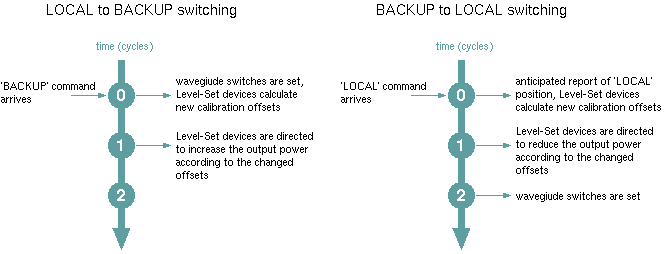
One task of the APS-Backup-Antenna-Switch device is to manage the individual waveguide switch settings necessary for the procedure to switch to the backup antenna and back up the local one. The other task of the device is to let the Level-Set devices attached to each HPA know about the actual signal path and to command them to adjust the power at the right time. The sequence of operations is as shown in the diagram below:
When switching to BACKUP (requires a higher power at the HPAs due to the longer waveguide path), the device first sets the waveguide switches and reports the signal destination to be BACKUP. The Level-Set devices monitoring this value calculate new calibration offsets due to the change, but do not change the ouptu power. One cycle (usually 1000 msesc) later, when the switches are in the BACKUP position, the APS-Backup-Antenna-Switch commands the Level-Set devices to increase the output power according to the changes calibration values.
When switching to LOCAL (this requires to reduce the output power), the device first reports the LOCAL setting although the waveguide switches have not yet been set. This causes the Level-Set device calculate the calibration offsets for the LOCAL signal path. One cycle later the output power reduction is commanded. In a third cycle the APS-Backup-Antenna-Switch device sets the waveguide switches to the LOCAL.
Switching the signal destination to DUMMY (dummy load) does not cause a change of the amplifiers' output power remains.
Destination monitoring
At power on, the APS-Backup-Antenna-Switch detects the actual destination selection from the waveguide switch positions (they are the 'permanent' memory for this parameter). If the combination of the switch positions is not valid (does not match any of the switch combinations defined with the configuration parameters), a fault flag is set.
Device window pages
The following table shows which device window pages are available with this individual device type. Tool-bar functions not mentioned here are described at the general description of device windows .
 --- Shows / commands the signal destination setting.
 --- The faults page.
 --- The device info page.
 --- The maintenance page. The configuration parameters from this page are described below.
Configuration parameters
At the maintenance page of the device window there are a couple of configuration parameter which must be set to interconnect the device with the switches that will perform the signal routing.
| parameter | description |
|---|---|
| lsetNames | A comma separated list of devices names. Each device must be a Level-Set device which shall receive an 'adjustDrive' command during the switchover sequence as described above. This list may be empty if there are no Level-Set devices to control. |
| Example: EIRP-1,EIRP-2,EIRP-3,EIRP-R | |
| swNames | A comma separated list of devices names. Each device must be a 'switch' type in that way, that is provides a variable called 'position' which selects the signal path. |
| Example: S01,S02,S03,S04 | |
| swLocal | A comma separated list defining the switch commands (positions) which get applied when the device switches to the LOCAL position. The number of items in the list must match the number of switches defined above. Switches and position commands are linked by their position in the list. |
| Example: A,A,B,B | |
| When switching to LOCAL, S01 and S02 are set to position 'A', S03 and S04 are set to 'B' following this example. | |
| swBackup | A comma separated list defining the switch commands (positions) which get applied when the device switches to the BACKUP position. The number of items in the list must match the number of switches defined above. Switches and position commands are linked by their position in the list. |
| Example: B,B,A,A | |
| When switching to BACKUP, S01 and S02 are set to position 'B', S03 and S04 are set to 'A' following this example. | |
| swDummy | A comma separated list defining the switch commands (positions) which get applied when the device switches to the DUMMY position. The number of items in the list must match the number of switches defined above or the field must be left empty. Switches and position commands are linked by their position in the list. |
| Example: A,B,A,B | |
| When switching to DUMMY, S01 and S03 are set to position 'A', S02 and S04 are set to 'B' following this example. If the field is left empty, the devices suppresses the DUMMY destination. |
Changes of the configuration parameter are recognized immediately. If this temporarily leads to invalid switch combinations, the 'Switch position match FAULT' is set. It may be necessary to switch the 'position' parameter once in order to clear this fault.
Fault flags
The device provides two fault flags:
Configuration hints
To make the APS-Backup-Antenna-Switch device interact properly with a Level-Set device, both devices mut be configured as follows:
Variables defined by this device driver
| name | type | flags | range |
|---|---|---|---|
| info.driver | TEXT | R/O | StringRange R/O |
| info.type | TEXT | R/O | StringRange R/O |
| info.frame | TEXT | R/O | StringRange R/O |
| config.lsetNames | TEXT | SAVE SETUP | StringRange |
| config.swNames | TEXT | SAVE SETUP | StringRange |
| config.swLocal | TEXT | SAVE SETUP | StringRange |
| config.swBackup | TEXT | SAVE SETUP | StringRange |
| config.swDummy | TEXT | SAVE SETUP | StringRange |
| position | CHOICE | EnumRange (LOCAL BACKUP) | |
| faults.01 | ALARM | R/O | AlarmFlagRange R/O (Switch position match) |
| faults.02 | ALARM | R/O | AlarmFlagRange R/O (Switch hardware) |