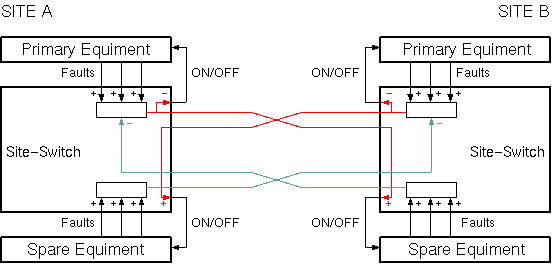
The Site-Switch logical device implements a site diversity switch control. Mostly used to backup up-link facilities at different sites, the Site-Switch device may be configured to work in various environments.
The primary equipment normally used for the up-link is monitored by the Site-Switch device. If the primary equipment fails, the local up-link gets shut down and the spare transmission facility at the remote site gets switched on. The control of the spare equipment at the remote site is done by a Site-Switch device, too. The site to site communication between the Site-Switch devices is performed via a TCP/IP network connection. The flow of signal ON/OFF commands between the sites appear as red lines in the figure below.
Due to the symmetrical design of the Site-Switch a setup like shown in the figure above can be done. The spare equipment at site B backs up the transmission from site A an vice versa. In a simpler configuration the spare equipment at site A and the primary equipment at site B do not apply.
Beside monitoring the primary equipment faults, the Site-Switch device also monitors the state of the spare equipment (in an asymmetrical setup this applies only to the Site-Switch device at site B). If the spare equipment at the redundant site fails, this is reported to the primary site and prevents the Site-Switch device there from switching to remote. The figure above shows this information as blue lines.
Device window pages
The following table shows which device window pages are available with this individual device type. Tool-bar functions not mentioned here are described at the general description of device windows .
 --- The main control page for the device. The operational parameters of the Site-Switch device are described below.
 --- The fault page:
 --- The device info page.
 --- The maintenance page. The configuration parameters described later are set at this page.
Operational parameters
The operational parameters of the Site-Switch device are set at the main control page. The table below explains each parameter in particular.
parameter --- description
actual location --- This parameter shows if the up-link is done at this location (LOCAL) or at the backup site (REMOTE). A manual switch over between the sites may be done at any time by changing this value. Be aware, that a switch over causes a transmission outage for a couple of seconds.
switchover mode --- The device knows three different operating modes.
switch delay --- Faults detected at the local (primary) equipment must continuously be present for the time defined with this parameter in order to trigger switchover. Set this time to prevent the Site-Switch from reporting to momentary faults
recovery delay --- In AUTOMATIC mode, this parameter defines the time, the local (primary) equipment continuously must be OK until the Site-Switch initiates a switch back to the primary site. Setting this time to a larger value reduces the risk that the site switching oscillates.
Configuration parameters
At the maintenance page of the device window there are a couple of configuration parameter which must be set to interconnect the Site-Switch device with the device id shall monitor/control.
| parameter | description |
|---|---|
| spareFault1Id spareFault2Id spareFault3Id | You may define up to three message identifiers of device fault parameter which indicate that the spare equipment is faulty. The Site-Switch recognizes fault messages like "MODEM-1.fault" or "MODEM-1.faults.03". The spare equipment is assumed to be faulty if at least one of the faults is active. |
| primFault1Id primFault2Id primFault3Id | You may define up to three message identifiers of device fault parameter which indicate that the primary equipment is faulty. The Site-Switch recognizes fault messages like "MODEM-1.fault" or "MODEM-1.faults.03". The spare equipment is assumed to be faulty if at least one of the faults is active. |
| spareRfOnId | Define the identifier of the message the Site-Switch shall issue in order to switch the spare up-link on or off, i.e. "HPA-2.tx.on". The Site-Switch sends "ON" or "OFF" as parameter value with this message. |
| primRfOnId | Define the identifier of the message the Site-Switch shall issue in order to switch the primary up-link on or off, i.e. "HPA-2.tx.on". The Site-Switch sends "ON" or "OFF" as parameter value with this message. |
| remoteIpAddress | Specify the IP address of the remote M&C computer with this parameter, either in dotted quad notation or as a computer name the local machine is able to resolve. |
Remarks
Variables defined by this device driver
| name | type | flags | range |
|---|---|---|---|
| info.driver | TEXT | R/O | StringRange R/O |
| info.type | TEXT | R/O | StringRange R/O |
| info.frame | TEXT | R/O | StringRange R/O |
| config.spareFault1Id | TEXT | SAVE SETUP | StringRange |
| config.spareFault2Id | TEXT | SAVE SETUP | StringRange |
| config.spareFault3Id | TEXT | SAVE SETUP | StringRange |
| config.primFault1Id | TEXT | SAVE SETUP | StringRange |
| config.primFault2Id | TEXT | SAVE SETUP | StringRange |
| config.primFault3Id | TEXT | SAVE SETUP | StringRange |
| config.spareRfOnId | TEXT | SAVE SETUP | StringRange |
| config.primRfOnId | TEXT | SAVE SETUP | StringRange |
| config.remoteIpAddress | TEXT | SAVE SETUP | StringRange |
| location | CHOICE | SAVE | EnumRange (LOCAL REMOTE) |
| spare | CHOICE | SAVE | EnumRange (OFF ON) |
| inhibit | BOOLEAN | BooleanRange (true false) | |
| switchMode | CHOICE | SAVE | EnumRange (MANUAL 1-SHOT AUTOMATIC) |
| lrDelay | FLOAT | SAVE | DoubleRange (0.0 .. 300.0) |
| rlDelay | FLOAT | SAVE | DoubleRange (0.0 .. 300.0) |
| updateInhibit | TEXT | StringRange | |
| faults.01 | ALARM | R/O | AlarmFlagRange R/O (Remote connection) |
| faults.02 | ALARM | R/O | AlarmFlagRange R/O (Remote spare equip.) |
| faults.03 | ALARM | R/O | AlarmFlagRange R/O (Local spare equip.) |
| faults.04 | ALARM | R/O | AlarmFlagRange R/O (Latched condition) |