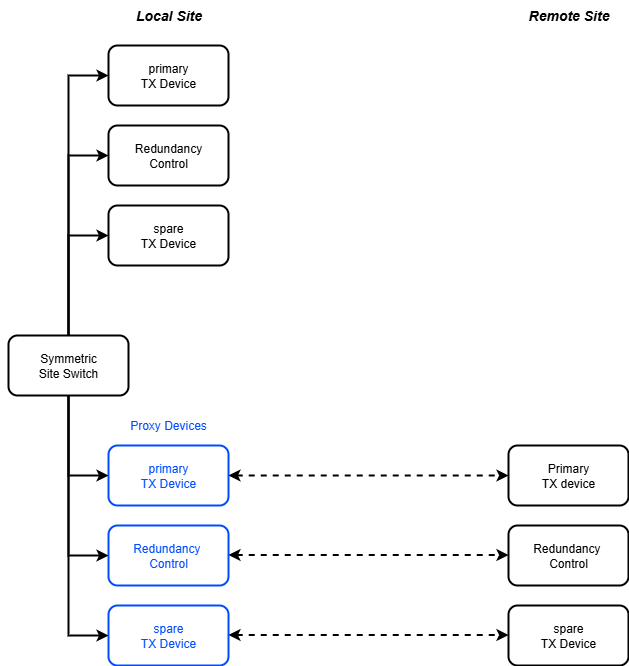
The Symmetric-Site-Switch logical device controls the equipment of one transmit chain for a site diversity application between two uplink ground stations. As the driver name implies, the device works completely symmetrically, there is no preference for a primary or a backup site.
As shown in the figure above, the Symmetric-Site-Switch logical device is operated at one of the two sites. There it controls the local RX device and the TX redundancy control device if there is any configured.
The devices of the second (remote) site are mapped as Proxy devices, providing control for these devices at the other site.
Site switch procedure
Switching the uplink from the one site to site to the other is a simple sequence of actions and checks. The procedure is exactly the same for switching from one site to the other and back. In the description below the site which transmits before the switchover is called 'source', the site which wil be transmitting after tge switchover is called 'destination'
Switching back to the original site works the same way the other way round.
Redundancy configuration
The Symmetric-Site-Switch supports four different modes of redundancy for the transmit devices. These modes are configured individually for both sites, this means you can have two 1:1 redundant HPAs at the one site and at the other site HPAs which are part of a N:1 redundancy. The redundancy modes are:
The protection controller mode for a site also has some impact how the Symmetric-Site-Switch expects some of its configuration parameters:
Device window pages
The following table shows which device window pages are available with this individual device type. Tool-bar functions not mentioned here are described at the general description of device windows .
 --- Shows / commands actual uplink location.
 --- The device info page.
 --- The maintenance page. The configuration parameters from this page are described below.
Configuration parameters
At the maintenance page of the device window there are a couple of configuration parameter which must be set to interconnect the device with the devices that will perform the carrier on/off settings.
| parameter | description |
|---|---|
| abortOn | The Symmetric-Site-Switch aborts a switchover procedure if one of the transmit devices reports a fault. This setting selects if this shall happen in case of a FAULT or also if the device reports a WARNING. |
| protectModeA/B | Selects the type of protection switch used with the TX equipment at the particular site. May be one of NONE, 1-TO-1, N-TO-1 or POOL. Should be set to the value describing the protection mode of the TX equipment. |
| protectDeviceA/B | The name of the protection controller device used at the particular site. Must be set if the protectMode is set to another value than NONE |
| txDeviceA/B | The device name of the transmit device (typically an HPA) which produces the carrier at the particular site. With protectMode POOL this is the Modem-Protection-Controller device managing the the redundancy to this carrier |
| txRedDeviceA/B | The name of the backup TX device at this particular site. For a symmetrical 1:1 redundancy this is the name of the second HPA (see redundancy configuration above). Not requires if protectMode is NONE or POOL |
| chainNoA/B | Must be set with N:1 redundancy configuration to the chain number of the txDevice in the protection device (1..12). Not used with the other protection mode options. |
| nameA/B | A short (one word) name for the this site. |
| descriptionA/B | A descriptive name for the site. This appears in event log entries and in status messages of the device, hence it should not be to long (max 15 characters are recommended) |
| txChgReadDelayA/B | This parameter sets the delay between an RF ON/OFF command sent to the TX device and the first read back which is done to check if the carrier is really at the commanded state. Some devices echo the RF ON/OFF state without switching the carrier and report the true state two seconds later because the command could not be executed as expected. Increasing the delay can help to suppress the consequences of this effect. |
| comment | The text is presented in the device's GUI as a description of the carrier which is switched between the sites. |
Variables defined by this device driver
| name | type | flags | range |
|---|---|---|---|
| info.driver | TEXT | R/O | StringRange R/O |
| info.type | TEXT | R/O | StringRange R/O |
| info.frame | TEXT | R/O | StringRange R/O |
| info.protectModeA | TEXT | R/O | StringRange R/O |
| info.protectModeB | TEXT | R/O | StringRange R/O |
| info.hasBeamOnA | TEXT | R/O | StringRange R/O |
| info.hasBeamOnB | TEXT | R/O | StringRange R/O |
| config.abortOn | CHOICE | SAVE SETUP | EnumRange (WARNING FAULT) |
| config.protectModeA | CHOICE | SAVE SETUP | EnumRange (NONE 1-TO-1 N-TO-1 POOL) |
| config.protectModeB | CHOICE | SAVE SETUP | EnumRange (NONE 1-TO-1 N-TO-1 POOL) |
| config.protectDeviceA | TEXT | SAVE SETUP | StringRange |
| config.protectDeviceB | TEXT | SAVE SETUP | StringRange |
| config.txDeviceA | TEXT | SAVE SETUP | StringRange |
| config.txDeviceB | TEXT | SAVE SETUP | StringRange |
| config.txRedDeviceA | TEXT | SAVE SETUP | StringRange |
| config.txRedDeviceB | TEXT | SAVE SETUP | StringRange |
| config.txChainNoA | INTEGER | SAVE SETUP | IntegerRange (0 .. 0) |
| config.txChainNoB | INTEGER | SAVE SETUP | IntegerRange (0 .. 0) |
| config.nameA | TEXT | SAVE SETUP | StringRange |
| config.nameB | TEXT | SAVE SETUP | StringRange |
| config.descriptionA | TEXT | SAVE SETUP | StringRange |
| config.descriptionB | TEXT | SAVE SETUP | StringRange |
| config.comment | TEXT | SAVE SETUP | StringRange |
| gotoA | TEXT | StringRange | |
| gotoB | TEXT | StringRange | |
| reset | TEXT | StringRange | |
| progressReport | TEXT | R/O | StringRange R/O |
| progressIcon | TEXT | R/O | StringRange R/O |
| location | TEXT | R/O | StringRange R/O |
| savedState | INTEGER | SAVE | IntegerRange (0 .. 0) |
| savedProtectionA | TEXT | SAVE | StringRange |
| savedProtectionB | TEXT | SAVE | StringRange |