2.15 Satellite operator list
All satellites operators known to system. You need to define a satellite operator before you can create an new satellite.
This list is also useful to store contact information of an satellite operator, e.g to perform a line-up before your start a transmission.
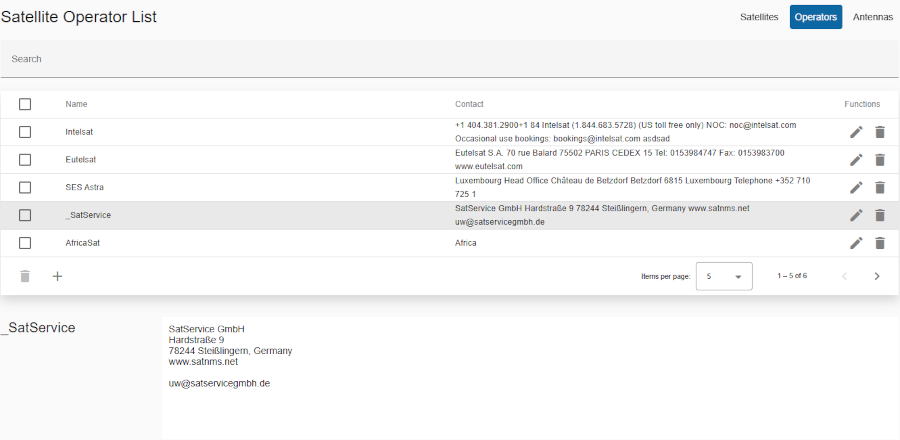
Title: Title of selected table (e.g. Operator list).
Menu options:
- Satellites: Displays the table of satellites.
- Operators: Displays the table of operators. The selected option has background color.
- Antennas: Displays the table of antennas.
Search bar
- Located at the top of the table.
- Allows users to filter events by keywords.
Header row
- You can sort rows in ascending or descending order by clicking on the column header.
- Sorting is applied to the entire dataset, not just the current page.
- The active sort order (ascending or descending) is typically indicated by an arrow or icon near the column name.
Table columns
- Checkbox column:
- Location: The checkbox column is located at the far left of the table.
- Purpose: Allows users to select one or multiple rows for delete row(s).
- Functionality:
- Single Selection: Click on a single checkbox to select an individual row.
- Multiple Selection: Click multiple checkboxes to select multiple rows at once.
- Select all: The checkbox in the header row allows you to select or deselect all rows on all pages.
- Delete: After selecting events, delete action on bottom toolbar can be performed for all selected items.
- Name: The name of operator.
- Contact: Contact details of operator.
- Functions: Action icons for managing the operator:
- Edit: Pencil icon to modify/edit the operator.
- Delete: Trash can icon to delete the operator.
Rows: Clicking on operator row shows details of selected row (operator).
Bottom toolbar
- Delete selected rows: A button to delete selected rows from checkbox column.
- Create: + button is used to create new operator.
- Pagination controls: Allows users to set the number of items displayed per page and navigate between pages.
Details of selected operator:
- Name of operator
- Contact details of operator