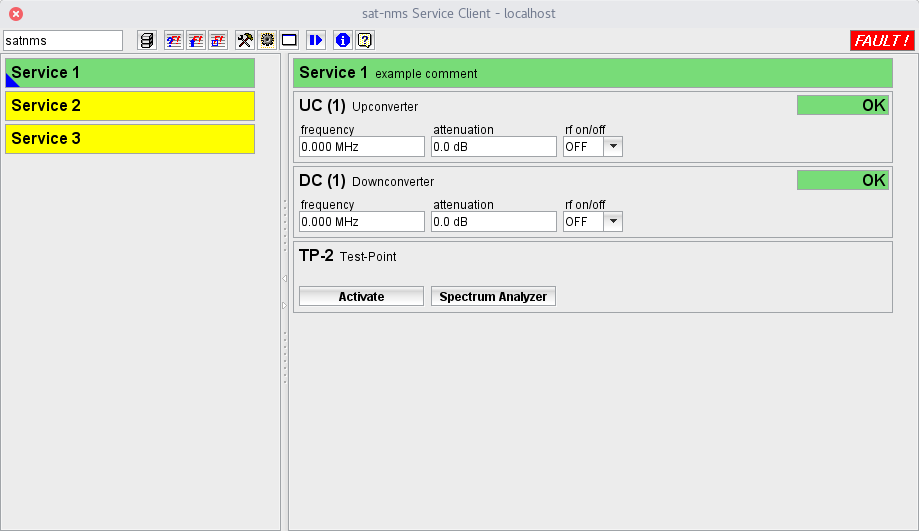
The sat-nms Service-Client is a client program for the sat-nms M&C server. It can be used in parallel to the standard M&C client program in order to organise certain devices and device parameters in "services".
There may be multiple instances of the Service-Client running at the the same time. Operating the software is fully multi-user capable, but adding/removing services should be done only from one computer at a time.
Service Definition A service is a combination of an arbitrary number of properties which each may be a up- or down converter, a splitter output, a combiner input, a fibre output or a test port. For each type of property there is a number of parameters which are monitored and - if applicable - controlled.
There is a summary fault state for each service which is the "worst condition" of the properties contained in this service. This service summary fault states does not appear in the server's event log as it is evaluated in the client program and known only there.
Operation
The Service-Client window mainly consists of a list of available services at the left and the actual settings / readings of the selected service at the right. By clicking to a service name the service gets selected and its parameters are shown at the right. Both, service list and parameter panel automatically add vertical scrollbars if required.
The program inherits a lot of functions from the sat-nms standard M&C client. It uses the same login scheme as the standard M&C GUI, toolbar buttons for event report query, live event log and list of active faults work in the same way here.
At the left side the window shows a list of all defined services. The background color shows the actual fault state of the particular service (one of DISABLED/OK/WARNING/FAULT). The colors used for this are configurable. Clicking with the right mouse button on a service name opens a context menu at the mouse pointer containing some convenience functions like enabling/disabling the service summary fault or opening the configuration editor for this service. The service fault status is updated in near real time for all defined service which are not "disabled".
The right side of the window shows the parameters and state of the actually selected service. For each property belonging to the service, a field containing the property's name, parameters and fault state. The layout of these fields is defined by a XML configuration file supplied by SarService. The displayed name of a property consists of a label for the property type, the sat-nms device name referenced and - if applicable - an index identifying the unit within the device used for this service.
Status values and control parameters of the properties of the selected service are updated in near real time like with the standard M&C GUI. Control parameters can be changed in place without the need to open another window.
Tool Bar
The Service Client provides a toolbar at the top of the window which gives access to a number of global functions in the software. Below there is a short description for each of the toolbar buttons.
 --- The left field at the window's tool-bar shows the login-name of the user who is actually logged in. You may click with the mouse to this field, the program pops up the login/logout dialog.
 --- Shows a drop down list with all devices installed in the M&C system. Selecting a device from this list opens it's Device window .
 --- Opens the Event Report window .
 --- Opens the Live Event Log window .
 --- Opens a list of currently active faults.
 --- Opens the Device Setup window to configure the device setup of the M&C system.
 --- Switches the service client window to "edit" mode, lets you add or delete services or change service definitions (see "Configuration" below)
 --- Opens a terminal window which connects to the debug / test port of the M&C server.
 --- Opens the Macro Management window which controls recording and replay of equipment setting macros.
 --- Shows the program version info.
 --- Shows this help page.
Configuration
Configuring the Service-Client means to add or remove equipment (properties) from an existing service definition or to add or remove complete service definitions. For this purpose the Service-Client provides a configuration mode which can be switched on from the main window's tool bar. The configuration mode permits to:
Changes made in configuration mode are reflected immediately, e.g. an added property shows up as soon as it is added. There is no "save" button in the configuration mode, all changes which are made are permanent.
When the configuration of services is changed, all other opened service clients are informed to re-read the configuration from the server to get updated. This happens within 15 seconds after a configuration change has been made.
When adding a new property to a service, the software knows which sat-nms devices or units within devices are suitable for the selected purpose. The software also knows which properties may be used only once and cannot configured a second time.
The operator gets a list of actually possible devices which may be configured as the new property for the service and selects the hardware representation of the property from this list.
The knowledge, which types of devices are suitable e.g. as a combiner input, how many identical units of this a sat-nms device manages and through which parameter identifiers the desired combiner port is addressed is defined in an XML configuration file which is supplied by SatService. By editing this file, more / new device types may be added to the list of known device drivers for the software.