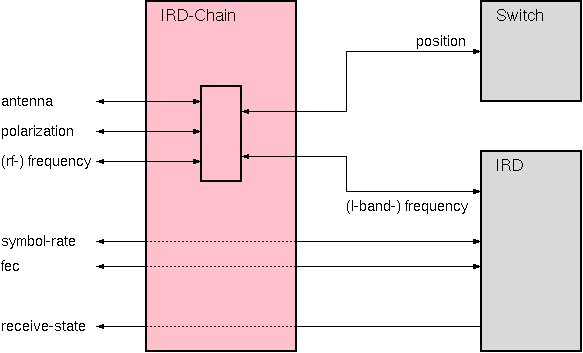
The IRD-Chain logical device controls the basic parameters of an IRD and an input switch for the IRD which selects frequency band and polarization. The IRD-Chain device is similar to the Band-Pol-4-To-1 device, but it is much more flexible to configure. It primarily is intended for configurations where several IRDs are connected to an L-band switch matrix which distributes the signals from multiple antennas. It however can be used for simpler applications, too.
The IRD-Chain device translates the user level parameters 'antenna', 'polarization' and 'frequency' into the frequency setting at the IRD and the position of the input selection switch / matrix output. The translation is made following the rules defined in a configuration file. This file describes the switch matrix inputs. The IRD-Chain device does the translation of LO-frequencies, as these may vary for the different antennas.
Beside the function described above, the IRD-Chain device implements a locking mechanism which prevents users from changing parameters at a receive chain which is currently in use. This protection only works on the parameters controlled by the IRD-Chain device, it does not influence the operation of the IRD through it's own screen.
Device window pages
The following table shows which device window pages are available with this individual device type. Tool-bar functions not mentioned here are described at the general description of device windows .
 --- The main control page for the device.
 --- The fault page
 --- The device info page.
 --- The maintenance page. The configuration parameters from this page are described below.
Configuration parameters
At the maintenance page of the device window there are a couple of configuration parameters which must be set to interconnect the IRD-Chain device with the IRD and the input switch.
| parameter | description |
|---|---|
| switchId | Enter the message identifier here of the parameter which shall receive the switch setting, e.g. "MATRIX.12.position". Look at the list of device driver variable definitions to see correct name of this setting at the device type you are using. |
| lockByIP | If you set this parameter to 'YES', only the operator who 'locked' the IRD-Chain may unlock it again. He is required to do this from the same workplace whre he locked the device. When set to 'NO' any operator logged in with privilege level 100 or more may unlock a locked IRD-Chain from any workplace. |
| configFile | The name of the configuration file, the IRD-Chain reads the matrix input assignments from. You may use a common configuration file for all IRD-Chain devices in the system or an individual file. The file format is described at the end of this chapter. |
Configuring an M&C with IRD-Chain devices
Unlike other logical devices, which know all links to other parameters / devices from configuration settings, the IRD-Chain device refers to the IRD it controls by it's name. This mainly is because of the IRD device icon which is contained in the IRD-Chain's device window.
The name of the IRD controlled by an IRD-Chain device always must start with an "I" followed by the suffix contained in the IRD-Chain name. The suffix is everything including and following the last hyphen in the name or any trailing digits. The list below shows a few examples for explanation:
| IRD-Chain name | IRD name |
|---|---|
| CHAIN1 | I1 |
| CHN-SCOPUS4 | I-SCOPUS4 |
| CH-RCV-T3 | I-T3 |
| CHAIN | ICHAIN |
When you select a name for the IRD-Chain device, you must name the IRD following this scheme to make the IRD being controlled by the IRD-Chain.
Using the lock/unlock mechanism in a task-oriented screen
The IRD-Chain's lock/unlock mechanism works through the variables 'locked' and 'togglelock'.
To make a parameter in a task-oriented screen 'protected' by the IRD-Chain device (i.e. the parameter only can be changed it the IRD-Chain is 'unlocked'), set the 'locked' flag of the IRD-Chain as the 'enable ID' of the parameter. Example: you want to protect the 'program' parameter of IRD I-3. The chain device is named CHN-3. Set the 'enable ID' field for the 'program' parameter to 'CHN-3.locked' and the 'enable Val' to 'false'. The parameter will be grayed out and treated as read-only as soon as the chain device is locked.
To control the locked state of a IRD-Chain device from a task-oriented screen, introduce a Parameter-Button element which sends the special value '%IP%' to the 'togglelock' variable of the IRD-Chain device. The user interface expands the '%IP%' to string 'username@ip-address' which is used to identify username and workplace from where the IRD-Chain device gets locked.
The configuration file format
The IRD-Chain's configuration file is a plain text file which defines the matrix / switch input assignments. As this is a system wide assignment, you usually will edit one common configuration file for all IRD-Chain devices connected to one input matrix.
In the file all empty lines and lines starting with a '#' character are ignored. All other lines are treated as table rows where the cells are separated by space characters. Each row describes one matrix input as follows:
| column | contents | remark |
|---|---|---|
| 1 | switch position / matrix input | If the input numbering starts at one or at zero, depends on the matrix / switch device driver. |
| 2 | antenna name | The antenna name must not contain spaces, commas ot pipe characters (' |
| 3 | polarization | You may name the polarization planes with X/Y, H/V, HOR/VERT or what ever mnemonics you prefer. The only restriction is that within one M&C system the polarization planes must be names always the same. Beside this you should consider, that longer tokens may not fit into the choice-box provided by the IRD-Chain's device window. |
| 4 | LNB LO frequency for this port | The LO frequency must be given as a decimal number (MHz) with a decimal point (no commas, no thousand's separators are allowed) |
| 5 | < or > | If this column contains ' < ', the switch position is used for frequencies below the limit contained in the nect column. ' < ' works the other way round. |
| 6 | frequency limit for this port | The frequency limit must be given as a decimal number (MHz) with a decimal point (no commas, no thousand's separators are allowed) |
Example:
#
#  Example configuration file for a IRD-Chain device
#
#
#  input no.    polarization      freq. limit [MHz]
#  |            |                 |
#  |   antenna  |  LO freq. [MHz] |
#  |   |        |  |              |

   1   ARD      H  9750.0         < 11850.0
   2   ARD      V  9750.0         < 11850.0
   3   ARD      H  10600.0        > 11850.0
   4   ARD      V  10600.0        > 11850.0

   5   NDR      H  9750.0         < 11850.0
   6   NDR      V  9750.0         < 11850.0
   7   NDR      H  10600.0        > 11850.0
   8   NDR      V  10600.0        > 11850.0

   9   EBU      H  10000.0        > 0.0
  10   EBU      V  10000.0        > 0.0

  11   TTC      H  10000.0        > 0.0
  12   TTC      V  10000.0        > 0.0

  13   ASTRA    H  9750.0         < 11850.0
  14   ASTRA    V  9750.0         < 11850.0
  15   ASTRA    H  10600.0        > 11850.0
  16   ASTRA    V  10600.0        > 11850.0

  17   SNGR     H  9750.0         < 11850.0
  18   SNGR     V  9750.0         < 11850.0
  19   SNGR     H  10600.0        > 11850.0
  20   SNGR     V  10600.0        > 11850.0

  21   I605     V  9750.0         > 0.0

  22   W1       V  10000.0        > 0.0
The IRD-Chain device parses this file on startup and when it receives a new name for the configuration file. So when you change the configuration file in the running M&C system, the best way is to restart the M&C server process to make all IRD-CHain devices read the configuration file again.
Variables defined by this device driver
| name | type | flags | range |
|---|---|---|---|
| info.driver | TEXT | R/O | StringRange R/O |
| info.type | TEXT | R/O | StringRange R/O |
| info.frame | TEXT | R/O | StringRange R/O |
| config.switchId | TEXT | SAVE SETUP | StringRange |
| config.lockByIP | CHOICE | SAVE SETUP | EnumRange (NO YES) |
| config.configFile | TEXT | SAVE SETUP | StringRange |
| antenna | CHOICE | NOPRESET | EnumRange (?) |
| polarization | CHOICE | EnumRange (H V) | |
| frequency | FLOAT | DoubleRange (0.0 .. 0.0) | |
| symbolRate | FLOAT | DoubleRange (0.00000 .. 0.00000) | |
| fec | CHOICE | EnumRange (?) | |
| satellite | TEXT | SAVE | StringRange |
| channel | TEXT | SAVE | StringRange |
| alias | TEXT | SAVE NOPRESET | StringRange |
| quality | TEXT | R/O | StringRange R/O |
| signal | BOOLEAN | R/O | BooleanRange R/O (true false) |
| locked | TEXT | R/O | StringRange R/O |
| togglelock | TEXT | NOPRESET | StringRange |
| locksource | TEXT | R/O | StringRange R/O |
| faults.01 | ALARM | R/O | AlarmFlagRange R/O (IRD lock) |
| faults.02 | ALARM | R/O | AlarmFlagRange R/O (Config file) |
| faults.03 | ALARM | R/O | AlarmFlagRange R/O (IRD summary) |