 button in the tool bar of the M&C / VLC main window. To get an introduction to parameter setting macros, see the chapter ' Concepts ' above.
The Macro Management window is the starting point for all operations like recording, playing, editing or deleting parameter setting macros. The window is shown if you click to the button in the tool bar of the M&C / VLC main window. To get an introduction to parameter setting macros, see the chapter ' Concepts ' above.
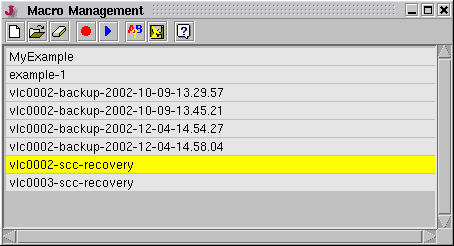
The window shows a list of all macro definitions stored at the server, double clicking a list item opens the macro in the Macro Edit window . Other functions may be called using the tool bar buttons as explained below.
 --- Opens the Macro Edit window with a new, empty macro definition.
 --- Opens the selected macro in the Macro Edit window .
 --- Deletes the selected macro.
 --- Starts recording a new macro definition.
 --- Plays the selected macro.
 --- Compares the selected macro to another one. Please note the macro comparison function ignores all macro directives and does no parameter substitution. This function primary is meant to compare macros which have been recorded with the backup function contained in the SYSTEM device.
 --- Saves the selected macro as the SCC recovery macro to the actual VLC. This icon only is active if the Macro Management window has been called in the context of an SCC enabled NMS application.
Remark
In an NMS, macros normally only can be played while the VLC this Macro Management window refers to is 'online'. An exception from this is a NMS controlling it's VLCs via SCC. Here macros also may be played for 'offline' VLCs, the commands get streamed to the SCC outbound communication channel in this case.
Macros played through the SCC outbound channel may be used to reinitialize a VLC's SCC transmit equipment if any attempts to setup a point to point connection to this VLC fail.