3.15.4.6 RX Devices
The section "rx devices" manages the receive devices or more strictly spoken the receive side connection end points available for the selected location. This usually comprises more than the plain decoder device.
A receive side connection end point consists of the following components:
- The data stored about this end point in the VioIP configuration database.
- A logical end point ( VioIP-End-Point ) device representing the connection end point in the sat-nms M&C software. The logical end point device receives abstract commands to start or stop a connection and translates this abstract command into the particular settings expected by the physical end point device. There is always exactly one logical end point device for a connection end point.
- A physical end point device in the sat-nms M&C software. This device - typically a decoder - receives the IP stream at its input and decodes it to the contained video / audio signals. There are devices containing more than one decoder unit in one physical device frame. Hence it is possible that multiple logical enpoint devices share the same physical device. A so called "module index" is used to identify the decoder unit which shall be used.
- Optionally there may be a file recorder device assigned to the connection end point. This file recorder logs quality parameters of the physical endpoint device like packet counters.
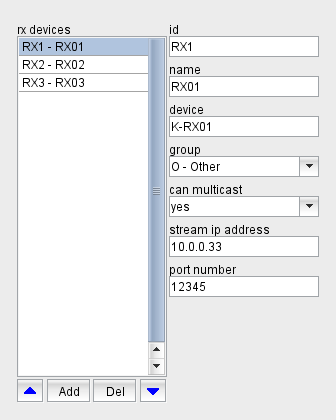
The section "rx devices" shows the list of rx devices available at the selected location. Selecting a device in the list shows the properties of this device right beside the list. You may edit the properties of the selected device to your needs
- id: The device ID internally identifies the device. It cannot be changed once the device has been created.
- name: The name of the device.
- device: The name of the VioIP-End-Point device representing this device or end point in the sat-nms M&C software.
- group: The group this device is assigned to. The device is only visible / accessible for a VioIP Client Application started for the ID of this group .
- can multicast: Set this to "yes" if the physical device representing this end point is capable to receive a multicast stream.
- stream ip address: Enter the IP address of the stream port of the device here. This is used as the destination address of unicast streams sent to this device. The address usually is not actively commanded at the device, however the value entered here must match the address configured in the device.
- port number: This is the destination port number for the unicast stream.
With the blue arrow buttons below the device list the selected device can be moved up and down in the list. When the software searches for the first available deviceThe topmost device which is used for connections the operator starts without specifying a device explicitly, it goes through this list from top to bottom.
The button "Add" lets you add a new device. The program shows a dialog window where you can enter the ID for the new device. An ID entirely consists of upper case letters and digits, the "-" character is allowed as a separator. The ID must be unique, you cannot define two devices with the same ID. The ID also is unalterable, once you defined a new device you cannot change the ID of the device later.
When you entered the ID for new device, the software shows in a next step a dialog which lets you select which aspects of the connection end point actually shall be created ans how these aspects shall be initialized. Chapter Adding New Devices later in this document describes this dialog more elaborately.
The button "Del" lets you delete the selected device. The program shows a query dialog before the device actually gets deleted. The dialog lets you select if the software shall remove the VioIP-End-Point device, the physical device and an optional file recorder device as well from the M&C system configuration.