3.14.2.5 The ODM Detailed Parameter Screens
The ODM detailed parameter screens are part of the M&C device window for the SatService ACU/ODM. This window integrates all status and control parameters which are available for the ODM. To monitor and control the tracking functions of the ACU, the following two screens are important:
Clicking to the meter symbol  in the toolbar shows the tracking state page. It displays a number of state parameters which report what the tracking engine actually does.
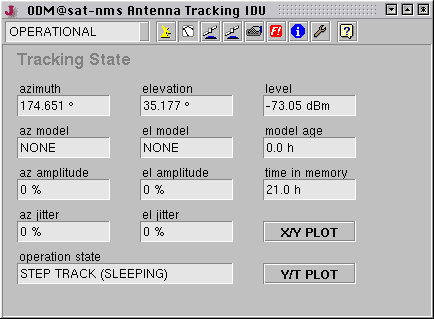
- azimuth --- The actual azimuth pointing.
- elevation --- The actual elevation pointing.
- level --- The actual beacon level (read from the ODM's analog input).
- az model --- The model type the ODM uses for the azimuth axis in ADAPTIVE mode if the beacon is lost. The value is displayed all the time, even if the beacon level is OK.
- el model --- The same for the elevation axis.
- model age --- This displays the time since the adaptive models have been updated the last time. The value normally is zero, if the beacon disappears it counts the time the antenna is tracked using the model.
- az amplitude --- The amplitude of the azimuth motion as a percentage of the antenna's 3 dB beamwidth. The ODM approximates the motion by a simple sine function to determine the amplitude.
- el amplitude --- The amplitude value for the elevation axis.
- time in memory --- The time span covered by the tracking data the ACU has in it's memory.
- az jitter --- The variance of all steptrack positions in memory with respect to the modeled values (azimuth). This is a measure how good the model fits. The jitter value is in percent if the antenna's 3 dB beamwidth. The 'jitter threshold' setting refers to the 'az/el jitter values.
- el jitter --- The same for the elevation axis.
- X/Y PLOT --- Clicking to this button opens a separate window showing the same X/Y diagram as displayed in the main window.
- operation state --- Shows what the tracking engine actually is doing.
- Y/T PLOT --- Clicking to this button opens separate window showing the same X/T diagram as can be accessed from the main window.
Clicking to the device control symbol  in the toolbar shows the tracking parameter page. Beside the tracking parameters shown in the application main window this page displays all adjustable parameters of the tracking subsystem.
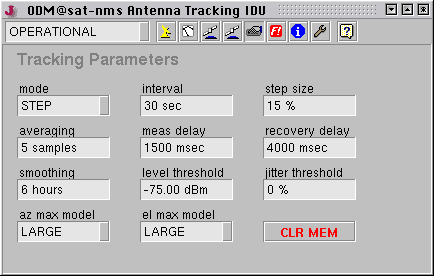
- mode --- The tracking mode parameter selects the tracking method, the ACU actually uses. Possible selection are:
- OFF --- No tracking is performed.
- STEP --- Step track mode. In regular intervals, the antenna performs small search steps to optimize the pointing.
- ADAPTIVE --- The adaptive tracking mode works the same way as step track, but it additionally is capable to predict the satellite's position when the beacon reception fails. It computes mathematical models of the satellites motion from the step track results recorded over a certain time.
- PROGRAM --- The program tracking mode is offered here only for compatibility purposes only. In conjunction with the IDU the pointing robot should be used rather than the program track mode of the ODM.
A full description of the tracking functions used in the sat-nms ACU is given in chapter '5.0 Theory Of Operation' of the ACU/ODM manual.
- interval --- The interval time specifies how often the ACU shall perform a step track cycle. The value is to be entered in seconds. In fact, the parameter does not specify a cycle time but the sleep time between two tracking cycles. This means, the true cycle time is the time the ACU needs to perform one step track cycle plus the time entered here. 300 seconds (5 minutes) is a good starting value for this parameter. Inclined orbit satellites probably will require a shorter cycle time, very stable satellites can be perfectly tracked with one step track cycle every 15 minutes (900 seconds).
- stepsize --- The tracking step size is a very important parameter for the performance of the tracking. It defines the size of every de-pointing step, the ACU makes in order to find out where the optimal antenna pointing is. Setting too high values will cause significant signal degradations during the step track cycle because the antenna moves a too large amount away from the satellite. Setting the value too small will let the beacon level jitter mask the level differences caused by the test steps, the antenna will not track the satellite properly.The step size is specified as a percentage of the antenna's half 3dB beamwidth. The ACU calculates the beamwidth from the antenna diameter and the beacon frequency. Expressing the step size in this relative way keeps the value in the same range, regardless of th type of antenna. The recommended value for this parameter is 15-20%. You may want to start with 20% and try to reduce down to 15% if the signal degradation during tracking becomes too high.The tracking step size is a common parameter for both axes. If both axes behave differently, you can tweak the antenna diameter settings in the setup. Specifying a larger diameter makes the ACU using a smaller step size for this axis.If the tracking step seem to be completely out of range, you should check if the beacon frequency is set properly. The frequency must be the true receive frequency at the antenna, entered in MHz, not an L-band frequency or other IF.
- averaging --- When measuring the beacon level, the ACU takes a number of samples and averages them. The standard value of 5 samples normally should not be changed. Larger values will slow down the ACU execution cycle.
- measdelay --- During a steptrack cycle, the ACU positions the antenna to a certain offset and then measures the level. Between the moment when the antenna reached commanded position and the beacon level measurement the ACU waits some time to let the beacon level settle. The optimal delay value depends on the beacon receiver's averaging / post detector filter setting and is a quite critical for the steptrack performance.If the delay is too short, the beacon voltage does not reach its final value, the steptrack does not properly recognize if the signal gor better or worse after a test step. If the delay is too long, the impact of fluctuation to the measures level grows and may cover the small level difference caused by the test step. With the sat-nms LBRX beacon receiver, best results are achieved if the receiver is set to 0.5 Hz post detector filter bandwidth and a measurement delay of 1500 msecs
- recoverydelay --- After the the ACU has done the tracking steps for the elevation axis, it waits some time before it starts tracking the azimuth axis. This is to let the beacon level settle after the final position has been found. A typical value for this parameter is 4000 msecs
- smoothing --- This parameter controls the smoothing function. Setting it to zero disables smoothing. Smoothing lets the ACU point the antenna to positions evaluated from a simple model calculated from the step track peaks of the recent few hours. To understand the functionality of the smoothing function you may want to read chapter '5.3.3 Smoothing' in the ACU/ODM manual.
- levelthreshold --- If the beacon level falls below this threshold value, the ACU does not perform a step track cycle. If the level falls below the threshold during the steptrack cycle, the cycle gets aborted.If the ADAPTIVE tracking ist enabled and there is enough data in the tracking memory, the ACU computes a mathematical model from the stored data and predicts the antenna pointing position from the extrapolation of the model. If the tracking mode is set to 'STEP', the ACU leaves the antenna where it is if the beacon level drops below the limit.Adjusting the threshold level that adaptive tracking is switched as expected must be done carefully and may require some iterations, specially if the beacon is received with a low C/N. A good starting value for the threshold is 10 dB below the nominal receive level or or 2 dB above the noise floor the beacon receiver sees with a de-pointed antenna, whatever value is higher.To turn off the monitoring of the beacon level (this in fact inhibits the adaptive tracking), simply set the threshold the a very low value (e.g. -99 dBm)
- jitterthreshold --- If the jitter value of at least one axis exceeds this threshold, the ACU raises an 'model fault'. If this happens three consecutive times, the ACU resets the models of both axes. Adaptive tracking will be possible not until 6 hours after this happens.A typical threshold value is 20%, this will detect very early that a model does not fit to describe the satellite's motion. If this value causes false alarms too often, you may want to raise the threshold to 50%. Setting it to 0 switches the threshold monitoring completely off.
- azmaxmodel elmaxmodel --- These settings let you limit the adaptive model to a simpler one, the ACU would choose by itself. The maximum model type can be set individually for each axis. Normally you will set both axes to 'LARGE', which leaves the model selection fully to the the ACU's internal selection algorithms.In cases where the ACU seems to be too 'optimistic' about the quality of the step track results, the maximum model on one or both axes may be limited to a more simple and more noise-resistant model. Specially inclined orbit satellites which are located close to the longitude of the antenna's geodetic location may require this limitation for the azimuth axis. With such a satellite, the elevation may move several degrees while the azimuth shows almost no motion.
- CLRMEM --- Clicking to this button clears the tracking memory. You should do this when you start to track a new satellite. Clearing the tracking memory about half an hour after tracking started significantly improves the quality of the first adaptive tracking model which will be evaluated after 6 hours of tracking. This is because the model does not get disturbed by the first search steps the antenna does until the optimal pointing to the satellite is found.