2.12.2.4 Logs table
The logs helps to trace the activities of device(s) and driver. Logs are also added automatically if M&C has recognized the driver. However, the user can also add the log entry manually. For example, when adding a device that M&C has not recognized automatically.
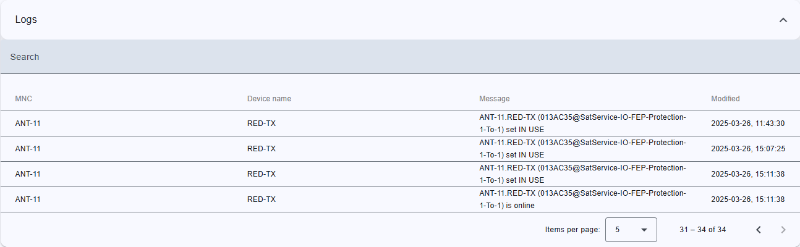
Top
- Left-side title of table.
- Icon button to expand or collapse table
Search bar
- Located at the top of the table.
- Allows users to filter by:
- Keywords: full-text search over all list and all columns
Header row
- You can sort rows in ascending or descending order by clicking on the column header.
- Sorting is applied to the entire dataset, not just the current page.
- The active sort order (ascending or descending) is typically indicated by an arrow or icon near the column name.
Table columns
The Logs table contains the following columns:
| MNC |
Name of M&C. |
| Device name |
Device name. |
| Message |
Purpose of this log. |
| Modified |
Date of added log. |
Bottom toolbar
- Pagination controls: Allows users to set the number of items displayed per page and navigate between pages.