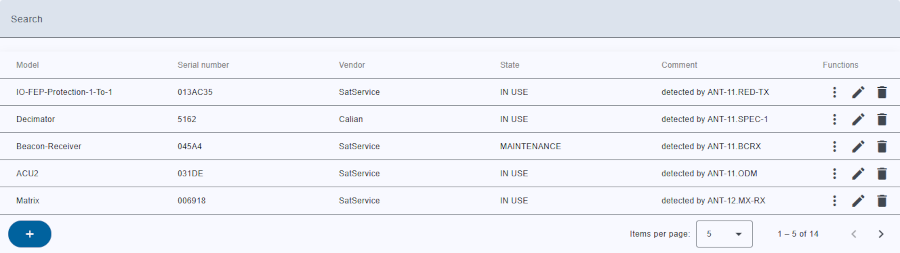
The inventory table provides a structured view of the drivers automatically found by M&C or added by the user, so that the user can easily track their state.
To enable the Inventory configure a following in the file vlc.properties with:
When the inventory is activated, the M&C automatically recognizes the drivers for whom the serial number has been recognized by M&C and automatically adds them to the database. Non-Recognized driver should be added by the user.
Inventory items are stored by there vendor and model name. For this reason, the item should only exist once.
The Inventory list also contains devices and logs.
Search bar
Header row
Table columns
The inventory table contains the following columns:
| Column name | Description |
|---|---|
| Model | name of model |
| Serial number | Serial number of driver |
| Vendor | name of vendor |
| State | State of driver |
| Comment | Free text describing the situation |
The last column located at the far right of the tables provides buttons to run actions on the corresponding inventory item.
The following functions for inventory are available:
| Function | Icon | Description |
|---|---|---|
| Drop down |  |
Go directs to documents page with selected action. |
| Edit |  |
modify/edit inventory item |
| Delete |  |
to delete the inventory item. A confirmation dialog will appear to confirms the action. |
Clicking on a inventory item row shows other relatives tables:
Bottom toolbar