2.3.3 Device details panel
The device details panel shows you the device information for a device. It is displayed on the right-hand side of the window on clicking e.g. on display element device icon. You can also perform some quick actions here, e.g. put the device into operational or out of service mode.
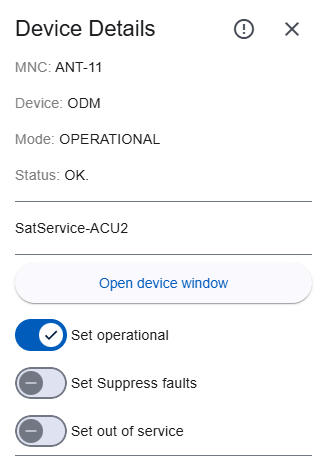
This panel will open if:
In the title of this panel the following icons are available:
 |
Click opens directly the fault page of the device. If there is any fault or warning the icon color will be red (alarm or fault) or yellow (warning) otherwise it will be gray. |
 |
Close the device panel. You can also click outside the panel to close the panel. |
Details
- MNC: name of MNC where the device belongs to
- Device: name of the device
- Mode: current operations mode of the device
- Status: Current summary status of the device (
MNC.DEVICE.fault)
- NO.: No fault
- Summary FAULT: text displayed in red color.
- WARNING: text displayed in yellow color.
- Driver name: name of the device driver
- Comment: shows the device comment if set in the device config page and available for this kind of driver (
MNC.DEVICE.config.deviceComment)
- On Air state shows
ON AIR if the a devices provides this information (MNC.DEVICE.info.signal.on)
- Open device window: open device window for the device
- Change mode switches: change the operation mode, select between
- OPERATIONAL: enable communcation between MNC and equipment
- FAULT-SUPPRESSED: suppresses summary fault or warning, but stays operational
- OUT-OF-SERVICE: disables the communication between MNC and equipment
- MAINTENANCE: disables the communication between MNC and equipment and marks the device to be in maintenance. This triggers the inventory system if enabled.
- Toggle switch: If the selected device is a switch element, a toggle button is displayed. You can toggle the position of the switch
A -> B or B -> A