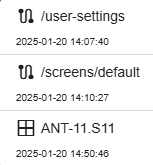
Clicking on the history button opens the list with your navigation history. If you click on a list entry you jump directly back to the listed page. This could be page from the main menu, a user screen or a device window.
Each list entry show the type (by icon), the name of the page (URL) or the name of the device. The timestamp in UTC corresponds to the time when the item was visited.
| icon | description |
|---|---|
 |
jump to a page or user screen (URL) |
 |
opens specified device window |
Remark: After reloading the page, the history is deleted.