
It gives you a clear view to the state of all connected servers and devices. Starting from left: The background color shows the summary fault state of the complete installation. The color is priorized in the following order (from low to high):
The number inside the notification represents the following information:
If there is a new fault arriving, the corresponding symbol will be start blinking. Clicking on it will stop blinking and/or stop alarm tone.
On click it shows a dropdown list with MNC names with details about MNCs and active faults
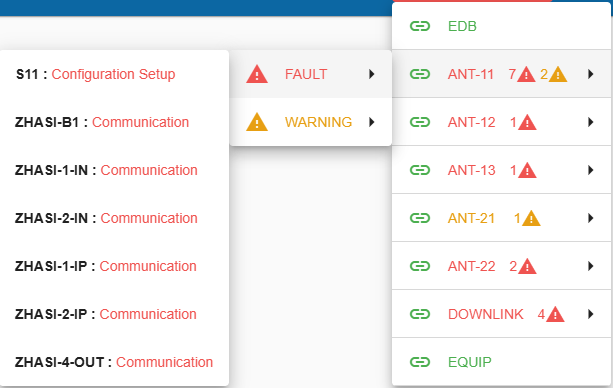
The first level of this drop down menu show the list of configured MNC services. Clicking on such an entry will open the default user screen associated with this MNC (if configured)
When a MNC has alarms, faults or warnings, a secondary dropdown appears with the following options:
Selecting the error type opens the 3rd level with a list of affected devices. Clicking on an entry will open the matching device in the device details panel.
After selecting the type ALARMS, FAULT or WARNING a list of affected devices is shown along with a brief error description