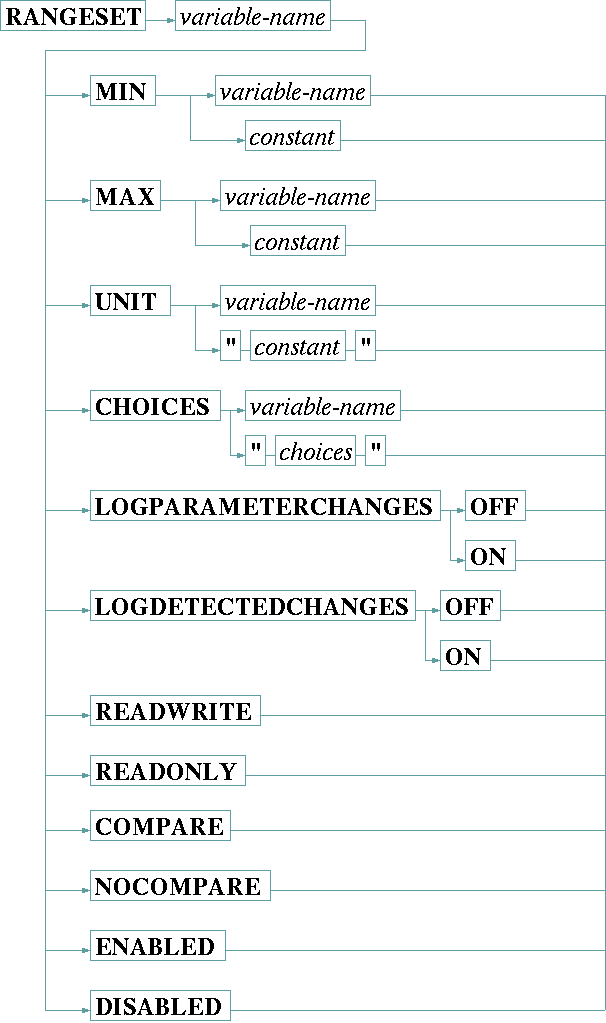
The RANGESET statement changes several aspects of the range definition of a variable. It is intended to be used in drivers which read some capabilities (e.g. a frequency range) from the device itself.
The options which may follow the RANGESET statement are described in the table below:
| MIN | Changes the minimum value for a numeric (INTEGER, HEX, FLOAT) variable. The new minimum value may be a constant numeric value or the contents of another variable. MIN applies to numeric variables only. |
| MAX | Changes the maximum value for a numeric (INTEGER, HEX, FLOAT) variable. The new maximum value may be a constant numeric value or the contents of another variable. MAX applies to numeric variables only. |
| UNIT | Changes the maximum value for a numeric (INTEGER, HEX, FLOAT) or a ALARM flag variable. The new unit string may e a constant value enclosed in double quotes or the contents of another variable. RANGESET / UNIT applied to ALARM flags changes the alarm description text. To make the unit string for a numeric variable look like the unit specified in the VAR statement, start the string with a space character (e.g. dBm). The VAR statement implicitly prepends this space character. |
| CHOICES | Changes the set of choices for a CHOICE variable. May be followed either by a variable name or by a quoted string defining the new list of choices. The list of choices is a comma separated list of strings, either defined as a constant enclosed in double quotes or read from the contents of the variable referenced after the CHOICES keyword. CHOICES applies to CHOICE variables only. |
| READWRITE | Makes the parameter writable from the user interface, overrides a former READONLY definition. READWRITE applies to all types of variables. |
| READONLY | Makes the parameter read only. READONLY applies to all types of variables. |
| LOGPARAMETERCHANGESON/OFF | Defines if this variables shall log changes which are commanded to it. Parameter changes are logged if this is set ON and the logParameterChanges switch in the device setup page is activated as well. LOGPARAMETERCHANGES is ON by default for all variables, hence you only need to state LOGPARAMETERCHANGES OFF for variables you want explicitly to be excluded from logging. |
| LOGDETECTEDCHANGESON/OFF | Defines if this variables shall log changes which are detected when reading back the values. Detected changes are logged if this is set ON and the logDetectedChanges switch in the device setup page is activated as well. LOGDETECTEDCHANGES is ON by default for all variables, hence you only need to state LOGDETECTEDCHANGES OFF for variables you want explicitly to be excluded from logging. Please note, the this modifier has no effect on read-only variables, they are not logged regardless of the logDetected setting. |
| COMPARE | Enables the read after write comparison check for this variable. This check generates a log message, if the value of the variable read back from the device differs from the commanded value. By default the read after write comparison check is enabled for all variables unless they are defined with the NOCOMPARE option in the VAR statement. |
| NOCOMPARE | Disables the read after write comparison check for this variable. |
| ENABLED | Enables a formerly disabled variable. ENABLED applies to all types of variables. |
| DISABLED | Disables a variable. Disabled variables show no value at the user interface, any user input is blocked. Disabled variables never cause a procedure which watches this variable to run. DISABLED applies to all types of variables. |
Updating the range of a variable marks the variable to be read from the device as soon as possible.
The sat-nms user interface recognizes range definitions every time a window is opened. An already opened window does not change the range definitions of it's input elements. A driver should change variable ranges only due to information which is read once on power up or after a device has been switched on.
Example
    PRINT "RMAF" INPUT "=" internal.rx.fmax
    PRINT "RMF"  INPUT "=" internal.rx.fmin

    RANGESET rx.frequency MAX internal.rx.fmax
    RANGESET rx.frequency MIN internal.rx.fmin
The example above - taken from the SSE K-Star device driver - reads the valid frequency range for the device into the internal driver variables internal.rx.fmax and internal.rx.fmin. RANGESET statements then update the range definition for the rx.frequency. This is done in a procedure which is called once after the driver gains communication to the device.