The switch element is a special version of the device element which may be used to visualize the position of a switch in a user interface screen designed as a block diagram. The switch icon has all capabilities of a plain device icon display element. The device details panel opens an you can toggle the position of switch.
Icon Selection
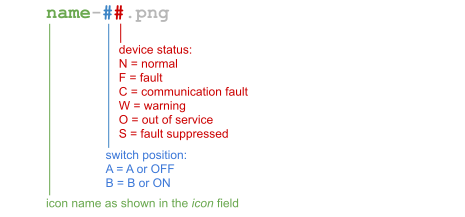
The switch element displays one icon of a given set depending on the switch position and the state of the switch device. For this the SwitchElement appends a '-' character, a 2-character status code and the suffix '.png' to the icon name given in icon in order to ge the file name to load / display: