5.3 Target Memory
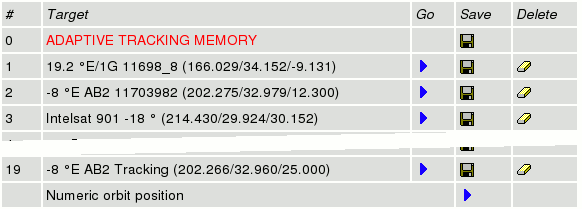
The page 'Targets' gives access to the ACU's target memory. The ACU
is capable to remember the pointing (and tracking parameters, if the ACU
has the tracking module installed) of up to 99 satellites. Managing
these memories is done with the 'Targets' page.
The page displays a table with all pointings actually stored. By
clicking the icons in the table, settings may be stored, recalled or
deleted:
- Go --- If a memory location has stored a pointing, the table shows a
blue arrow in the 'Go' column of the table. Clicking to this arrow
recalls the settings stored for that target and moves the antenna to the
stored pointing. The ACU displays a confirmation dialog before it
actually recalls the target memory. Only if you click to 'Submit' in
this dialog, the antenna moves to the stored location.
- Save --- For each memory location the table shows a floppy disk icon
in the 'Save' column. Clicking to this icon saves the actual pointing
(and tracking parameters if applicable) to the selected memory location.
Again, there is a confirmation dialog page before the data actually is
saved.
- Delete --- Analogous to the 'Save' icon, the table shows an eraser
icon in the 'Delete' column. The icons only are shown for the memory
locations which are in use. Clicking to the eraser icon clears the
selected memory location after a confirmation inquiry.
- Numeric orbit position --- The table contains an additional row at
the bottom labeled 'Numeric orbit position'. Clicking to the blue arrow
icon in this row opens a dialog where you are requested to enter the
orbit position of a satellite you want the antenna to point to. After
you pressed 'Submit' in this dialog, the ACU computes the antenna
pointing for the orbit position you entered and
immediately moves the antenna to the calculated
position. To make this function work satisfactory, it is necessary to
have the geodetic location of the antenna entered at the Setup page with a sufficient accuracy.
The first target location, labeled 'adaptive tracking memory', is
reserved for special purposes: If you store to this target location,
this saves the tracking parameters and the tracking memory as well. When
this memory location is recalled later on, the parameters and the memory
contents are restored. This may be useful to track another satellite for
a couple of hours and then to return to the first satellite. If the
tracking memory has been saved before the antenna has been moved to the
second satellite, it may be restored after the antenna returned to the
old position.
You should not use the first target location for general purposes in
order to keep it available for the short time storage described
above.
Targets Page Example: