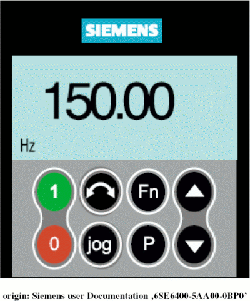
The frequency inverters used in the sat-nms ACU-ODM are equipped with a basic operation panel (BOP) that shows you all of the parameters set to the frequency inverter. It also is able to show you the actual values of frequency, voltage and output voltage. The following picture shows how the BOP looks like:
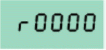
After start-up of the inverter the display of the BOP shows you the following values:
If you like to get some other parameters, press and hold the button Fn longer than 2s. By pressing the button Fn once you can change between the following parameters:
To return to the start-up display mode, press and hold the button Fn for longer than 2s. The following Table shows the function of the frequency-inverters buttons.
 ---
indicates statusThe LCD displays the settings and values currently used
by the converter.
---
indicates statusThe LCD displays the settings and values currently used
by the converter. --- start
converterpressing the button starts the converter. This button is
disabled by default . To enable this button set P0700 =
1.
--- start
converterpressing the button starts the converter. This button is
disabled by default . To enable this button set P0700 =
1. --- stop
converterOFF1 Pressing the button causes the motor to
come to a standstill at the selected ramp down rate. Disabled by
default , to enable set P0700 =1. OFF2
Pressing the button twice (or once long) causes the motor to coast to a
standstill. This function is always enabled.
--- stop
converterOFF1 Pressing the button causes the motor to
come to a standstill at the selected ramp down rate. Disabled by
default , to enable set P0700 =1. OFF2
Pressing the button twice (or once long) causes the motor to coast to a
standstill. This function is always enabled. --- change
directionpress this button to change the direction of rotation of the
motor. Reverse is indicated by a minus (-) sign or a flashing decimal
point. Disabled by default , to enable set P0700 =
1.
--- change
directionpress this button to change the direction of rotation of the
motor. Reverse is indicated by a minus (-) sign or a flashing decimal
point. Disabled by default , to enable set P0700 =
1. --- jog
motorPressing this button while the inverter has no output causes the
motor to start and run at the preset jog frequency. The motor stops when
the button is released. Pressing this button when the motor is running
has no effect.
--- jog
motorPressing this button while the inverter has no output causes the
motor to start and run at the preset jog frequency. The motor stops when
the button is released. Pressing this button when the motor is running
has no effect. --- functionsthis
button can be used to view additional information. It works by pressing
and holding the button. It shows the following, starting from any
parameter during operation:
--- functionsthis
button can be used to view additional information. It works by pressing
and holding the button. It shows the following, starting from any
parameter during operation:
Additional presses will toggle around the above displays.Jump Function From any parameter (rXXXX or PXXXX) a short press of the Fn button will immediately jump to r0000, you can then change another parameter, if required. Upon returning to r0000, pressing the Fn button will return you to your starting point.
 --- access
parameterspressing this button allows access to the parameters
--- access
parameterspressing this button allows access to the parameters --- increase
valuepressing this button increases the displayed value. To change the
Frequency Setpoint via the BOP set P1000 = 1.
--- increase
valuepressing this button increases the displayed value. To change the
Frequency Setpoint via the BOP set P1000 = 1. --- decrease
valuepressing this button decreases the displayed value. To change the
Frequency Setpoint via the BOP set P1000 = 1.
--- decrease
valuepressing this button decreases the displayed value. To change the
Frequency Setpoint via the BOP set P1000 = 1.Table 1 origin: Siemens user Documentation 6SE6400-5AA00-0BP0