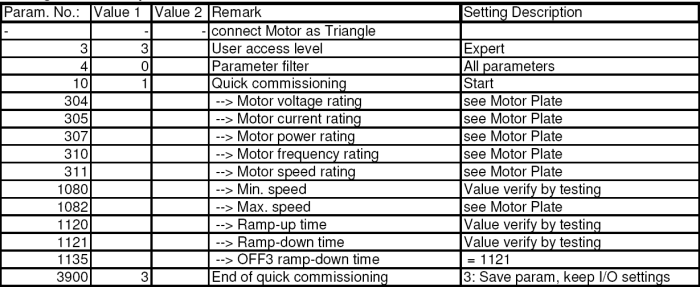
 Table 2
On Table 4 and Table 5 you can see the test-settings that are programmed in the delivery state.
To change the parameters press button P once, now you can change the parameter-number with the arrow-buttons up and down. To change the chosen parameter press button P once again. Now you can change the parameter with the arrow-buttons to the desired value. To save the new parameter value, press button P once. To go back to the parameter choice, without saving, press button Fn
The Parameters that you can find in row Value 1 have to be set as written in the following tables.
When you are finished with setting the parameters, you have to set parameter 971 to value 1 (transfer Data from RAM to EEPROM) and press button P . Otherwise the settings are deleted with the next power-down of the frequency inverter.
When you have changed the parameters in {i quick commissioning mode} (Parameter No. 10 = 1), the changed parameters have to be saved with setting Parameter No. 3900 = 3. ATTENTION! If you save the quick commissioning changes with Parameter No. 3900 = 1, all of the interface parameters are set to factory defaults, and have to bet set to the desired values for the sat-nms ACU-RMU to ensure proper function.
ATTENTION! Change the frequency inverters motor-parameters only when the corresponding motor is connected. This is because while changing the motor parameters the frequency inverter makes some measures to define the power that is needed to make the motor run. In normal cases it suffices to change the following Parameters of the frequency-inverters:
Setting of the motor parameters Table 2
Setting of the interface parameters 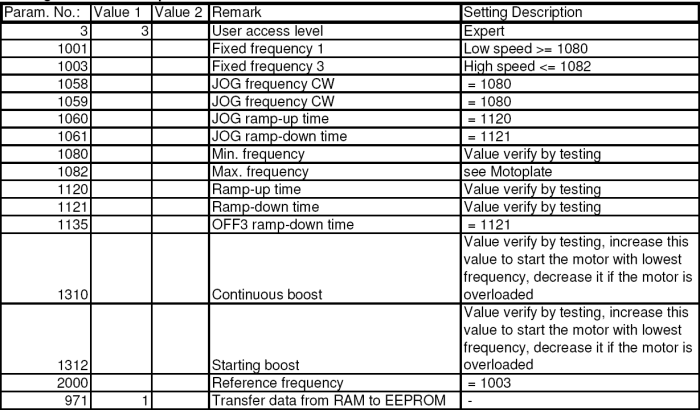 Table 3