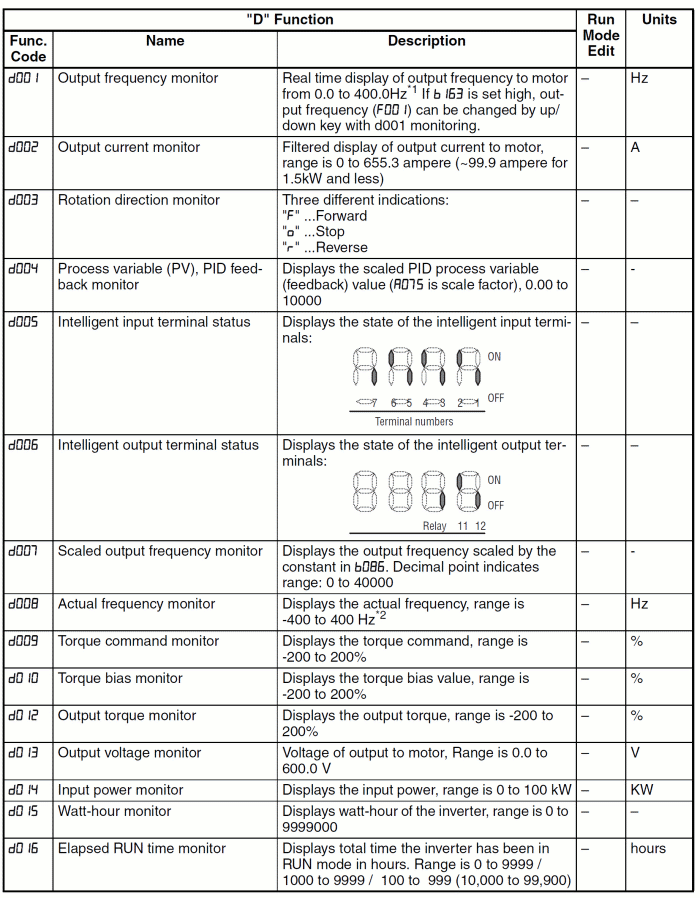
 Table 1 origin: OMRON user
Documentation I570-E2-01-X+MX2+UsersManual
Table 1 origin: OMRON user
Documentation I570-E2-01-X+MX2+UsersManualAfter startup the display of the frequency inverter shows a value depending on setting of parameter B038 (value 001...104 corresponds to display values d001...d104 shown on next table) If you like to view some other parameters, press Set Key (14). By pressing the Up and Down Key (13) and (14) select desired parameter. By pressing Set Key (14) this selected parameter is displayed. The following table gives you the possible values to display:
Table 1 origin: OMRON user
Documentation I570-E2-01-X+MX2+UsersManual
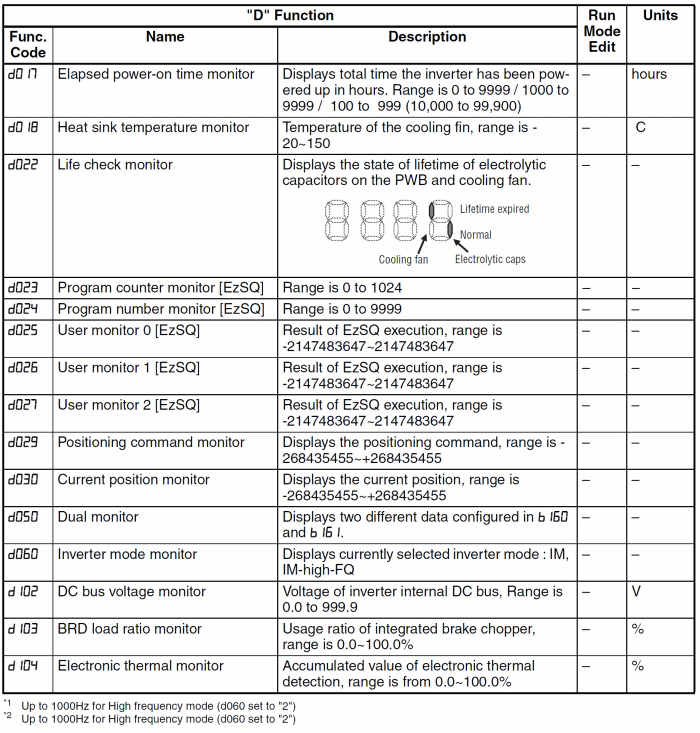 Table 2 origin: OMRON user
Documentation I570-E2-01-X+MX2+UsersManual
Table 2 origin: OMRON user
Documentation I570-E2-01-X+MX2+UsersManual