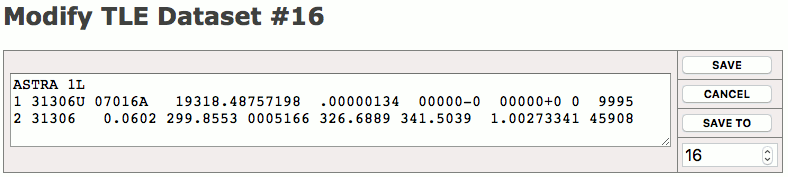
If you click to a TLE dataset number at the Orbital Data Editor page, the ACU opens the TLE Dataset Editor page for this particular dataset. The editor shows the TLE data in a multiline text field where it can be edited or modified with copy&paste. A number of buttons are provided to tell the ACU what to do with the edited dataset.
The buttons at the right side of the TLE dataset editor page let you either save the edited values, save the edited values to another memory location or you may leave the editor without saving the changes.
All three buttons work immediately when clicked, there is no ‘do you really want’ query before the clicked action is executed. To delete a dataset, clear the text input field and save the dataset, its content will be cleared.
TLE Dataset Editor Page Example:
You may use copy&paste to get the TLE data from the external source into this form field, this is a convenient way to edit or update single TLE datasets at the ACU. Beside this, the ACU permits to upload a text file with all 99 datasets with FTP. This way you may update / replace all TLE data at once. The procedure for this is described below step by step:
Step 1: prepare a text file named TLE.TXT containing all 99 TLE datasets
In this file, each dataset occupies exactly 3 lines of text: one line with the satellite name followed by two lines of TLE data. The TLE data format is commonly used, a detailled specification of the format may be found at Wikipedia.
TDRS 3
1 19548U 88091B   21039.70744037 -.00000308  00000-0  00000-0 0  9992
2 19548  14.0431 355.3612 0039480 323.7372  25.7572  1.00275903105784


SKYNET 4C
1 20776U 90079A   21039.50845519  .00000115  00000-0  00000-0 0  9996
2 20776  13.9269   3.9374 0002599 315.1892  36.0996  1.00268879111281
TDRS 5
1 21639U 91054B   21039.72583038  .00000073  00000-0  00000-0 0  9991
2 21639  14.2519   8.6689 0026423 358.2787 225.7580  1.00268316108116
TDRS 6
1 22314U 93003B   21039.89348271 -.00000306  00000-0  00000-0 0  9994
2 22314  14.0797  11.8449 0005571  62.6291 340.3063  1.00279982102812


ASTRA 1D
1 23331U 94070A   21039.48377461 -.00000282  00000-0  00000-0 0  9990
2 23331   9.4282  40.8176 0003567 279.7873 279.3655  1.00273492 96683
...
The example above shows the the beginning of a TLE.TXT file defining the ‘TDRS 3’ satellite in dataset 1, ‘SKYNET 4C’ in dataset 3, ‘TDRS 5’ in dataset 4 and so on. Datasets 2, 6 and 7 are empty in this example, unused datasets have to be expressed as three empty lines. Please note, that this scheme must be strictly followed as the software interprets the file content based on the line numbers.
Step 2: upload the TLE.TXT file to the ACU using FTP
You may use the FTP client of your preference for this, simply connect to the ACU’s IP address and log in with user name ‘service’, password ‘service’. Then upload the TLE.TXT file to the default directory on the ACU. You may be asked to confirm if the existing TLE.TXT file shall be overwritten.
Step 3: reload the TLE.TXT file in the ACU software
For this last step open the Orbital Data Editor page from the navigation bar and ensure that the page shows the TLE ephemerides list (The heading ‘Two Line Elements’ is shown at the top left).
Now click to the ‘re-read the TLE.TXT file’ link at the bottom of the page.
The TLE data is now imported from the TLE.TXT file, replacing all TLE ephemerides previously stored on the ACU.