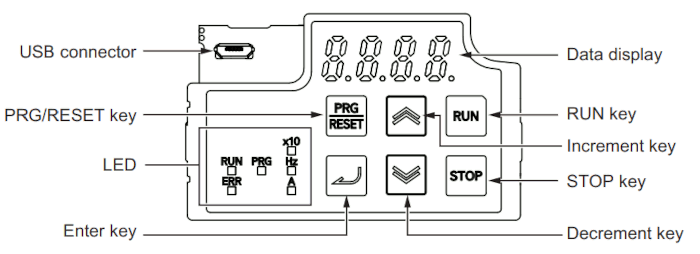
The frequency inverters used in the sat-nms ACU2-ODU have an integrated display that shows you all of the parameters set to the frequency inverter. It also is able to show you the actual values of e.g. output frequency, voltage and output voltage. The following picture shows how the frontpanel looks like:
The following table shows the function of the frequency inverter’s buttons:
| display | item | content |
|---|---|---|
| ERR | Error LED | Lights (red) when the inverter trips. |
| PRG | Program LED | Lights (green) when editable data (set value) is displayed on the data display. |
| RUN | RUN LED | Lights (green) when the inverter is running (during output to the motor). Lights during deceleration after RUN command OFF. |
| Hz | Monitor LED [Hz] | Lights (green) when a frequency value is displayed on the data display |
| A | Monitor LED [A] | Lights (green) when a current value is displayed on the data display |
| x10 | x10 LED [A] | This x10 LED lights (green) when the displayed data exceeds 9999. ‘Currently displayed data x 10’ is the actual data. |
| Display | Data Display | Displays (in red) various data such as a parameter value, frequency value, or set value. |
| RUN | RUN command LED indicator | Lights (green) when the Run command is set to Digital Operator, and flashes (green) when the RUN key is enabled by the forced operator function. (This indicates that the RUN key is enabled on the Digital Operator.) |
| RUN | Run key | Starts inverter operation. Note that this key is enabled when the RUN command is set to Digital Operator. (disabled by default) |
| STOP | STOP key | Stops the inverter (deceleration stop). (disabled by default) |
| PRG/RESET | PRG/RESET key | In Operation mode: Pressing this key switches the mode to the Program mode. In Program mode: Pressing this key switches the mode to the Operation mode. In Alarm mode: Pressing this key after removing the cause of the alarm cancels the alarm and switches the mode to the Operation mode. |
| ENTER | ENTER key | In Operation mode: Switches the monitor items (output frequency, output current, output voltage, etc.) for the operation status. In Program mode: Confirms the parameter display and data. In Alarm mode: Switches to the display of the alarm details information |
| arrow UP | Increment key | Increases the parameter number or the set data value. |
| arrow DOWN | Decrement key | Decreases the parameter number or the set data value. |
| USB | USB connector | The connector (mini-B type) for connecting a computer. Used to connect to the automation software Sysmac Studio. |
origin: OMRON user Documentation 3G3M1-STD User manual I669-E1-02.pdf