 origin: OMRON user
Documentation 3G3M1-STD User manual I669-E1-02.pdf
origin: OMRON user
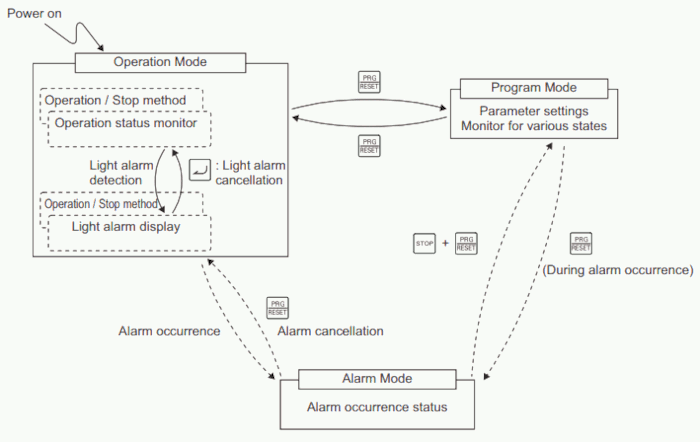
Documentation 3G3M1-STD User manual I669-E1-02.pdfThere are three possible operation modes:
| Mode | description |
|---|---|
| Operation mode | This mode is automatically entered after the power is turned ON. In this mode, the set frequency/PID process commands and other information can be set, and RUN/STOP command operations are possible by the RUN/STOP keys. Operation status can be monitored in real time. When a light alarm occurs, the display switches to the light alarm display (L-AL). |
| Program mode | In this mode, parameter data can be set, and inverter status, various maintenance related information and other information can be checked. |
| Alarm mode | In this mode, alarm codes can be displayed when an alarm occurs, and various alarm related information can be checked. For details on the alarm codes, refer to chapter 3.1.1.5 Alarm Mode |
If the Operator is not operated for five minutes, the display automatically changes to the initial screen.
Transition through these modes by the following key operations.
origin: OMRON user
Documentation 3G3M1-STD User manual I669-E1-02.pdf