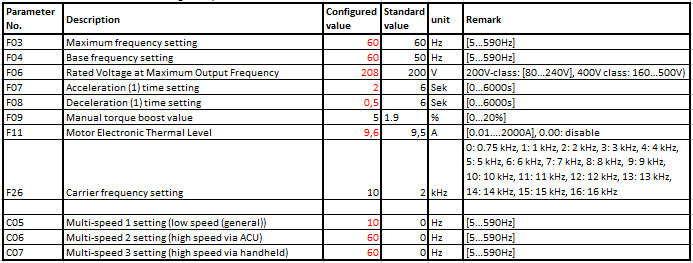
On following table you can see the test-settings that are programmed in the delivery state. The red ones usually are set to project specific motor values. To change the parameters press “PRG/RESET� key. Then press “arrow UP� or “arrow DOWN� key as long as you have reached the desired parameter group (F…Y). Then press “ENTER� key to select the desired parameter group. Now press “arrow UP� or “arrow DOWN� key as long as you have reached the desired parameter number. Press “ENTER� key and change value with “arrow UP� or “arrow DOWN� key. Comfirm and save setting by “ENTER� key to return to parameter selection without saving, press “PRG/RESET� key.
In normal cases it suffices to change the following Parameters of the frequency-inverters: in row ‘Configured value’ the ACU2-ODU standard setting is given, ‘Standard value’ represents the OMRON delivery state value. Please refer to the OMRON manual for more detailed parameter informations
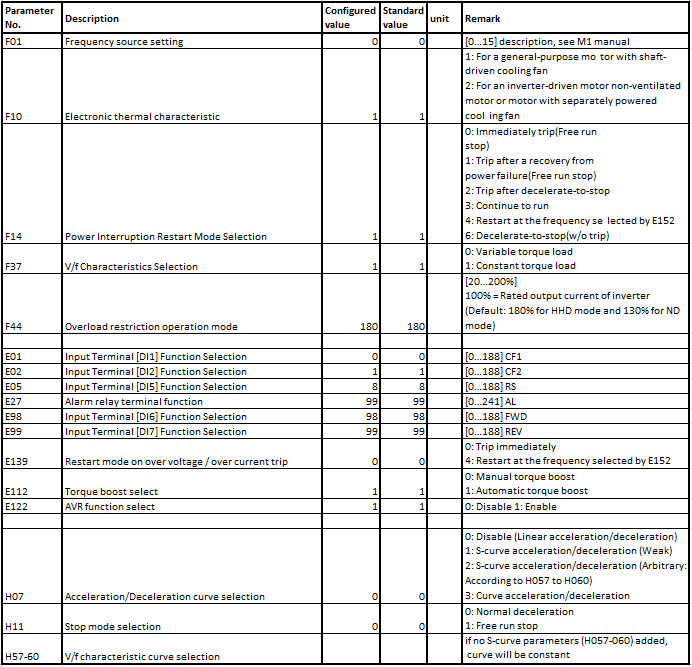
Here all parameters that are non-standard setting by Omron or might
be helpful for setting up: 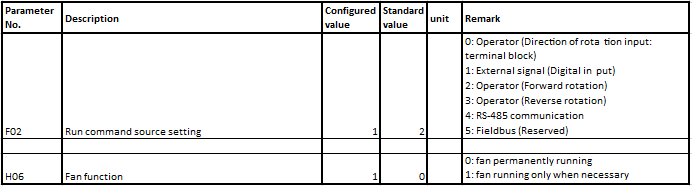
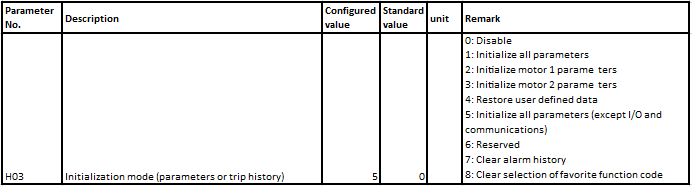
If you like to reset the inverter to factory settings, here is the
parameter that you need: