2.3.1 general overview
The following diagram shows the layout of the IO-FEP2's connectors.
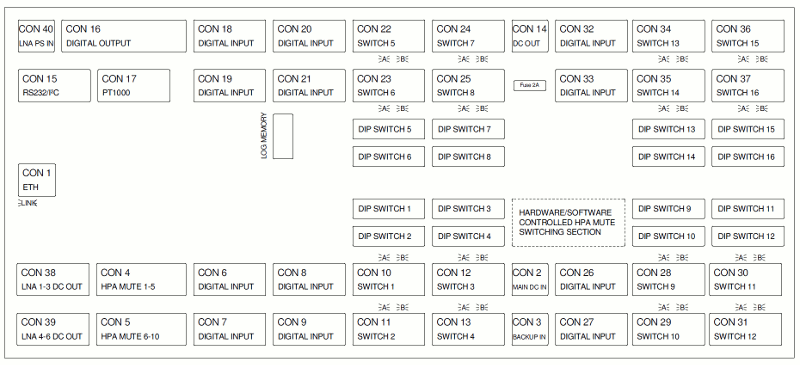
- CON1 is the Ethernet 100Base-T / RJ45 connector. Use a standard double shielded twisted pair network cable to connect the IO-FEP2 to an Ethernet hub. We recommend to use CAT7 S/FTP cable, e.g. DRAKA UC900 SS27 Cat.7 PUR. If your computer is not providing autosensing on the LAN port and you want to connect your computer and the IO-FEP2 directly without using a hub, you need a crossover cable for this with swapped RX/TX lines.
- CON2 is to supply the sat-nms IO-FEP2 with power. You need two power supplies, one for 24V INT‚ and another for 24V EXT circuit.
- CON3 is to realize a redundant power supply system. When you connect two other backup power supplies on this connector the sat-nms IO-FEP2 switches automatically to the other supply in case of power outage at CON2.
- CON4 and CON5 are digital outputs via photomos-relays. The standard configuration is, that the outputs are connected to the inhibit matrix to mute the connected HPAs in the moment of switching a waveguide switch. You can use them also as normal digital outputs. Therefore you have to change the position of internal switches. On above shown layout, this section is mentioned 'HARDWARE/SOFTWARE CONTROLLED HPA MUTE SWITCHING SECTION'. How to do this is described in chapter 2.4.3 Photomos-relay digital outputs . In contrast to the former sat-nms IO-FEP(-E), the photomos-relay outputs at this new sat-nms IO-FEP2 are closed when IO-FEP2's power is off. So if the unit fails, your transmission will not be interrupted by this issue!
- CON6, CON7, CON8 and CON9 are the connectors for digital inputs 1...16. They are only able to detect potential-free contacts. Never put Voltage to these pins, the sat-nms IO-FEP2 might be damaged in this case.
- CON10, CON11, CON12 an CON13 connect waveguide- or coaxial-switches #1...4 that you want to control here. Pin allocation is the same on all of these switch interfaces.
- CON14 is the spare power output. If you want to use 24V_EXT for other units, you can take the power from here. The maximum continuous current that can be taken from here is 500mA. Never exceed this limit, the IO-FEP2 might be damaged.
- CON15 is the RS232 and the I2C-bus interface. If you need an adapter cable to connect the sat-nms IO-FEP2 via RS232 interface to your computer, call SatService GmbH support centre. The I²C-bus interface is actual not active and for special requirements only.
- CON16 is the connector for digital outputs switched by relays. COM11-13 is switched by three relays to 11, 12 and 13. 14, 15 and 16 are single contacts without a common potential. The external voltage that has to be switched by the relays must not exceed 48V. Maximum possible continuous current to be switched is 1A.
- CON17 up to 4 external sensors for measuring external temperatures have to be connected here. You can use any standard PT1000 type.
- CON18, CON19, CON20 and CON21 are the connectors for digital inputs 17...32. They are only able to detect potential-free contacts. Never put Voltage to these pins, the sat-nms IO-FEP2 might be damaged in this case. These interfaces are deactivated in standard delivery state. They can easily be enabled by entering the corresponding feature code. See chapter 2.4.1 Feature code activation for further information. Call SatService GmbH sales team for purchasing a feature code.
- CON22, CON23, CON24 and CON25 connect the waveguide- or coaxial-switches 5...8 that you want to control here. Pin allocation is the same on all of these switch interfaces. These interfaces are deactivated in standard delivery state. They can easily be enabled by entering the corresponding feature code. See chapter 2.4.1 Feature code activation for further information. Call SatService GmbH sales team for purchasing a feature code.
- CON26, CON27 are connectors for digital inputs 33...40. They are only able to detect potential-free contacts. Never put Voltage to these pins, the sat-nms IO-FEP2 might be damaged in this case. These interfaces are deactivated in standard delivery state. They can easily be enabled by entering the corresponding feature code. See chapter 2.4.1 Feature code activation for further information. Call SatService GmbH sales team for purchasing a feature code.
- CON28, CON29, CON30 an CON31 connect the waveguide- or coaxial-switches 9...12 that you want to control here. Pin allocation is the same on all of these switch interfaces. These interfaces are deactivated in standard delivery state. They can easily be enabled by entering the corresponding feature code. See chapter 2.4.1 Feature code activation for further information. Call SatService GmbH sales team for purchasing a feature code.
- CON32, CON33 are connectors for digital inputs 41...48. In delivery configuration they are only able to detect potential-free contacts. Never put Voltage to these pins, the sat-nms IO-FEP2 might be damaged in this case. If you want to detect a 24V-Signal, have a look at chapter 2.4.4 Detect 24V DC signals with DIN41...18 to learn how to configure the digital inputs to be able to detect a 24V-Signal. These interfaces are deactivated in standard delivery state. They can easily be enabled by entering the corresponding feature code. See chapter 2.4.1 Feature code activation for further information. Call SatService GmbH sales team for purchasing a feature code.
- CON34, CON35, CON36 and CON37 connect the waveguide- or coaxial-switches 13...16 that you want to control here. Pin allocation is the same on all of these switch interfaces. These interfaces are deactivated in standard delivery state. They can easily be enabled by entering the corresponding feature code. See chapter 2.4.1 Feature code activation for further information. Call SatService GmbH sales team for purchasing a feature code.
- CON39 and CON39 connect LNA's/LNB's here that need to be monitored. It is possible to monitor current and voltage for each single LNA/LNB. Connected LNA's/LNB's are supplied by a power supply connected to CON40. Supply voltage has to be in the range of +15...+24VDC. Maximum current is 600mA per LNA/LNB. To protect your external Equipment, each output will separately be disabled upon a current above 1A. Monitoring of these interfaces is deactivated in standard delivery state. It can easily be enabled by entering the corresponding feature code. See chapter 2.4.1 Feature code activation for further information. Call SatService GmbH sales team for purchasing a feature code. Additionally +24V EXT and corresponding GND EXT is provided at pin 7 and 8 of these connectors. Maximum current at these interfaces is 300mA each. Take care not to connect a LNA/LNB here if you have a 15V Type, it might be damaged!