
The sat-nms LBRX19 provides an integrated multiswitch, which allows the beacon receiver via its input frequency and polarization parameters the selection of the corresponding LNB. The input connectors are named J8.1 ... J8.4. J6, the RF Test output connector, is located at the front panel.
rear view of the sat-nms LBRX19
| J1 | pin no. | *Alarm contacts (SUB-D 9P pin) |
|---|---|---|
| 1 | not used | |
| 2 | not used | |
| 3 | not connected | |
| 4 | not used | |
| 5 | not used | |
| 6 | Fault relay (48V D/C, 100mA max.) | |
| 7 | Fault relay | |
| 8 | Level/Frequency track fault relay (48V D/C, 100mA max.) | |
| 9 | Level/Frequency track fault relay |
| J3 | pin no. | RS232 serial interface, DCE, (SUB-D 9P socket) |
|---|---|---|
| 1 | not connected | |
| 2 | TxD (output) | |
| 3 | RxD (input) | |
| 4 | internally bridged to pin 6 | |
| 5 | GND | |
| 6 | internally bridged to pin 4 | |
| 7 | internally bridged to pin 8 | |
| 8 | internally bridged to pin 7 | |
| 9 | not connected |
| Connector | Description |
|---|---|
| J2 | Ethernet 10Base-T, (RJ45) |
| J4 | Beacon level 0..10V (SMA female) |
Mains input connector
Connect the mains cord with 100...240VAC to the IEC connector to power up the unit. As a special version with 2 internal power supplies is available, you also may also find 2 LEDs (PS1 and PS2) on the rear panel. They show the actual state of the 2 power supplies. If you have ordered the standard version with only one power supply, blind plugs are installed instead of LEDs here. Do not forget to connect the "GND"-labeled screw to the PE potential.
RF connectors
| Connector | Description |
|---|---|
| J5 | RF Input (SMA female) |
| J6 | RF Test Output on Frontpanel (SMA female) |
| J7 | 8:1 input switch RF Output (SMA female) |
LNB input connectors
| Connector | Description |
|---|---|
| J8.1 | LNB Input LO1 (Low Band) Vertical (SMA female) |
| J8.2 | LNB Input LO1 (Low Band) Horizontal (SMA female) |
| J8.3 | LNB Input LO2 (High Band) Vertical (SMA female) |
| J8.4 | LNB Input LO2 (High Band) Horizontal (SMA female) |
75Ohm F connectors for the LNB inputs are available on special request.
LNB DC power supply can be switched for each input via corresponding DIP-switch. Take care if you connect a signal source that is not able to handle DC-power!
Using the sat-nms LBRX19 without integrated Multiswitch
For using the sat-nms LBRX19 without integrated Multiswitch, you feed the beacon signal via a SMA connector to J5 (Loop In). The sat-nms LBRX19 provides in this case the possibility to control an external switch via 14/18V Signal and 22 kHz Tone on/off or just to supply voltage to a LNB.
Using integrated Multiswitch
If you like to use the integrated Multiswitch, connect the LNBs as follows:
| LNB | connector |
|---|---|
| Low Band (11GHz) vertical | J8.1 |
| Low Band horizontal | J8.2 |
| High Band (12GHz) vertical | J8.3 |
| High Band horizontal | J8.3 |
J5 (Loop In) and J7 (Loop Out) have to be connected via the SMA-SMA semi-rigid cable which is delivered together with the unit. If you like the sat-nms LBRX19 to switch automatically to the LNB, the parameters "LNB voltage" and "22kHz Tone" on the "Settings" page have to be set to "AUTO". The parameter "High band LO frequency", "Low band LO frequency" and "Band edge" have to be configured as well to allow the sat-nms LBRX19 the automatic switching between the different LNBs. For a standard LNB we recommend the following settings:
| Parameter name | Setting |
|---|---|
| LNB voltage | AUTO |
| 22kHz Tone | AUTO |
| High band LO frequency | 9750 MHz |
| Low band LO frequency | 10600 MHz |
| Band edge | 11800 MHz |
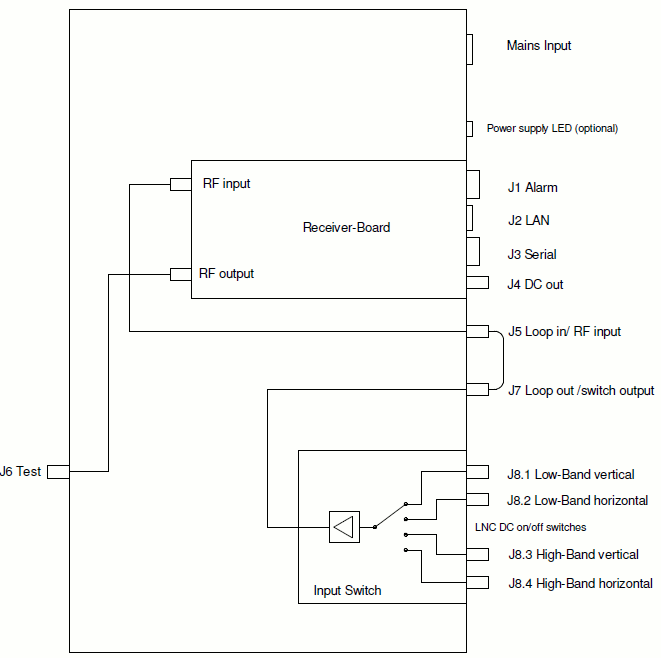
Block diagram LBRX19