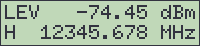
The rack mountable version of the sat-nms beacon receiver provides a LCD and a small keyboard at the front panel for operating the device locally.
Display
The 2-line display normally shows the actual measurement value and some common parameters. During menu operation it is used to view and edit each individual parameter of the beacon receiver.
The first character at the second line shows the selected polarization setting as one character. If there are polarization aliases defined, the first character of the actually selected polarization alias is shown. In all other cases 'H' or 'V' is shown.
LEDs
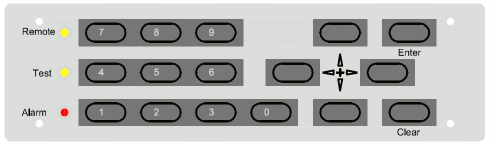
Three LEDs at the front panel signal the summary state of the beacon receiver.
Keys
The front panel keyboard provides beside the numeric keys four arrow keys and two keys named ENTER and CLEAR. The general meaning of the keys remains constant through all levels of the menu:
 --- The ENTER key descends in the menu tree, accepts and stores changed values.
 --- The CLEAR key leaves to higher menu levels, abandons changes when editing parameters. It also resets the alarm buzzer when in display mode.
 --- The arrow keys navigate in the menu, in some cases they also increment / decrement values.