The menu mode lets you view and change the receiver's settings. From the display mode, you enter the menu by pressing the  key. To leave the menu, repeatedly press the
  key until the display screen appears again. If there are no keystrokes for 2 minutes, the receiver automatically leaves the menu and returns to display mode. The menu structure is shown in the diagram below:
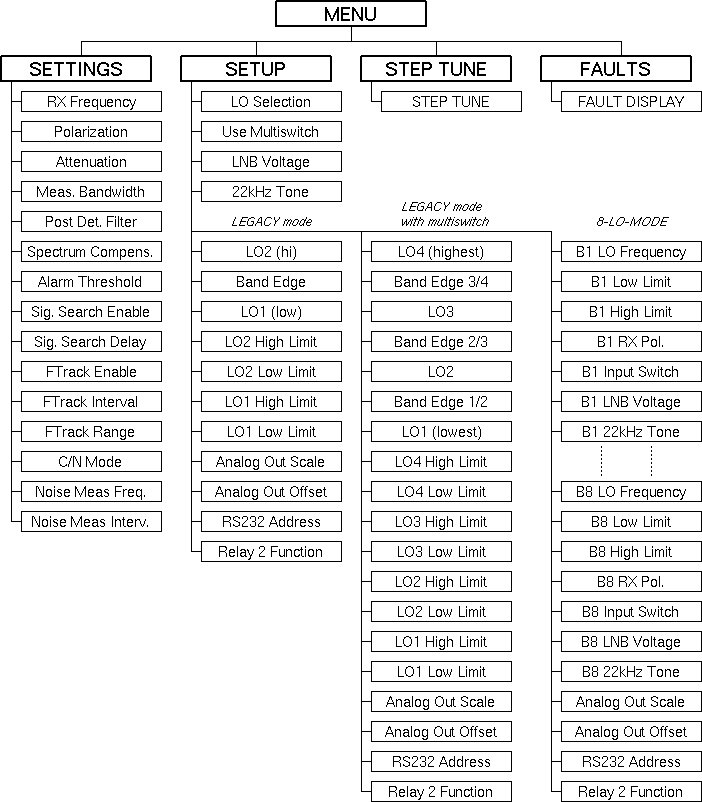
The 'SETTINGS' sub menu lets you view and modify the operational parameters of the receiver. The 'SETUP' sub menu contains a number of parameters which usually only need to be changed during the beacon receiver installation. For further information about the receiver parameters see the chapters 3.3 Operational Parameters and 3.4 Installation Parameters of this manual.
To navigate in the menu, use the  to select a sub menu, then press to descend in the selected menu branch. Within the 'SETTINGS' and 'SETUP' sub menus use the
  keys to select the desired parameter.
Pressing one returns to the main menu level, pressing it twice returns to display mode.