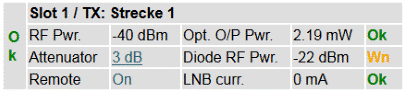
If a LFTX card is installed, you can read the following parameters:
| Parameter Name | Description |
|---|---|
| RF Pwr | This value shows the input RF power of the LFTX card. The measurement range is approx. -45...0dBm (range varies by changing RF offset on Setup page and attenuator setting. Provided values are valid for RF offset = -61dB and attenuator setting = 15dB). |
| Attn | An integrated attenuator makes it possible to attenuate the RF-signal in 1dB-steps from 0 to 31dB. The selected value is displayed here. If the parameter 'Remote' is 'ON', you can easily change the attenuation value by clicking on it. Now you can select the desired value from a drop-down-box. Pressing the 'Submit'-button applies the new attenuation. If the parameter 'Remote' is 'OFF' it is not possible to change this parameter by remote control. |
| Remote | It is possible to change some settings of the LFTX card remote (e.g. via web browser interface) or local (only on the front panel of the card). The current state of the hardware remote/local switch on the corresponding card is shown here. |
| Opt. O/P Pwr | This parameter shows the transmitted optical power. The label behind this parameter tells you, if the value is in range (OK) or not (FLT). The values are given by the LFTX card and can not be changed. |
| Diode RF Pwr | This value shows the output RF power of the LFTX cards Laser-diode. The label behind behind this parameter tells you, if the value is in range (OK) or not (Warn). The values are given by the LFRX card and can not be changed. If a 'Warn' is displayed, the summary state of this slot is nevertheless 'OK', because this is not a fault. Alarm threshold values are: RFmin typ. -23dBm (-25...-20dBm), RFmax typ. -10dBm (-11...-5dBm) |
| LNB curr. | If the chassis is configured to supply LNCs, the actual current is shown here for every slot. The current limits can be changed on the 'Config' menu. If the current is within this range, a green 'OK' is shown, if the value is out of the range, a red 'FLT' is displayed here. |