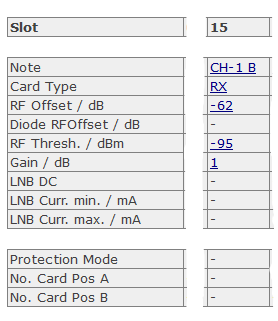
If "TX" is chosen as card type, you can change the following parameters:
| Parameter Name | Description |
|---|---|
| Note | You can give every slot a name with up to 18 characters. Click on the Hyperlink, a page to change this parameter will be opened. Type in here the desired slot name and press the submit button. |
| Card Type | To change the card-type, click on the field and a new page will be opened. Now choose the desired parameter (RX, TX, SW, NONE) from the drop-down-menu and press the submit-button to pass the changed parameter to the chassis. |
| RF Offset | This parameter is a factory setting, that has not to be changed by the customer. Depending on the LFTXRX chassis configuration the card has different internal RF attenuation. This value defines the offset to guarantee that the displayed value matches the real values at the I/O-RF-connectors (without options about -62). |
| Diode RF Offset | This parameter is a factory setting, that has not to be changed by the customer. Depending on the LFTXRX chassis configuration the card has different internal RF attenuation. This value defines the offset to guarantee that the displayed value matches the real values at the I/O-RF-connectors (without options about -42). |
| RF Thresh. | The RF threshold defines the RF fault level. If the RF level under-runs the threshold, the RF threshold alarm is set. To change the value click on it and enter the new RF threshold and press the submit button. Software-limits configuration: <-90dBm will disable the Threshold Alarm, <-95dBm will also disable the RF-card Alarm/Warning (Hardware Limit Card) at the Web-page and the remote interface. |
| Gain | An integrated attenuator makes it possible to attenuate the RF-signal in 1dB-steps from -16 to +15dB. The selected value is displayed here. If the parameter 'Remote' is 'ON', you can easily change the attenuation value by clicking on the Hyperlink, a page to change this parameter will be opened. Select in here the desired gain and press the submit button. |
| LNB DC | LFTX cards are able to power LNCs with 15VDC. This parameter switches the 15VDC to the on or off. |
| LNB Curr.Min | This parameter defines the LNB current minimum level. In case of under-running this level (e.g. if a cable break occurred) the LNB current alarm will be set. |
| LNB Curr.Max | This parameter defines the LNB current maximum level. In case of over-running this level (e.g. if a short-circuit occurred), the LNB current alarm will be set. |