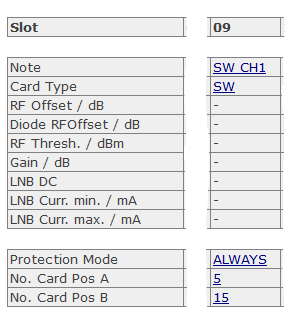
If "SW" is chosen as card type, you can change the following parameters:
| Parameter Name | Description |
|---|---|
| Note | You can give every slot a name with up to 18 characters. Click on the Hyperlink, a page to change this parameter will be opened. Type in here the desired slot name and press the submit button. |
| Card Type | To change the card-type, click on the field and a new page will be opened. Now choose the desired parameter (RX, TX, SW, NONE) from the drop-down-menu and press the submit-button to pass the changed parameter to the chassis. |
| Protection Mode | This parameter defines the Protection Mode following settings are possible: 'ONCE' if redundancy switching occours the protection will be set to OFF. 'ALWAYS' the redundancy is always active. |
| No. Card Pos A | Here the Slot number of switch position A can be defined. Keep in mind that also the hardware interconnection from the switch connector A to the slot with the defined number have to be done. |
| No. Card Pos B | Here the Slot number of switch position B can be defined. Keep in mind that also the hardware interconnection from the switch connector B to the slot with the defined number have to be done. |