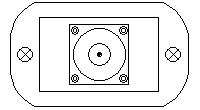
The connectors of the power sensor are placed on both sides. One side contains the RF input connector, the other side the D/C and Data connectors.
RF connectors:
D/C and data connectors:
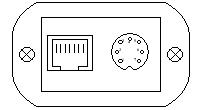
The RF input connector is a make N-type connector, mounted at one front panel of the power sensor enclosure. At the other side, the Ethernet and power supply connectors are mounted. The Ethernet connector is a standard 10 Base-T / RJ45 connector. Use a standard network cable to connect the power sensor to an Ethernet hub. If you want to connect your computer and the power sensor directly without using a hub, you need a crossover cable for this with swapped RX/TX lines.
The power supply connector also contains the fault relay contact. The latter is a floating Photo MOS solid state circuit. In fault state (level below an adjustable threshold) or while the unit is powered off it is in hi-Z state (several MOhms). A resistance below 10 Ohms indicates that the function is OK. The diagram below shows the pin out of this connector (front view).
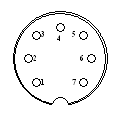
Connector type: Binder series 712, subminiature circular, connector (socket), front view
| pin no. | description |
|---|---|
| 1 | n.c. |
| 2 | Fault relay circuit (max. ratings: 120V D/C, 100 mA) |
| 3 | Fault relay circuit (max. ratings: 120V D/C, 100 mA) |
| 4 | Ground |
| 5 | Ground |
| 6 | n.c |
| 7 | +24V Power Supply |
Internally the power sensor interconnects RF ground and D/C ground. In order to avoid ground loops, it is recommended not to connect RF ground and D/C ground at a second point.