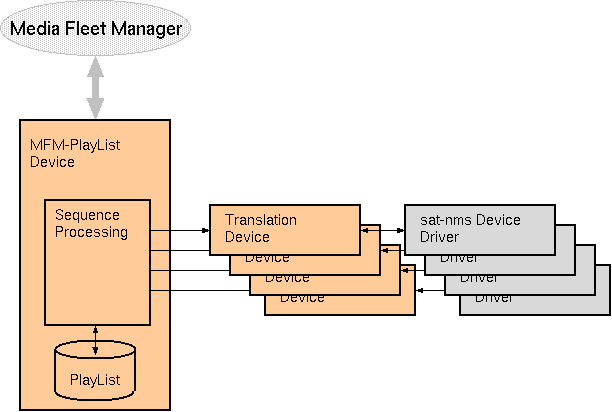
The MFM-PlayList logical device is part of the sat-nms MFM framework which interconnects a sat-nms VLC to the ND SatCom Media Fleet Manager.The MFM-PlayList is the central device of this framework, it provides the background processing control for scheduled transmissions and it manages the communication between Media Fleet Manager and the sat-nms VLC.
Overview
The sat-nms MFM framework consists of the MFM-PlayList device and a number of so called translation devices. The MFM-PlayList device does the communication with the Media Fleet Manager using the proprietary protocol of this. It manages the sequence control of transmissions, even if there is no connection to the MFM.
Beside this, there are translation devices which have to be configured with one instance for each DVB uplink or downlink chain, for each IP encoder or decoder. The task of translation devices is to translate the settings commanded by the media fleet manager in it's own format into the individual format each sat-nms device driver expects. The translation devices also check if parameters have been set properly and forward this information to the MFM-PlayList device.
Adding a translation device for a certain physical device to the configuration automatically makes this device known to the MFM. The following types of translation devices are available with the sat-nms MFM framework:
Device usage
The first page of the device window shows the list of transmissions scheduled for this device. To see details for a certain transmission from the list, double-click to the list entry. Once an entry is selected, the window shows the detail parameters of this entry and also updates them automatically.
If satellite selection is configured as 'MANUAL', the window shows at it's bottom the prompt if the antenna must be moved to another satellite. Sequence processing of the actual playlist entry pauses until the operator has pointed the antenna, clicked 'DONE' and then confirmed that the antenna is pointed properly.
Right above the playlist widget, the window shows two buttons "START" and "ABORT". These button give a local operator limited control over the transmission sequence.
'START' forces the selected transmission to start immediately now. This is possible for transmissions in the states 'SCHEDULED' and 'HOTPHASE'. Please note that starting a transmission this way ahead of time bypasses all resource availability checks and may lead either to double transmissions on the satellite or to a premature end of another transmission done from this station.
'ABORT' prematurely switches a running transmission OFF-AIR. This is safely possible at any time. Aborted transmissions are signalled as 'MANUAL-LINE-DOWN' to the Media Fleet Manager, they stay in the playlist until their regular end time.
Device window pages
The following table shows which device window pages are available with this individual device type.
 --- Shows the list of scheduled transmissions
 --- Faults and fault mask
 --- The device info page.
 --- The maintenance page. The configuration parameters described below are set at this page.
Configuration parameters
At the page 'Maintenance' the setup dialog contains some settings to configure this logical device.
| parameter | description |
|---|---|
| preconfiguration | Enables / disabled preconfiguration. With preconfiguration devices are configured already with beginning of the 'hotphase'. without preconfiguration device configuration is done exactly with the start time of a transmission, what in fact delays the effective start of transmission for a couple of seconds. |
| pointing | When set to 'AUTO', the MFM-PlayList device commands the name of the satellite which shall be used for the transmission directly to an antenna controller. This requires an antenna controller which is capable to this. With 'MANUAL', the MFM-PlayList device prompts the operator to point the antenna to the correct satellite and to confirm the pointing before the transmission actually will be started. Setting this parameter to 'MANUAL' will clear the 'satelliteId' and 'antennaPolId' fields. |
| polset | When set to 'ANTENNA', the MFM-PlayList device assumes the polarization plane for a transmission has to be done by turning the feed to the proper polarization. Again, this can be performed automatically by a command to the antenna controller or manually by the operator, depending on the 'pointing' setting above. |
| homeSatellite | The name of the 'home satellite', which is the one used to establish the control connection between MFM and the sat-nms station. In 'AUTO' mode, this satellite is actually commanded to the ACU after a transmission has completed. In 'MANUAL' mode, the operator is prompted to do this. |
| homeSatellitePol | The polarization plane used to establish the control connection to the MFM. |
| hotPhaseDuration | The duration of the 'hot phase', in seconds before the planned start of a transmission. |
| donePhaseDuration | The duration of the 'done phase', in seconds after the end of a transmission. |
| satelliteId | The message ID of the ACU parameter which causes the antenna controller to point the antenna to a certain satellite (only required in 'AUTO' mode). |
| antennaPolId | The message ID of the ACU parameter which switches the antenna's polarization plane (only effective in 'AUTO' mode with 'polset' set to 'ANTENNA'). |
| antennaPolSense | Selects if the polarization plane commanded to the antenna refers to the transmit or to the receive side. Also sets the 'sense' of the polarization plane prompted to the operator in 'MANUAL' mode. |
| pointedId | The message ID of the parameter the ACU uses to confirm that the antenna is properly pointed. |
| courseId | The message ID of the parameter telling the course of the antenna. |
| latitudeId | The message ID of the parameter telling the antenna's geodetic latitude. |
| longitudeId | The message ID of the parameter telling the antenna's geodetic longitude. |
| longitudeDir | Switches the sign interpretation of the longitude values. 'WEST' means positive values count westward, 'EAST' means positive values count eastward. |
| sealevelId | The message ID of the parameter telling the antenna's altitude. |
Settings in vlc.properties
There are a number of parameters of the MFM-PlayList device which are set in the vlc.properties file. These parameters normally should not be changed, they are listed here with their default values for completeness:
# The MFM task numbers

MFM.playList.taskNo=1
MFM.stationDevices.taskNo=2
MFM.systemState.taskNo=3

# The communication timeout (secs)

MFM.timeout=30

# The sat-nms listen port for connections from the MFM

MFM.portNumber=5005

# With this set to 'false' the software no longer waits
# after commanding a satellite name to an ACU until the ACU
# states 'pointed'. Only for testing purposes.

MFM.playList.waitUntilAntennaPointed=true

# Setting this true ignores communication faults of the
# attached physical devices. Only for testing purposes.

MFM.playList.ignoreCommFaults=false
Variables defined by this device driver
| name | type | flags | range |
|---|---|---|---|
| info.driver | TEXT | R/O | StringRange R/O |
| info.type | TEXT | R/O | StringRange R/O |
| info.port | TEXT | R/O | StringRange R/O |
| info.frame | TEXT | R/O | StringRange R/O |
| info.initialized | BOOLEAN | R/O | BooleanRange R/O (true false) |
| info.connected | BOOLEAN | R/O | BooleanRange R/O (true false) |
| config.preconfiguration | CHOICE | SAVE SETUP | EnumRange (DISABLED ENABLED) |
| config.pointing | CHOICE | SAVE SETUP | EnumRange (AUTO MANUAL) |
| config.polset | CHOICE | SAVE SETUP | EnumRange (ANTENNA SWITCH) |
| config.homeSatellite | TEXT | SAVE SETUP | StringRange |
| config.homeSatellitePol | CHOICE | SAVE SETUP | EnumRange (HORIZONTAL VERTICAL LHCP RHCP) |
| config.hotPhaseDuration | INTEGER | SAVE SETUP | IntegerRange (0 .. 0) |
| config.donePhaseDuration | INTEGER | SAVE SETUP | IntegerRange (0 .. 0) |
| config.satelliteId | TEXT | SAVE SETUP | StringRange |
| config.antennaPolId | TEXT | SAVE SETUP | StringRange |
| config.antennaPolSense | CHOICE | SAVE SETUP | EnumRange (TX-POL RX-POL) |
| config.pointedId | TEXT | SAVE SETUP | StringRange |
| config.courseId | TEXT | SAVE SETUP | StringRange |
| config.latitudeId | TEXT | SAVE SETUP | StringRange |
| config.longitudeId | TEXT | SAVE SETUP | StringRange |
| config.longitudeDir | CHOICE | SAVE SETUP | EnumRange (WEST EAST) |
| config.sealevelId | TEXT | SAVE SETUP | StringRange |
| playlist | CHOICE | EnumRange (???) | |
| operatorMessage | TEXT | R/O | StringRange R/O |
| antennaPointed | TEXT | StringRange | |
| promptPending | TEXT | R/O | StringRange R/O |
| debug | TEXT | StringRange | |
| start | TEXT | StringRange | |
| startEnabled | TEXT | R/O | StringRange R/O |
| abort | TEXT | StringRange | |
| abortEnabled | TEXT | R/O | StringRange R/O |
| plAudioRate | TEXT | R/O | StringRange R/O |
| plAudioRate2 | TEXT | R/O | StringRange R/O |
| plBitRate | TEXT | R/O | StringRange R/O |
| plSymbolRate | TEXT | R/O | StringRange R/O |
| plCodingFormat | TEXT | R/O | StringRange R/O |
| plConfigState | TEXT | R/O | StringRange R/O |
| plDestination | TEXT | R/O | StringRange R/O |
| plDvbEncryptionMode | TEXT | R/O | StringRange R/O |
| plDvbS2FrameSize | TEXT | R/O | StringRange R/O |
| plDvbS2PilotInsertion | TEXT | R/O | StringRange R/O |
| plEirp | TEXT | R/O | StringRange R/O |
| plErrorCode | TEXT | R/O | StringRange R/O |
| plFec | TEXT | R/O | StringRange R/O |
| plIPDestination | TEXT | R/O | StringRange R/O |
| plIPQualityOfService | TEXT | R/O | StringRange R/O |
| plIPSourceAddress | TEXT | R/O | StringRange R/O |
| plIPStreamingMode | TEXT | R/O | StringRange R/O |
| plId | TEXT | R/O | StringRange R/O |
| plDevices | TEXT | R/O | StringRange R/O |
| plInjectedID | TEXT | R/O | StringRange R/O |
| plInterComEirp | TEXT | R/O | StringRange R/O |
| plInterComRxFreq | TEXT | R/O | StringRange R/O |
| plInterComTxFreq | TEXT | R/O | StringRange R/O |
| plIpBitRate | TEXT | R/O | StringRange R/O |
| plModulation | TEXT | R/O | StringRange R/O |
| plModulationStd | TEXT | R/O | StringRange R/O |
| plPacketSize | TEXT | R/O | StringRange R/O |
| plRASKey | TEXT | R/O | StringRange R/O |
| plRemark | TEXT | R/O | StringRange R/O |
| plRollOffFactor | TEXT | R/O | StringRange R/O |
| plRxFreq | TEXT | R/O | StringRange R/O |
| plRxPol | TEXT | R/O | StringRange R/O |
| plSatName | TEXT | R/O | StringRange R/O |
| plSessionWord | TEXT | R/O | StringRange R/O |
| plSkyWanChannelID | TEXT | R/O | StringRange R/O |
| plSkyWanSigDemodBoardID | TEXT | R/O | StringRange R/O |
| plSlotName | TEXT | R/O | StringRange R/O |
| plSource | TEXT | R/O | StringRange R/O |
| plStartTime | TEXT | R/O | StringRange R/O |
| plStatus | TEXT | R/O | StringRange R/O |
| plStopTime | TEXT | R/O | StringRange R/O |
| plTitle | TEXT | R/O | StringRange R/O |
| plTransportType | TEXT | R/O | StringRange R/O |
| plTxFreq | TEXT | R/O | StringRange R/O |
| plTxPol | TEXT | R/O | StringRange R/O |
| plVideoCodingStandard | TEXT | R/O | StringRange R/O |
| plVideoRate | TEXT | R/O | StringRange R/O |
| hotphase | BOOLEAN | R/O | BooleanRange R/O (true false) |
| alarm | BOOLEAN | R/O | BooleanRange R/O (true false) |
| onair | BOOLEAN | R/O | BooleanRange R/O (true false) |
| warning | BOOLEAN | R/O | BooleanRange R/O (true false) |
| actualSatellite | TEXT | R/O | StringRange R/O |
| faults.01 | ALARM | R/O | AlarmFlagRange R/O (MFM communication) |