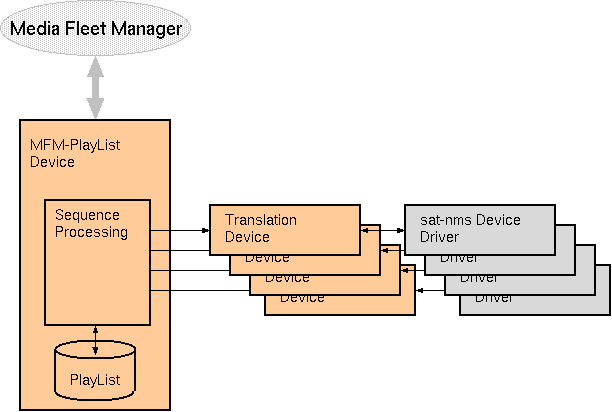
The MFM-SkyWANIdu logical device is part of the sat-nms MFM framework which interconnects a sat-nms VLC to the ND SatCom Media Fleet Manager. The MFM-SkyWANIdu is a so called translation device which interconnects the MFM-PlayList device to a sat-nms SkyWAN IDU device driver. The MFM-SkyWANIdu logical device must be configured together with a NDSatCom-SkyWAN-IDU device driver.
Internally the Media Fleet Manager codes all equipment settings in binary enumerations (for choice parameters) and scaled integers for numeric values. The MFM-SkyWANIdu translation device takes these settings and translates them into the parameter representation expected by the sat-nms device driver. For this, it inspects each parameter's range definition and matches the settings against the MFM encoding of the parameters.
Overview
The sat-nms MFM framework consists of the MFM-PlayList device and a number of so called translation devices. The MFM-PlayList device does the communication with the Media Fleet Manager using the proprietary protocol of this. It manages the sequence control of transmissions, even if there is no connection to the MFM.
Beside this, there are translation devices which have to be configured with one instance for each DVB uplink or downlink chain, for each IP encoder or decoder. The task of translation devices is to translate the settings commanded by the media fleet manager in it's own format into the individual format each sat-nms device driver expects. The translation devices also check if parameters have been set properly and forward this information to the MFM-PlayList device.
Adding a translation device for a certain physical device to the configuration automatically makes this device known to the MFM. The following types of translation devices are available with the sat-nms MFM framework:
Device window pages
The following table shows which device window pages are available with this individual device type. Tool-bar functions not mentioned here are described at the general description of device windows .
 --- General status.
 --- The device info page.
 --- The maintenance page. The configuration parameters described below are set at this page.
Configuration parameters
At the page 'Maintenance' the setup dialog contains some settings to configure this logical device.
| parameter | description |
|---|---|
| aliasName | The alias name of the device reported to the Media Fleet Manager. |
| checkDelay | After receiving a set of parameters from the MFM-Playlist and setting these parameters at the IRD, the MFM-SkyWANIdu device waits the time set here until it checks if all parameters have been set properly. |
| onAirFaultDelay | After going on air, the device suppresses faults for the time configured here. This helps to avoid receiver lock faults/warnings for the first seconds after the signal is switched on. |
| skywanDevice | The device name of the SkyWAN IDU. This is used to get the IRD's summary fault, it's communications fault and it's OPERATING/OUT-OF-SERVICE setting. |
Remarks
Variables defined by this device driver
| name | type | flags | range |
|---|---|---|---|
| info.driver | TEXT | R/O | StringRange R/O |
| info.type | TEXT | R/O | StringRange R/O |
| info.port | TEXT | R/O | StringRange R/O |
| info.frame | TEXT | R/O | StringRange R/O |
| config.aliasName | TEXT | SAVE SETUP | StringRange |
| config.checkDelay | INTEGER | SAVE SETUP | IntegerRange (0 .. 30) |
| config.onAirFaultDelay | INTEGER | SAVE SETUP | IntegerRange (0 .. 30) |
| config.skywanDevice | TEXT | SAVE SETUP | StringRange |
| set | TEXT | StringRange | |
| check | CHOICE | R/O | EnumRange R/O (IDLE PENDING SUCCESS FAILED) |
| errorCode | INTEGER | R/O | IntegerRange R/O (0 .. 0) |
| onAir | CHOICE | EnumRange (OFFAIR ONAIR) | |
| releaseCheckFault | TEXT | StringRange |