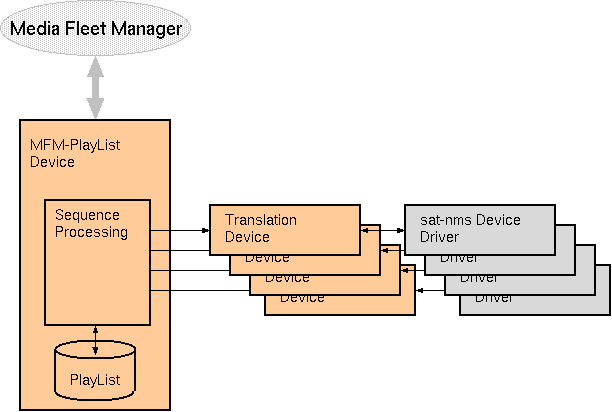
The MFM-Upc logical device is part of the sat-nms MFM framework which interconnects a sat-nms VLC to the ND SatCom Media Fleet Manager.The MFM-Upc is a so called translation device which interconnects the MFM-PlayList device to the sat-nms device drivers of an encoder / modulator / upconverter / amplifier uplink chain. As the message ID of each target parameter is individually configurable, the device seamlessly supports combined devices like encoders with built in modulators.
Internally the Media Fleet Manager codes all equipment settings in binary enumerations (for choice parameters) and scaled integers for numeric values. The MFM-Upc translation device takes these settings and translates them into the parameter representation expected by the sat-nms device drivers. For this, it inspects each parameter's range definition and matches the settings against the MFM encoding of the parameters.
Overview
The sat-nms MFM framework consists of the MFM-PlayList device and a number of so called translation devices. The MFM-PlayList device does the communication with the Media Fleet Manager using the proprietary protocol of this. It manages the sequence control of transmissions, even if there is no connection to the MFM.
Beside this, there are translation devices which have to be configured with one instance for each DVB uplink or downlink chain, for each IP encoder or decoder. The task of translation devices is to translate the settings commanded by the media fleet manager in it's own format into the individual format each sat-nms device driver expects. The translation devices also check if parameters have been set properly and forward this information to the MFM-PlayList device.
Adding a translation device for a certain physical device to the configuration automatically makes this device known to the MFM. The following types of translation devices are available with the sat-nms MFM framework:
Device window pages
The following table shows which device window pages are available with this individual device type. Tool-bar functions not mentioned here are described at the general description of device windows .
 --- General status.
 --- The device info page.
 --- The maintenance page. The configuration parameters described below are set at this page.
Configuration parameters
At the page 'Maintenance' the setup dialog contains some settings to configure this logical device.
| parameter | description |
|---|---|
| aliasName | The alias name of the device reported to the Media Fleet Manager |
| checkDelay | After receiving a set of parameters from the MFM-Playlist and setting these parameters at the IRD, the MFM-Upc device waits the time set here until it checks if all parameters have been set properly. |
| onAirFaultDelay | After going on air, the device suppresses faults for the time configured here. This helps to avoid receiver lock faults/warnings for the first seconds after the signal is switched on. |
| upcDevice | The device name of the transmit chain's upconverter. This is used to get the device summary fault, it's communications fault and it's OPERATING/OUT-OF-SERVICE setting. |
| encDevice | The device name of the transmit chain's encoder. This is used to get the device summary fault, it's communications fault and it's OPERATING/OUT-OF-SERVICE setting. |
| hpaDevice | The device name of the transmit chain's HPA. This is used to get the device summary fault, it's communications fault and it's OPERATING/OUT-OF-SERVICE setting. |
| modDevice | The device name of the transmit chain's modulator. This is used to get the device summary fault, it's communications fault and it's OPERATING/OUT-OF-SERVICE setting. |
| frequencyId | The message ID of the parameter controlling the transmit frequency. The frequency is commanded in terms of true satellite frequency, so either the target device or it's device driver has to do the LO calculations. |
| polarizationId | The message ID of the parameter controlling the transmit polarization plane. |
| eirpId | The message ID of the parameter controlling the transmit power. The power is commanded in terms EIRP (dBW), so the target device for this parameter usually will be a power calculating / controlling logical device like the Level-Set device. |
| measuredEirpId | The message ID of a parameter reporting the measured transmit power. The power is expected in terms EIRP (dBW). The Level-Set provides a measurement value which can be used for this. |
| symbolRateId | The message ID of the modulator parameter controlling the symbol rate. |
| dvbModeId | The message ID of the modulator parameter controlling the dvb mode (DVB-S/DVBS2). |
| modulationId | The message ID of the modulator parameter controlling the modulation type (QPSK, 8PSK, etc). |
| fecId | The message ID of the modulator parameter controlling the FEC. |
| pilotsId | The message ID of the modulator parameter switching DVB-S2 pilots on/off. |
| rollOffId | The message ID of the modulator parameter controlling the roll off factor. |
| frameSizeId | The message ID of the modulator parameter controlling the DVB frame size (NORMAL/SHORT) |
| packetSizeId | The message ID of the modulator parameter controlling the packet size (188/204) |
| encryptModeId | The message ID of the encoder parameter controlling the encryption mode (BISS-1/BISS-E). |
| session1WordId | The message ID of the encoder parameter setting the BISS-1 session word. |
| sessionEWordId | The message ID of the encoder parameter setting the BISS-E session word. |
| injectedIDId | The message ID of the encoder parameter setting the BISS injected ID. |
| rasKeyId | The message ID of the encoder parameter setting the RAS encryption key. |
| audioRateId | The message ID of the encoder parameter setting the first audio channel bitrate. |
| audioRate2Id | The message ID of the encoder parameter setting the second audio channel bitrate. |
| audio2EnableId | The message ID of the encoder parameter enabling the second audio channel. |
| videoRateId | The message ID of the encoder parameter setting the video bitrate. |
| rfOnId | The message ID of the parameter switching transmit power ON/OFF. |
All message ID settings above may be left empty. The MFM-Upc device will not control a parameter with an empty ID setting and it will not check if it is set properly.
If the transmit chain uses a combined encoder / modulator, the 'modDevice' setting may be left empty. The same applies to the 'upcDevice' and 'hpaDevice' settings if they are not present as separately controlled devices.
Session word and encryption key parameters are not read back and compared to the commanded values, as some devices do not support a readout of these values.
Video profiles
Encoder devices are handling encoding profile parameters in different ways, depending on vendor and / or encoder type. For this reason there is no direct translation possible from the MFM specific parameters selecting an encoding profile and the corresponding encoder parameters. Instead, the MFM-Upc device calls a sat-nms device preset to configure these parameters.
To make this work, you have to store device presets for each particular encoder type you are using and the video encoding profiles used in your MFM equipment presets. The names of the presets called by the MFM-Upc device follow a fixed scheme, resembling the combination of the "video coding standard" and "coding format" MFM parameters.
This is the list of all presets names recognized by the MFM-Upc device:
    MPEG2-MP@ML-420     MPEG4-MP@ML-420
    MPEG2-MP@LL-420     MPEG4-MP@LL-420
    MPEG2-HP@ML-422     MPEG4-HP@ML-422
    MPEG2-HP@LL-422     MPEG4-HP@LL-422
    MPEG2-SP@LL-420     MPEG4-SP@LL-420
    MPEG2-SP@ML-420     MPEG4-SP@ML-420
    MPEG2-MP@H14-420    MPEG4-MP@H14-420
    MPEG2-MP@HL-420     MPEG4-MP@HL-420
    MPEG2-HP@H14-422    MPEG4-HP@H14-422
    MPEG2-HP@HL-422     MPEG4-HP@HL-422
    MPEG2-HP@HL-420     MPEG4-HP@HL-420
    MPEG2-HP@H14-420    MPEG4-HP@H14-420
    MPEG2-HP@ML-420     MPEG4-HP@ML-420
It is not necessary to create all of these presets, only these ones addressed by MFM transmission presets are required.
If the presets are created by the "preset store" function in the device window, they should be edited afterwards to remove all parameters from the preset which are set explicitly by the MFM-Upc device. If such a parameter remains in the preset, it may overwrite the value actually commanded by the MFM-Upc device. There is no fixed order in which preset contained parameters and explicitly commanded ones are processed by the encoder device driver.
Remarks
Variables defined by this device driver
| name | type | flags | range |
|---|---|---|---|
| info.driver | TEXT | R/O | StringRange R/O |
| info.type | TEXT | R/O | StringRange R/O |
| info.port | TEXT | R/O | StringRange R/O |
| info.frame | TEXT | R/O | StringRange R/O |
| config.aliasName | TEXT | SAVE SETUP | StringRange |
| config.checkDelay | INTEGER | SAVE SETUP | IntegerRange (0 .. 30) |
| config.onAirFaultDelay | INTEGER | SAVE SETUP | IntegerRange (0 .. 30) |
| config.upcDevice | TEXT | SAVE SETUP | StringRange |
| config.encDevice | TEXT | SAVE SETUP | StringRange |
| config.hpaDevice | TEXT | SAVE SETUP | StringRange |
| config.modDevice | TEXT | SAVE SETUP | StringRange |
| config.frequencyId | TEXT | SAVE SETUP | StringRange |
| config.polarizationId | TEXT | SAVE SETUP | StringRange |
| config.eirpId | TEXT | SAVE SETUP | StringRange |
| config.measuredEirpId | TEXT | SAVE SETUP | StringRange |
| config.symbolRateId | TEXT | SAVE SETUP | StringRange |
| config.dvbModeId | TEXT | SAVE SETUP | StringRange |
| config.modulationId | TEXT | SAVE SETUP | StringRange |
| config.fecId | TEXT | SAVE SETUP | StringRange |
| config.pilotsId | TEXT | SAVE SETUP | StringRange |
| config.rollOffId | TEXT | SAVE SETUP | StringRange |
| config.frameSizeId | TEXT | SAVE SETUP | StringRange |
| config.packetSizeId | TEXT | SAVE SETUP | StringRange |
| config.encryptModeId | TEXT | SAVE SETUP | StringRange |
| config.session1WordId | TEXT | SAVE SETUP | StringRange |
| config.sessionEWordId | TEXT | SAVE SETUP | StringRange |
| config.injectedIDId | TEXT | SAVE SETUP | StringRange |
| config.rasKeyId | TEXT | SAVE SETUP | StringRange |
| config.audioRateId | TEXT | SAVE SETUP | StringRange |
| config.audioRate2Id | TEXT | SAVE SETUP | StringRange |
| config.audio2EnableId | TEXT | SAVE SETUP | StringRange |
| config.videoRateId | TEXT | SAVE SETUP | StringRange |
| config.rfOnId | TEXT | SAVE SETUP | StringRange |
| set | TEXT | StringRange | |
| check | CHOICE | R/O | EnumRange R/O (IDLE PENDING SUCCESS FAILED) |
| errorCode | INTEGER | R/O | IntegerRange R/O (0 .. 0) |
| onAir | CHOICE | EnumRange (OFFAIR ONAIR) | |
| releaseCheckFault | TEXT | StringRange | |
| rfOn | BOOLEAN | R/O | BooleanRange R/O (true false) |
| measuredEirp | INTEGER | R/O | IntegerRange R/O (0 .. 0) |