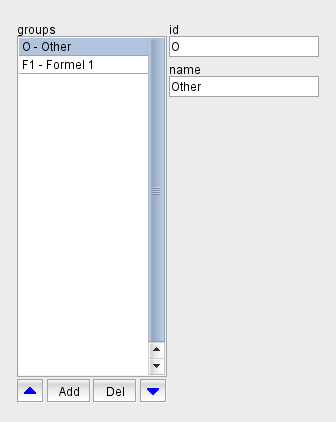
The sat-nms VioIP software lets you define groups of operators which only have access to a well defined part of the equipment. The VioIP Client Application is always started for one particular group and shows only the resources assigned to this group.
The group definition section is located in the top right corner of the application window. It shows the list of defined groups, selecting a group in the list shows the properties of this group right beside the list. You may edit the name of the selected group to your needs, the group name acts as a comment only. The group is uniquely identified by its ID, this cannot be changed once a group has been defined.
With the blue arrow buttons below the list, the selected group can be moved up and down in the list. The position of a group in the list is important inasmuch as the topmost group in the list is considered to be the default group.
The button "Add" lets you add a new group. The program shows a dialog window where you can enter the ID for the new group. An ID entirely consists of upper case letters and digits, the "-" character is allowed as separator. The ID must be unique, you cannot define two groups with the same ID. The ID also is unalterable, once you defined a new group you cannot change the ID of the group later.
The button "Del" lets you delete the selected group. The program shows a query dialog before the group actually gets deleted. The group you want to delete will probably be referenced by other resources, with these the following will happen: