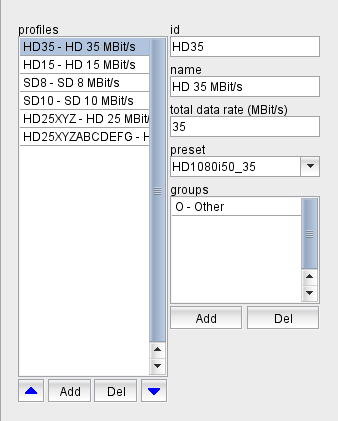
Profiles define the data rate of the encoded stream, the video and audio encoding of the signal and many more parameters. The software uses a profile by applying a preset to the devices representing the end points of the upcoming connection.
To make a profile universally usable, presets with the name defined in the profile must be present for all types of encoder/decoder equipment used by the software. The software checks this when a new profile is defined.
There are device types which contain multiple encoders or decoders in one device frame. The software knows about these device types and expects a preset "NAME" to be present as "NAME-1", "NAME-2" ... "NAME-n" for all encoder or decoder instances this device may contain.
The profile definition section is located in the bottom right corner of the window. It shows the list of defined profiles, selecting a profile in the list shows the properties of this profile right beside the list. You may edit the properties of the selected profile to your needs. The profile is uniquely identified by its ID, this cannot be changed once a profile has been defined.
With the blue arrow buttons below the profile list the selected profile can be moved up and down in the list. The topmost profile in the list is considered to be the default which is used for connections the operator starts without the "user defined" option.
The button "Add" lets you add a new profile. The program shows a dialog window where you can enter the ID for the new profile. An ID entirely consists of upper case letters and digits, the "-" character is allowed as a separator. The ID must be unique, you cannot define two profiles with the same ID. The ID also is unalterable, once you defined a new profile you cannot change the ID of the profile later.
The button "Del" lets you delete the selected profile. The program shows a query dialog before the profile actually gets deleted. Deleting a profile does not delete the preset definitions referenced by this profile.